Codex Auto Mode: How to Turn On 'Approve for Me', and Why It Still Asks
Codex has no setting called auto mode. The closest thing is Approve for me (Auto-review): the same sandbox as the default, with a reviewer agent approving what you used to approve. How to turn it on in the CLI, config.toml and the app, what it reviews, why it still asks or denies, what replaced --full-auto, and how it compares with Claude Code's auto mode.
 Tahir Nazir19 min read
OpenAI's Codex (the CLI, the desktop app and the IDE extension) has no setting called "auto mode", as of Codex 0.166.0. What people mean is Approve for me, which the docs also call Auto-review: Codex keeps the same workspace-write sandbox as its default mode, but when it needs to cross that sandbox, a separate reviewer agent approves or denies the request instead of you. Turn it on with codex --approve-for-me, with approvals_reviewer = "auto_review" in ~/.codex/config.toml, or by choosing Approve for me in the permissions control under the composer. The old --full-auto flag is gone: 0.147.0 removed it from codex exec, and the 0.166.0 build has no trace of it.
| You want | CLI | ~/.codex/config.toml | App or IDE extension |
|---|---|---|---|
| Codex to approve for you (auto mode) | codex --approve-for-me | approval_policy = "on-request" and approvals_reviewer = "auto_review" | Approve for me |
| To approve things yourself (the default) | codex | approval_policy = "on-request" | Ask for approval |
| Read and plan only | codex --sandbox read-only --ask-for-approval on-request | sandbox_mode = "read-only" | n/a (CLI: /permissions → Read Only) |
| No sandbox, no questions | codex --yolo | sandbox_mode = "danger-full-access" | Full access |
| Unattended runs in CI | codex exec --sandbox workspace-write | sandbox_mode = "workspace-write" and approval_policy = "never" | n/a |
Last reviewed 5 November 2026, against Codex 0.166.0. Settings and behavior are from OpenAI's Codex docs and the release notes; flag names and on-screen text are quoted from the 0.166.0 Linux package, which I downloaded from npm and searched without running it. I couldn't run a signed-in Codex session for this post, so nothing here claims a first-hand test of the reviewer's decisions.
Is there an auto mode in Codex?
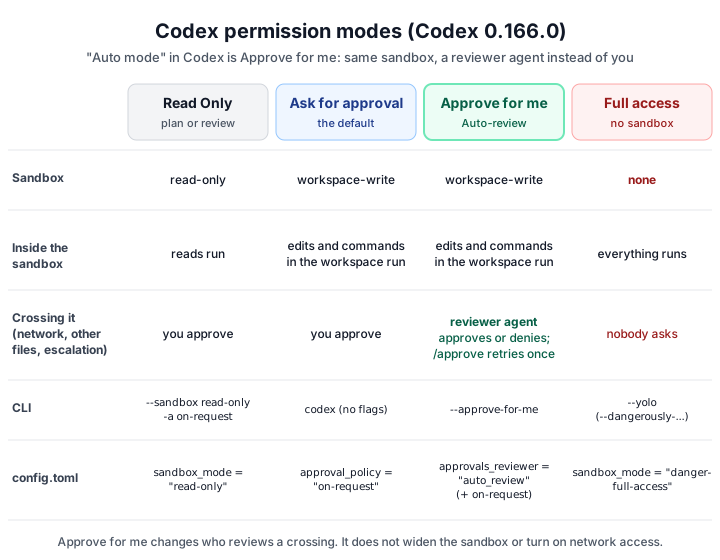
Not by that name, but Approve for me does the job. Codex has two separate controls. The sandbox decides what Codex can do on its own (read files, edit the workspace, use the network). The approval policy decides when it has to stop and ask. In the default mode, called Ask for approval in the app and Default in the 0.166.0 CLI picker, Codex edits files and runs commands inside your workspace without asking, and asks you before it crosses that boundary. OpenAI's approvals and security page calls this same default the Auto preset, which is part of the confusion: that preset is not Approve for me, because you still answer every request to cross the sandbox.
Approve for me keeps all of that and changes one thing: who answers. From the Auto-review docs:
Auto-review replaces manual approval at the sandbox boundary with a separate reviewer agent. The main Codex agent still runs inside the same sandbox, with the same approval policy and the same network and filesystem limits.
So if you came from Claude Code looking for "auto mode", Approve for me is the equivalent: fewer prompts, with a model checking the risky steps. The difference is in what gets checked, which the comparison below covers.
How do I turn on auto mode (Approve for me) in Codex?
Use codex --approve-for-me for one session, /permissions inside a running session, or approval_policy = "on-request" plus approvals_reviewer = "auto_review" in ~/.codex/config.toml to make it your default. In the app or IDE extension, choose Approve for me in the permissions control under the composer, chat by chat.
In the app or the IDE extension
Open the permissions control below the composer and choose Approve for me. The setting is per chat, so check it's selected in the chat you're working in; the docs warn that "having a mode available doesn't mean it's selected." If it isn't in the list, see Approve for me is missing.
In the CLI, for one session
Start Codex with codex --approve-for-me. The 0.166.0 build describes the flag as:
Route approval requests through automatic review using the workspace-write sandboxOr, in a running session, type /permissions and pick Approve for me. Since 0.164.0 you can also do it in one line:
/permissions :workspace --approval-policy=on-request --reviewer=auto_reviewFor every session: config.toml
Add both keys to ~/.codex/config.toml:
approval_policy = "on-request"
approvals_reviewer = "auto_review"
Both matter. The docs are explicit that "changing the approval policy alone doesn't select the reviewer," and the reviewer only runs when approvals are interactive: with approval_policy = "never", there is nothing to review. For a one-off run without editing the file, -c approvals_reviewer=auto_review on the command line does the same, as long as your approval policy is still on-request.
What does Approve for me actually review?
Only the actions that would otherwise stop and wait for you. Per the Auto-review docs, that means:
- shell or exec calls that ask for escalated sandbox permissions
- network requests the sandbox or policy blocked
- file edits outside the writable folders
- MCP or app tool calls that need approval because of their annotations or your settings
Everything that already fits inside the sandbox runs without a review step: editing files in the workspace, running your tests, reading the repo. That's why most of a session never reaches the reviewer. Computer Use is an exception: its app approvals still come to you.
The reviewer is itself a Codex agent. It sees a compact transcript (your messages, Codex's visible updates, relevant tool calls and their output) plus the exact request, but not Codex's hidden reasoning. It's built to block four kinds of action: sending private data or credentials to untrusted places, probing for credentials or tokens, broad or lasting security weakening, and destructive actions that are hard to undo. The full policy is public in the Codex repository as policy.md, and you can replace it with your own text under [auto_review] policy in config.toml. If you do, copy the whole default policy first: a custom policy replaces it rather than adding to it.
How is Approve for me different from Ask for approval and Full access?
Approve for me and Ask for approval share the same workspace-write sandbox; the only difference is whether a reviewer agent or you answer requests to cross it. Full access removes the sandbox, so nothing is reviewed at all.
| Mode | Sandbox | Crossing the sandbox | Set with |
|---|---|---|---|
| Read Only | read-only | You approve | --sandbox read-only |
| Ask for approval (default) | workspace-write, network off | You approve | codex, approval_policy = "on-request" |
| Approve for me | workspace-write, network off | Reviewer agent approves or denies | --approve-for-me, approvals_reviewer = "auto_review" |
| Full access | None | Nothing is asked | --dangerously-bypass-approvals-and-sandbox (alias --yolo), sandbox_mode = "danger-full-access" |
The jump from Approve for me to Full access is much bigger than it looks in the menu. Full access removes the sandbox, so there's no boundary left for anything to review. The help text for the flag reads:
Skip all confirmation prompts and execute commands without sandboxing. EXTREMELY DANGEROUS. Intended solely for running in environments that are externally sandboxedWhen you choose full access, Codex 0.166.0 warns that it "can edit any file on your computer and run commands with network, without your approval" and adds: We strongly recommend selecting "Approve for me" instead, and customizing the reviewer policy for your use case. Keep Full access for containers or VMs you can throw away. That advice isn't Codex-specific: an agent with no sandbox can delete files outside the project.
What happened to --full-auto?
It was removed in Codex 0.147.0, released on 7 August 2026. The release notes say: "Remove the deprecated codex exec --full-auto flag; use --sandbox workspace-write instead." The same release added --approve-for-me. Neither full-auto nor full_auto appears anywhere in the 0.166.0 build, so scripts and guides that still pass it should now stop with an unknown-argument error (I couldn't run Codex to confirm the exact message).
What to use instead depends on what --full-auto meant to you:
- "Work in my repo without asking": plain
codex, which is alreadyworkspace-writewith on-request approvals. - "Also stop asking me about the risky steps":
codex --approve-for-me. - "Run unattended in CI":
codex exec --sandbox workspace-write. Add--ask-for-approval never(-a never) when nothing should wait for a person; failures then go straight back to the model.
Two more retirements catch people out. approval_policy = "untrusted" is no longer supported since 0.149.0, and the docs warn that it "can prevent either client from starting", so remove it from config files and profiles. on-failure is deprecated. The supported values are on-request, never and a granular policy.
Why does Codex still ask for approval in auto mode?
Either the chat is still in Ask for approval, so you are the reviewer, or the request is outside what Auto-review changes: network access is off by default, folders outside the workspace aren't writable, .git, .codex, .agents and .aws stay read-only, and Computer Use app approvals always come to you. The two cases have different fixes.
You're actually in the default mode. If a prompt such as Would you like to run the following command? or Would you like to make the following edits? appears, the reviewer is you. Check the permissions control or the status line for Approve for me. In the app it's set per chat, and approval_policy = "never" or a granular policy that hides a prompt category means Auto-review never sees those requests.
The request is outside what Approve for me covers. Auto-review swaps the reviewer; it doesn't grant anything. These still need a decision or a setting change:
-
Network access. It's off in
workspace-writeby default, so every networked command is a crossing. If you trust the repo, turn it on:toml[sandbox_workspace_write] network_access = true -
Files outside the workspace. Add the folders you need with
--add-dir, or list them inwritable_roots, instead of approving each write. -
Protected paths. Inside a writable folder,
.git,.codex,.agentsand.awsstay read-only inworkspace-write, so writes there are always crossings. -
Destructive MCP and app tools. A tool that advertises a destructive annotation always needs approval. In Approve for me that approval goes to the reviewer; in the default mode it comes to you.
-
Computer Use. Its app approvals come to you directly.
OpenAI's own advice is to fix the boundary instead of training the reviewer to wave things through: add narrow writable_roots and precise command rules such as ["cargo", "test"] or ["pnpm", "run", "lint"], and avoid broad ones like ["python"] or ["curl"], which "often erase the boundary Auto-review is meant to guard."
Why did Auto-review deny my command, and how do I override it?
A denial is deliberate, not an error. When the reviewer says no, Codex passes its rationale to the main agent with an instruction not to reach the same goal by a workaround, to continue only with "a materially safer alternative," and otherwise to stop and ask you. If the reviewer gave no reason, the 0.166.0 build shows Auto-reviewer denied the action without a specific rationale.
To override one denial in the CLI:
- Type
/approve. - Pick the action from the Auto-review Denials list. Per the Auto-review docs, Codex keeps up to 10 recent denials per task.
- Confirm. Codex retries that exact action once.
The override is narrow on purpose. It covers that action only, not similar ones later, and the retry still goes through Auto-review, which "can deny again if policy says the user cannot overwrite that class of denial."
Two limits worth knowing:
- There's a circuit breaker. According to the Auto-review docs, it stops the turn after 3 denials in a row, or 10 denials within the last 50 reviews in the same turn. If a turn ends with a warning after several denials, that's why.
- The desktop app has no
/approve. As of 5 November 2026, open issues report the reviewer rejecting actions the user had clearly authorized in chat, with no way to override in the app: #58401, #58501 and #58855. Until that changes, switch the chat to Ask for approval, approve the one action yourself, and switch back.
Why is Approve for me missing or disabled?
Usually an outdated app or CLI, an explicit features.guardian_approval = false in your effective config, or an admin policy that doesn't allow the auto_review reviewer. Local settings can't override a managed policy. OpenAI's troubleshooting page lists three checks:
- Update, then look at the permissions menu in the chat where you want it. Local and cloud environments can offer different choices.
- Check your effective local config for an explicit
features.guardian_approval = false, and check the permission profile, approval policy and reviewer you've set. - Ask your admin if you're in a managed workspace. Organizations can restrict the allowed permission profiles, sandbox modes, approval policies and reviewers (
allowed_approvals_reviewers), and local settings can't override that.
The app and the CLI can ship different Codex versions, so a mode can appear in one before the other. Run codex --version for the CLI.
Does Approve for me use more tokens?
Yes, it can. The approvals and security docs say plainly that "automatic review uses extra model calls, so it can add to Codex usage." The reviewer only runs for actions that already need approval, so the extra cost tracks how often your work crosses the sandbox, not how many commands Codex runs. A session that installs packages and calls APIs all day will pay for more reviews than one that edits and tests inside the repo. Turning on network access for a repo you trust removes most of those crossings. To put a figure on a session, plug its token counts into an LLM cost calculator.
Is Codex auto mode the same as Claude Code auto mode?
Same goal, different design. Both cut prompts by letting a second model judge risky steps. They draw the line in different places.
| Codex Approve for me | Claude Code auto mode | |
|---|---|---|
| What runs without review | Anything the OS sandbox allows: workspace edits and commands | Reads and file edits in your working directory |
| What the reviewer checks | Only requests to cross the sandbox | Shell commands, network calls and other actions |
| Main safety line | OS-enforced sandbox (Seatbelt on macOS, bwrap on Linux, MXC on Windows) | The classifier, with an optional sandbox |
| Starting mode | Ask for approval (you review) | Auto mode, since Claude Code 2.1.283 (2.1.284 for every account) |
| Fix a false block | /approve in the CLI for one retry; narrow command rules | /auto-mode-setup, or autoMode.environment and autoMode.allow |
| Turn it on | --approve-for-me or approvals_reviewer = "auto_review" | Shift+Tab, or "defaultMode": "auto" |
In practice, Codex's sandbox does most of the work and the reviewer handles the exceptions, while Claude Code's classifier sees most commands. If you use both, the Claude side is covered in Claude Code auto mode is now the default, and how Claude Code's optional sandbox compares is in the Claude Code sandbox guide.
What changed in Codex approvals recently?
Between 0.146.1 and 0.166.0 (August to October 2026), Codex added --approve-for-me, removed --full-auto, retired the untrusted policy and let /permissions set the reviewer inline.
| Version | Date | Change |
|---|---|---|
| 0.146.1 | 5 Aug 2026 | Safer Auto-review defaults for cyber models backported |
| 0.147.0 | 7 Aug 2026 | --approve-for-me flag added; codex exec --full-auto removed |
| 0.148.0 | 18 Aug 2026 | Strict Auto-review enforced for MCP tool calls; Auto-review state included in turn metadata |
| 0.149.0 | 20 Aug 2026 | untrusted approval policy retired |
| 0.164.0 | 23 Oct 2026 | /permissions accepts a profile, approval policy and reviewer inline |
| 0.166.0 | 29 Oct 2026 | The CLI respects server approval-policy defaults at startup |
The dates are the dates on Codex's GitHub releases. One more change sits outside the table: per the Auto-review docs, choosing an approved Daybreak (cyber) model in the app switches the chat to Approve for me, and the 0.166.0 build explains it with Cyber models default to "Approve for me" for safety reasons.
Key takeaways
- Codex has no 'auto mode' setting. The equivalent is Approve for me (Auto-review): the default workspace-write sandbox, with a reviewer agent answering approval requests instead of you.
- Turn it on with codex --approve-for-me, /permissions, or approval_policy = "on-request" plus approvals_reviewer = "auto_review" in ~/.codex/config.toml.
- Auto-review only checks requests to cross the sandbox. It doesn't turn on network access, add writable folders or unlock .git, .codex, .agents and .aws.
- --full-auto was removed in Codex 0.147.0. Use plain codex, --approve-for-me, or codex exec --sandbox workspace-write for CI.
- Override a denial once with /approve in the CLI. The app has no /approve, so switch that chat to Ask for approval for the one action.
- Full access (--yolo) removes the sandbox and every check. Keep it for containers and VMs you can throw away.
FAQ
Frequently asked questions
Is there an auto mode in Codex?
Not under that name. The closest is Approve for me, also called Auto-review. Codex keeps the same workspace-write sandbox as its default Ask for approval mode, but when it needs to cross that sandbox (network access, files outside the workspace, an escalated command), a separate reviewer agent approves or denies the request instead of you. Turn it on with codex --approve-for-me, approvals_reviewer = "auto_review" in config.toml, or Approve for me in the app's permissions control.
How do I turn on Approve for me in the Codex CLI?
For one session, start Codex with codex --approve-for-me, or type /permissions and pick Approve for me. To make it the default, add approval_policy = "on-request" and approvals_reviewer = "auto_review" to ~/.codex/config.toml. Changing the approval policy alone doesn't select the reviewer, and with approval_policy = "never" there is nothing left to review.
What is the difference between Approve for me and Full access in Codex?
Approve for me keeps the sandbox: Codex can edit and run commands inside the workspace, and a reviewer agent checks every request to go beyond it. Full access removes the sandbox and the approvals entirely (sandbox_mode = "danger-full-access", or --dangerously-bypass-approvals-and-sandbox, alias --yolo), so nothing is checked. OpenAI recommends Full access only inside an environment that is already isolated, such as a container.
What happened to codex --full-auto?
It's gone. Codex 0.147.0 (7 August 2026) removed the deprecated codex exec --full-auto flag and said to use --sandbox workspace-write instead, and the same release added --approve-for-me. The 0.166.0 build contains neither full-auto nor full_auto. For an interactive equivalent of the old behavior, plain codex already runs workspace-write with on-request approvals.
Why does Codex still ask for approval?
Because the request crosses the sandbox and the reviewer is still you. In the default mode Codex asks before network access (off by default in workspace-write), before editing files outside the workspace, and before running commands that need escalation. Turn on Approve for me to hand those to the reviewer, enable network with [sandbox_workspace_write] network_access = true, or add folders with --add-dir. Writes to .git, .codex, .agents and .aws inside the workspace stay read-only either way.
How do I override an Auto-review denial in Codex?
In the CLI, type /approve, pick the denied action from the Auto-review Denials list, and confirm. Codex retries that exact action once, and the retry still goes through Auto-review, which can deny it again if policy says users can't override that kind of denial. The desktop app has no /approve; switch the chat to Ask for approval and approve the action yourself.
Why is Approve for me missing or disabled in Codex?
Usually one of three things: an older app or CLI version, an explicit features.guardian_approval = false in your effective configuration, or an organization policy that doesn't allow the auto_review reviewer, the workspace-write sandbox or on-request approvals. Local settings can't override managed requirements. The app and CLI can also bundle different Codex versions, so check both with codex --version.
Does Approve for me use more tokens?
Yes, it can. OpenAI's docs say automatic review uses extra model calls, so it can add to Codex usage. Reviews only run for actions that already need approval, so the cost depends on how often your work crosses the sandbox, not on how many commands Codex runs inside it.
Related
References
- Agent approvals & security (Codex docs)learn.chatgpt.com · accessed 2026-11-05
- Auto-review (Codex docs)learn.chatgpt.com · accessed 2026-11-05
- Permissions (Codex docs)learn.chatgpt.com · accessed 2026-11-05
- Configuration reference (Codex docs)learn.chatgpt.com · accessed 2026-11-05
- Developer commands: /permissions and /approve (Codex docs)developers.openai.com · accessed 2026-11-05
- Troubleshooting: Approve for me is missing or disabled (Codex docs)learn.chatgpt.com · accessed 2026-11-05
- Codex 0.147.0 release notes (--approve-for-me added, --full-auto removed)github.com · accessed 2026-11-05
- @openai/codex 0.166.0 (npm)npmjs.com · accessed 2026-11-05
- Approval review treats direct user authorization as untrusted transcript (openai/codex #58401)github.com · accessed 2026-11-05
- Codex releases on GitHub (0.146.1 to 0.166.0)github.com · accessed 2026-11-05
- Default Auto-review policy (codex-rs/prompts/templates/guardian/policy.md)github.com · accessed 2026-11-05
Last reviewed November 5, 2026

Tahir Nazir
Senior AI Engineer & Full-Stack Lead
5+ years shipping AI-powered products — RAG pipelines, agentic workflows, and MCP tooling. Top Rated on Upwork with a 100% job success score.
More about Tahir →Keep reading
New posts land here first. Follow along by RSS, or get in touch if you are building something similar.
Related articles
Claude Code Auto Mode Is Now the Default: Turn It Off, or Keep It
Claude Code now starts in auto mode: 'Auto mode is now Claude Code's default permission mode.' What auto mode does, how to turn it off with permissions.defaultMode or Shift+Tab, how it compares with accept edits, plan and bypass permissions, and what each 'auto mode unavailable' message means.How-toAI Engineering21 min readClaude Code Sandbox: How to Set It Up on macOS, Linux, Windows and Docker (Tested)
How to sandbox Claude Code: turn on the built-in Bash sandbox with /sandbox, what it does and doesn't isolate, why it doesn't run on native Windows, and how to run Claude Code in Docker for --dangerously-skip-permissions. Includes a test showing the built-in sandbox can't start in a default Docker container.How-toAI Engineering20 min readClaude Code 'Auto Mode Check Unavailable' or 'Classifier Unavailable'? 4 Fixes
Bash, Edit and MCP calls all refused while Read still works. The auto mode safety check failed, not your command. What the error means, why it stops after ten, and four fixes from Anthropic's own docs.TroubleshootingAI Engineering15 min read