Claude Code Sandbox: How to Set It Up on macOS, Linux, Windows and Docker (Tested)
How to sandbox Claude Code: turn on the built-in Bash sandbox with /sandbox, what it does and doesn't isolate, why it doesn't run on native Windows, and how to run Claude Code in Docker for --dangerously-skip-permissions. Includes a test showing the built-in sandbox can't start in a default Docker container.
 Tahir Nazir20 min read
Claude Code has a built-in sandbox for shell commands: run /sandbox in a session, or set "sandbox": { "enabled": true } in ~/.claude/settings.json. It works on macOS, Linux and WSL2, not on native Windows. It only covers shell commands, so for unattended runs with --dangerously-skip-permissions, put the whole Claude Code process in a Docker container, a VM or the sandbox runtime instead. And if you combine the two, know this first: in my test with the sandbox runtime 0.0.81, bubblewrap, the tool Claude Code's sandbox uses on Linux, couldn't start inside a default Docker container at all.
| You want to | Use | Works on |
|---|---|---|
| Fewer permission prompts on your own machine | The built-in sandbox, /sandbox | macOS, Linux, WSL2 |
Run with --dangerously-skip-permissions | A Docker or dev container, as a non-root user | Anywhere Docker runs, including Windows |
| Isolate MCP servers and hooks too, without Docker | The sandbox runtime, srt claude | macOS, Linux, WSL2 |
| Work on a repository you don't trust | A VM, or a cloud session | Anywhere |
| Use Claude Code on native Windows | WSL2 for the sandbox, or Docker Desktop | Windows |
Last checked 30 October 2026, against Claude Code 2.1.314 and sandbox runtime 0.0.81. The Docker tests in this post ran on my own Windows 11 machine with Docker Desktop (WSL2 backend), and every test image, container and volume was removed afterwards.
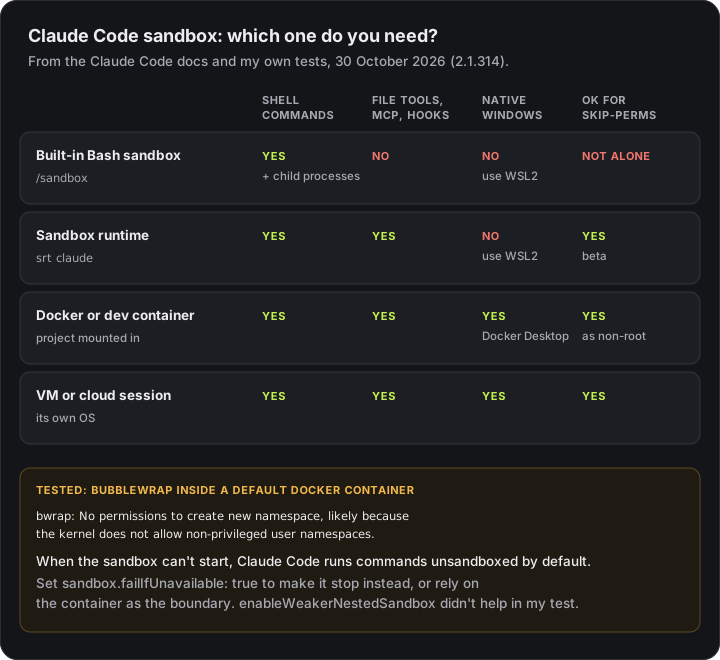
What the Claude Code sandbox isolates
Claude Code's built-in sandbox uses bubblewrap on Linux and WSL2, and Apple's Seatbelt on macOS, to put an operating-system boundary around the shell commands Claude runs: Bash, PowerShell and Monitor commands, plus every process they start. Covering child processes is what makes it different from permission rules. A test runner, a build script or a node script that Claude launches is inside the same boundary, so a delete hidden in a test can't reach your home folder.
With the sandbox on, by default:
| Allowed | Change it with | |
|---|---|---|
| Writes | The working directory, a per-user temp folder, and directories you added with --add-dir | sandbox.filesystem.allowWrite, denyWrite |
| Reads | Most of the machine, including ~/.ssh and ~/.aws/credentials | sandbox.filesystem.denyRead, sandbox.credentials |
| Network | No direct route out; a local proxy allows only approved domains, and the list starts empty | sandbox.network.allowedDomains |
| Environment | Inherited, including secrets in it | sandbox.credentials, CLAUDE_CODE_SUBPROCESS_ENV_SCRUB |
Some files in the project stay write-protected even inside it: the .claude settings, skills, agents, commands and hooks folders, .mcp.json, shell startup files, .vscode, .idea, and hooks and config inside .git.
What it doesn't cover is just as important:
- Claude's own file tools. Read, Edit and Write run inside Claude Code, outside the sandbox, and follow permission rules instead. A
denyReadentry doesn't stop the Read tool. - MCP servers, hooks, plugin monitors and your status line command. They run with your full access.
- Commands you type at the
!prompt, commands listed inexcludedCommands, and commands Claude retries outside the sandbox after a failure (allowUnsandboxedCommands: falseturns those retries off). - Files inside the project. In my sandbox runtime test, an
rm -rfof a folder inside the project went through. The sandbox protects everything around your project, not the project itself.
How to enable the sandbox in Claude Code
Run /sandbox in a Claude Code session and pick Auto-allow or Regular permissions; that writes the project's .claude/settings.local.json. For every project, set sandbox.enabled to true in ~/.claude/settings.json. Linux and WSL2 need bubblewrap and socat installed first; macOS uses Seatbelt, so there's nothing to install. Step by step:
-
Install the dependencies (Linux and WSL2 only). macOS uses its built-in Seatbelt framework, so skip this step there.
bashsudo apt-get install bubblewrap socat # Ubuntu, Debian sudo dnf install bubblewrap socat # Fedora -
Run
/sandboxin a Claude Code session. If a package is missing, the panel shows only a Dependencies tab that names it. Install it, restart Claude Code, and run/sandboxagain. -
Pick a mode on the Mode tab:
- Auto-allow: sandboxed commands run without a permission prompt. Deny rules, content-scoped ask rules such as
Bash(git push *), and the check for dangerousrmcommands still apply. - Regular permissions: the sandbox enforces the same limits, and you still approve each command.
- Auto-allow: sandboxed commands run without a permission prompt. Deny rules, content-scoped ask rules such as
That saves to the project's .claude/settings.local.json. To turn the sandbox on for every project, put it in ~/.claude/settings.json instead. These are the settings I'd use:
{
  "sandbox": {
    "enabled": true,
    "failIfUnavailable": true,
    "allowUnsandboxedCommands": false,
    "network": {
      "allowedDomains": ["registry.npmjs.org", "github.com"]
    }
  }
}
failIfUnavailable: truemakes Claude Code exit at startup when the sandbox can't start. Without it, Claude Code quietly runs commands unsandboxed when a dependency is missing or the platform isn't supported. That default is the one to change first.allowUnsandboxedCommands: falseremoves the escape hatch where Claude retries a failing command outside the sandbox. While retries are allowed, an allow rule that matches the command approves the unsandboxed retry with no prompt.allowedDomainsis the network allowlist. List what your package manager and Git remote need; the first time a command needs a new domain, Claude Code asks you.
To try it for one session without saving anything, start Claude Code with:
claude --settings '{"sandbox": {"enabled": true, "allowUnsandboxedCommands": false}}'To turn the sandbox off again, set "enabled": false in the settings file that turned it on: .claude/settings.local.json if you used /sandbox.
Check that commands really run sandboxed
Ask Claude (don't type it yourself at !) to run:
touch ~/sandbox-probeInside the sandbox it fails with Read-only file system on Linux and WSL2, the same error my sandboxed rm got in the sandbox runtime Docker test further down, or Operation not permitted on macOS. If the file gets created, delete it and run /sandbox to see what's missing. If Claude asks to retry the command outside the sandbox, say no.
Claude Code sandbox on Windows
The built-in sandbox doesn't run on native Windows. Anthropic's Claude Code docs put it plainly: "On native Windows, Claude Code runs commands unsandboxed." You have three ways to get one:
- WSL2. Install a Linux distribution (
wsl --install -d Ubuntu), install Claude Code,bubblewrapandsocatinside it, and use/sandboxthere. Check you're on WSL2 withwsl -l -v; on WSL1, Claude Code reportsSandboxing requires WSL2. - Docker Desktop. Run Claude Code in a container, as shown in How to run Claude Code in Docker. This is the route I tested.
- A VM or a cloud session, if you need a full separate operating system.
On Ubuntu 24.04 and later, including inside WSL2, AppArmor can stop bubblewrap from creating the namespaces it needs. Run sysctl kernel.apparmor_restrict_unprivileged_userns: if it prints 1, the sandboxing docs have a small AppArmor profile that lifts it for bwrap only. Since 2.1.310, /sandbox names this restriction itself when it's the cause.
On native Windows without any of these, you still get the PowerShell tool's built-in guards: Remove-Item on a drive root, a system folder or your home folder is refused in every mode. That stops the worst deletes, not a sandbox's worth of them. What Claude Code's protections each stop has the full comparison.
How to run Claude Code in Docker
To run Claude Code in Docker, build an image that installs it with npm and switches to a non-root user, then mount your project and keep ~/.claude in a named volume. The container puts all of Claude Code inside the boundary: shell commands, file tools, MCP servers and hooks. Anthropic recommends a container, a VM or the sandbox runtime for every --dangerously-skip-permissions session. Here's a minimal image I built and tested:
FROM node:22-bookworm-slim
RUN apt-get update && apt-get install -y --no-install-recommends git ca-certificates \
    && rm -rf /var/lib/apt/lists/*
RUN npm install -g @anthropic-ai/claude-code
USER node
RUN mkdir -p /home/node/.claude
ENV CLAUDE_CONFIG_DIR=/home/node/.claude
WORKDIR /workspace
Save it as Dockerfile, then build it and run it from your project folder:
docker build -t claude-sandbox .
docker run -it --rm -v "$PWD:/workspace" -v claude-config:/home/node/.claude claude-sandbox claude
In PowerShell, write ${PWD} instead of $PWD. The first time, Claude Code asks you to sign in. Per Anthropic's dev container docs, if no browser opens inside the container, copy the login URL it prints into your browser and paste the code back; Bedrock, Vertex and Foundry users pass cloud credentials as environment variables instead. For an unattended run, end the command with claude --dangerously-skip-permissions instead of claude.
What I checked in it:
- It runs as a non-root user.
idprintednode uid=1000, andclaude --versionprinted2.1.314 (Claude Code). - Claude Code's config survives restarts. The
claude-confignamed volume kept what Claude Code wrote to~/.claude(projects,sessions,backups,plugins) across separate containers. I didn't sign in, but per the docs the sign-in is stored there too. SettingCLAUDE_CONFIG_DIRmatters: without it,~/.claude.jsonstays in the home folder and is lost with the container. - The project is shared both ways. A file written to
/workspaceinside the container appeared in my project folder on the host. That's the point, and also the risk: anything Claude deletes in/workspaceis deleted on your disk. - The image is big: 1.18 GB. If disk space is tight, remove it with
docker rmi claude-sandboxwhen you're done, and the login withdocker volume rm claude-config.
--dangerously-skip-permissions cannot be used with root/sudo privileges
Claude Code 2.1.314 printed --dangerously-skip-permissions cannot be used with root/sudo privileges for security reasons when I ran claude --dangerously-skip-permissions as root in a plain node container. Per Anthropic's docs, it refuses the flag as root on Linux and macOS. Docker containers run as root unless you change the user, which is why the Dockerfile in this section has USER node. Run as the node user, the same command got past that check and stopped only at Not logged in · Please run /login.
Is --dangerously-skip-permissions safe?
Only inside an isolation boundary: a container, a VM, or the sandbox runtime (srt claude). The built-in Bash sandbox alone isn't enough, because Claude's file tools, MCP servers and hooks run outside it. Even in a container, the mounted project can be changed, and with the flag on, Anthropic's dev container docs warn that a malicious project can send out anything the container can read, "including the Claude Code credentials stored in ~/.claude". Restrict network egress if you run code you don't trust.
Claude Code in a dev container
If you use VS Code dev containers or GitHub Codespaces, Anthropic publishes a Dev Container Feature that installs Claude Code. A minimal .devcontainer/devcontainer.json with a non-root user and the config kept in a volume, built from the examples in Anthropic's dev container docs (I didn't build this one; the plain Docker route is the one I tested):
{
  "image": "mcr.microsoft.com/devcontainers/base:ubuntu",
  "features": {
    "ghcr.io/anthropics/devcontainer-features/claude-code:1.0": {}
  },
  "remoteUser": "vscode",
  "mounts": ["source=claude-code-config,target=/home/vscode/.claude,type=volume"],
  "containerEnv": { "CLAUDE_CONFIG_DIR": "/home/vscode/.claude" }
}
Then run Dev Containers: Rebuild Container and start claude in the container's terminal. remoteUser must be a non-root account for --dangerously-skip-permissions to start. For untrusted code, Anthropic's reference dev container adds an init-firewall.sh script that allows only approved destinations, with the NET_ADMIN and NET_RAW capabilities it needs.
Two other Docker products come up in the same searches: Docker Sandboxes, which Anthropic's docs describe as a microVM that can run Claude Code without Docker Desktop, and Docker's MCP Toolkit, which is about adding MCP servers to Claude Code rather than isolating it.
Does the Claude Code sandbox work inside Docker?
Not in a default container, in my test. On Docker Desktop, with the sandbox runtime 0.0.81 and bubblewrap 0.8.0 in node:22-bookworm-slim, bubblewrap couldn't create its namespaces, because Docker's default seccomp profile blocks them for unprivileged processes. --security-opt seccomp=unconfined let it start. The sandbox runtime uses the same bubblewrap as Claude Code's built-in sandbox on Linux; I couldn't run a signed-in Claude Code session in the test container, so these results are bubblewrap's behaviour, not a Claude Code session's.
In a default Docker container, as the non-root node user, every sandboxed command failed with:
bwrap: No permissions to create new namespace, likely because the kernel does not allow non-privileged user namespaces.Setting the runtime's enableWeakerNestedSandbox option to true (Claude Code exposes the same setting as sandbox.enableWeakerNestedSandbox), which Anthropic's docs suggest for a different in-container error (Can't mount proc), made no difference. The block comes from Docker's default seccomp profile, which doesn't let an unprivileged process create user namespaces.
The sandbox runtime failed closed: it refused to run each command at all. Claude Code's built-in sandbox doesn't, by default. Per Anthropic's docs, when the sandbox can't start, Claude Code "runs commands without sandboxing", so a container plus /sandbox can leave you with no inner sandbox and only a startup warning that's easy to miss. "failIfUnavailable": true turns that into a startup error.
With --security-opt seccomp=unconfined on docker run, bubblewrap started, and these were the results:
| Command, run inside the sandbox | Result |
|---|---|
rm -rf /home/node/precious (outside the project) | Blocked: rm: cannot remove '/home/node/precious/data.txt': Read-only file system |
The same delete from inside a node -e script | Blocked: the script failed and the folder survived |
sh -c "echo 20; rm -rf /home/node/precious" (modelled on the payload from issue #105342) | Printed 20, then the delete was blocked |
| Write a file inside the project | Allowed |
rm -rf a folder inside the project | Allowed |
fetch("https://example.com") with no allowed domains | Blocked: EAI_AGAIN |
So once bubblewrap can start, it enforces those limits, at least through the sandbox runtime I tested. But seccomp=unconfined removes a protection from the container itself, so for most people the better choice is to treat the container as the boundary and leave the inner sandbox off. If you do want both, Anthropic's fix for unprivileged containers is enableWeakerNestedSandbox; in my Docker Desktop setup the seccomp profile was the blocker first.
Claude Code sandbox runtime (srt claude)
The Claude Code sandbox runtime is Anthropic's open-source tool for sandboxing the whole Claude Code process, not just its shell commands: start Claude Code with srt claude, and file tools, MCP servers and hooks run inside the boundary too, without Docker. The package is @anthropic-ai/sandbox-runtime, a beta; I tested 0.0.81. Install it with npm install -g @anthropic-ai/sandbox-runtime, set the boundary in ~/.srt-settings.json, and run srt claude from your project folder:
{
  "filesystem": {
    "denyRead": [],
    "allowWrite": [".", "~/.claude", "~/.claude.json", "/tmp"],
    "denyWrite": []
  },
  "network": {
    "allowedDomains": ["api.anthropic.com", "claude.ai", "platform.claude.com"]
  }
}
Claude Code needs to write its own config (~/.claude, ~/.claude.json) and its temp folder (/tmp on Linux and WSL2, /private/tmp on macOS), and to reach the API and sign-in domains; an API-key login can drop the two claude domains. On Linux, create the config paths before the first run, because the runtime only grants writes to paths that already exist. Two cautions from Anthropic's docs: it's a beta research preview, and if ~/.srt-settings.json is missing it still starts, with built-in defaults, so a clean start doesn't prove your settings loaded.
When the Claude Code sandbox isn't working
Usually either bubblewrap or socat is missing, or user namespaces are blocked (Docker's seccomp profile, or AppArmor on Ubuntu 24.04 and later). When the sandbox can't start, Claude Code runs commands unsandboxed unless sandbox.failIfUnavailable is true, so check this first if a sandboxed setup seems too permissive.
| What you see | Why | Fix |
|---|---|---|
/sandbox shows only a Dependencies tab | bubblewrap or socat missing (Linux, WSL2) | Install them, restart Claude Code |
bwrap: No permissions to create new namespace | User namespaces blocked: Docker's seccomp profile, or AppArmor on Ubuntu 24.04+ | Container: rely on the container, or seccomp=unconfined. Ubuntu: the AppArmor profile from the docs |
bwrap: Can't mount proc on /newroot/proc: Operation not permitted | Unprivileged container | "enableWeakerNestedSandbox": true, only when the container is your real boundary |
Sandboxing requires WSL2 | WSL1 | Convert the distribution to WSL2 |
| Commands work but can reach anything | The sandbox didn't start and Claude Code fell back | Set "failIfUnavailable": true, then check /sandbox |
| A build fails to download packages | The domain isn't in allowedDomains | Add it, or approve it when asked |
A tool needs to write outside the project, such as ~/.kube | Writes are limited by default | Add the path to sandbox.filesystem.allowWrite rather than excluding the tool |
Recent sandbox fixes worth updating for
| Version | Fix |
|---|---|
| 2.1.299 | Sandboxed commands on WSL2 no longer fail with bwrap: Can't mkdir /mnt/c/Program Files/ClaudeCode; on macOS, a denied path can no longer be read or written through its real location behind a symlink |
| 2.1.305 | New sandbox.allowNestedUserNamespaces, for tools such as Chromium or rootless podman, at the cost of weakening the sandbox's file protections |
| 2.1.309 | Sandboxed commands no longer run the shell's startup files outside the sandbox before each command; Linux write denies no longer lift when a background command outlives the session |
| 2.1.310 | /sandbox names Ubuntu's AppArmor restriction, and how to lift it, when it keeps bubblewrap from starting |
| 2.1.314 | Sandbox protections now apply to a worktree entered with claude -p --resume or --continue |
Key takeaways
- Turn on the Claude Code sandbox with /sandbox, or sandbox.enabled in ~/.claude/settings.json. It runs on macOS, Linux and WSL2, not native Windows.
- It covers shell commands and every process they start, so a delete inside a test or script is stopped outside the project. It doesn't cover Claude's file tools, MCP servers, hooks, or files inside the project.
- Set failIfUnavailable: true. By default, when the sandbox can't start, Claude Code runs commands unsandboxed.
- For --dangerously-skip-permissions, run Claude Code in a container as a non-root user. As root it refuses: 'cannot be used with root/sudo privileges for security reasons'.
- In my sandbox runtime test in a default Docker container, bubblewrap couldn't start ('No permissions to create new namespace'). Treat the container as the boundary rather than relying on /sandbox inside it.
FAQ
Frequently asked questions
Does Claude Code have a sandbox?
Yes. Claude Code has a built-in sandbox for shell commands. Run /sandbox in a session, or set sandbox.enabled to true in ~/.claude/settings.json. It limits Bash, PowerShell and Monitor commands, and every process they start, to writing inside your project, a temp folder and directories you added, and routes network traffic through a proxy that allows only the domains you approve. It runs on macOS, Linux and WSL2.
How do I enable the sandbox in Claude Code?
Run /sandbox and pick a mode on the Mode tab: auto-allow runs sandboxed commands without prompting, regular permissions keeps the prompts. That saves to the project's .claude/settings.local.json. To turn it on for every project, set sandbox.enabled to true in ~/.claude/settings.json. On Linux and WSL2, install bubblewrap and socat first; on macOS there's nothing to install.
Does the Claude Code sandbox work on Windows?
Not on native Windows: there, Claude Code runs commands unsandboxed. Run Claude Code inside WSL2, where the sandbox works once bubblewrap and socat are installed, or run it in a Docker container, a dev container or a VM. Docker Desktop on Windows is enough for the container route.
Does the Claude Code sandbox work inside Docker?
Not in a default Docker container. In my test on Docker Desktop, using the sandbox runtime 0.0.81 rather than a signed-in Claude Code session, bubblewrap failed with 'No permissions to create new namespace', with or without enableWeakerNestedSandbox, because Docker's default seccomp profile blocks the user namespaces it needs. It worked with --security-opt seccomp=unconfined, but that weakens the container. Since Claude Code runs commands unsandboxed when the sandbox can't start, set sandbox.failIfUnavailable to true, or treat the container as the boundary.
How do I run Claude Code in Docker?
Build an image that installs Claude Code with npm install -g @anthropic-ai/claude-code and switches to a non-root user, then run it with your project mounted, for example docker run -it --rm -v "$PWD:/workspace" -v claude-config:/home/node/.claude your-image claude (in PowerShell, use ${PWD}). Keep Claude Code's config, including the sign-in, in a named volume and set CLAUDE_CONFIG_DIR to it. The mounted project folder stays writable, so commit before long runs.
Why does --dangerously-skip-permissions say it cannot be used with root?
Claude Code refuses the flag when it runs as root on Linux and macOS, with the message '--dangerously-skip-permissions cannot be used with root/sudo privileges for security reasons'. Docker containers run as root unless you change the user. Add USER node (or another non-root user) to your Dockerfile, or set remoteUser in a dev container.
Is it safe to use --dangerously-skip-permissions?
Only inside an isolation boundary: a container, a VM, or the sandbox runtime (srt claude). The built-in Bash sandbox alone isn't enough, because Claude's file tools, MCP servers and hooks run outside it. Even in a container, the mounted project can be changed and anything inside the container, including the Claude Code login, can be sent out unless you restrict network egress.
What is the difference between the sandbox and the sandbox runtime?
The built-in sandbox wraps each shell command Claude runs. The sandbox runtime, the open source @anthropic-ai/sandbox-runtime package, wraps the whole Claude Code process when you start it with srt claude, so file tools, MCP servers and hooks are inside the boundary too. Both use bubblewrap on Linux and WSL2 and Seatbelt on macOS. The runtime is a beta research preview.
How do I check that commands really run sandboxed?
Ask Claude to run touch ~/sandbox-probe. Inside the sandbox it fails with 'Read-only file system' on Linux and WSL2, or 'Operation not permitted' on macOS. Typing the command yourself at the ! prompt doesn't test it, because those commands usually run outside the sandbox. If Claude offers to retry outside the sandbox, decline.
If Claude Code has already deleted something, Claude Code deleted my files covers getting it back, and the full list of Claude Code errors and fixes covers everything else. My Claude Code settings builder writes the sandbox block for you, and the subagents guide covers scoping what each agent can touch. Setting up coding agents to run unattended safely is part of the work I do: see recent projects.
References
- Configure the sandboxed Bash tool (Claude Code docs)code.claude.com · accessed 2026-10-30
- Choose a sandbox environment (Claude Code docs)code.claude.com · accessed 2026-10-30
- Development containers (Claude Code docs)code.claude.com · accessed 2026-10-30
- Permission modes: bypassPermissions and actions no mode auto-approves (Claude Code docs)code.claude.com · accessed 2026-10-30
- Settings reference: sandbox settings (Claude Code docs)code.claude.com · accessed 2026-10-30
- anthropics/sandbox-runtime READMEgithub.com · accessed 2026-10-30
- Reference dev container: devcontainer.json, Dockerfile, init-firewall.sh (anthropics/claude-code)github.com · accessed 2026-10-30
- Claude Code changelog (2.1.299 to 2.1.314)github.com · accessed 2026-10-30
- Docker Sandboxes (Docker docs)docs.docker.com · accessed 2026-10-30
Last reviewed October 31, 2026

Tahir Nazir
Senior AI Engineer & Full-Stack Lead
5+ years shipping AI-powered products — RAG pipelines, agentic workflows, and MCP tooling. Top Rated on Upwork with a 100% job success score.
More about Tahir →Keep reading
New posts land here first. Follow along by RSS, or get in touch if you are building something similar.
Related articles
Claude Code Deleted My Files: How to Get Them Back, and How to Stop It Happening Again
Claude Code deleted your files or your project? /rewind can't bring back a file only rm removed. The five places deleted files can still be, in order, then which protection (deny rules, hooks, the sandbox, containers) stops which kind of delete, tested.TroubleshootingAI Engineering21 min readClaude Code Not Working? Every Error and Its Fix
Every Claude Code error I've written up, grouped by what actually broke: network and enterprise setup, cost and context limits, or setup and tools. Find your exact message in the lookup table, get the one-line answer, then follow the link to the full fix.TroubleshootingAI Engineering15 min readClaude Code 'Auto Mode Check Unavailable' or 'Classifier Unavailable'? 4 Fixes
Bash, Edit and MCP calls all refused while Read still works. The auto mode safety check failed, not your command. What the error means, why it stops after ten, and four fixes from Anthropic's own docs.TroubleshootingAI Engineering15 min read