Claude Code 'Not Logged In · Please Run /login' and 'Login Expired': What Each Means and the Fix
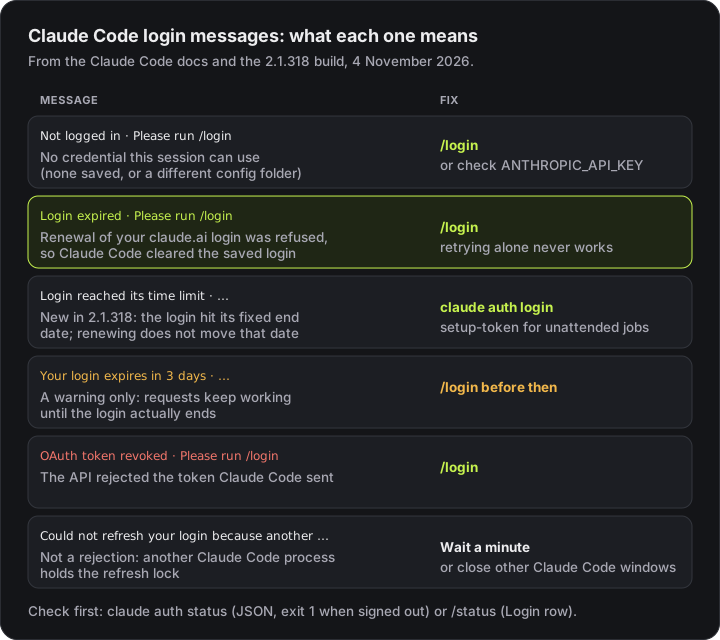
Claude Code says 'Not logged in · Please run /login' when the session has no credential it can use, and 'Login expired · Please run /login' when renewing your claude.ai login failed and the login was cleared. Since 2.1.318 there is a third: 'Login reached its time limit'. What each one means, how to check when your login ends, why Claude Code keeps logging you out, and how to stay signed in for scripts with claude setup-token.
 Tahir Nazir18 min read
Claude Code shows Not logged in · Please run /login when the session has no credential it can use, and Login expired · Please run /login when it tried to renew your saved claude.ai login, the renewal was refused, and it cleared the login. Both are fixed the same way: run /login inside Claude Code, or claude auth login in a shell. Retrying without signing in shows the same message on every request. Since Claude Code 2.1.318 there is a third message, Login reached its time limit · Please run /login, for a login that hit its fixed end date; renewing early doesn't move that date, and for unattended jobs the fix is claude setup-token.
| You see | What it means | Fix |
|---|---|---|
Not logged in · Please run /login | No saved login, API key or token this session can use | /login, or check ANTHROPIC_API_KEY and CLAUDE_CONFIG_DIR |
Login expired · Please run /login | Renewing your claude.ai login was refused, so the login was cleared | /login |
Login reached its time limit · Please run /login (2.1.318+) | The login reached its fixed end date | claude auth login; claude setup-token for jobs |
Your login expires in 3 days · run /login to renew | A warning; requests keep working until then | /login before the date |
OAuth token revoked · Please run /login | The API rejected the token Claude Code sent | /login |
Could not refresh your login because another Claude Code process is refreshing it… | Not a rejection: another process holds the refresh lock | Wait a minute, or close other windows |
Authentication required · Sign in again to continue | The Not logged in state, in a Claude Desktop session | Sign in again from the app |
Remote Control disconnected — Claude.ai login expired — run /login … | Your login expired or was rejected during Remote Control | /login, then /remote-control if the message says so |
Failed to authenticate: OAuth session expired and could not be refreshed | Login expired, in claude -p or the Agent SDK | Run claude, complete /login, rerun |
Last reviewed 4 November 2026, against Claude Code 2.1.318. I reproduced Not logged in · Please run /login on Windows 11 with Claude Code 2.1.161 by pointing CLAUDE_CONFIG_DIR at an empty folder. The 2.1.318 messages are quoted from the Linux build, which I downloaded from npm into a throwaway folder and searched without running it. Everything else comes from Anthropic's authentication docs, error reference and changelog, linked at each point.
What does "Not logged in · Please run /login" mean?
It means Claude Code found no credential it can use for this session. The error reference puts it in one line: "No valid credential is available for this session." Nothing was rejected; there was simply nothing to send.
You can reproduce it in under a minute, which is a good way to see what "no credential" looks like. With a fresh, empty config folder and no key in the environment:
CLAUDE_CONFIG_DIR=/tmp/empty-claude claude -p "hi"
# Not logged in · Please run /login     (exit code 1)

CLAUDE_CONFIG_DIR=/tmp/empty-claude claude auth status
# output from 2.1.161; 2.1.268+ also prints configDirectory, 2.1.318+ loginExpiresAt{
"loggedIn": false,
"authMethod": "none",
"apiProvider": "firstParty"
}claude auth status exits with code 1 when you're signed out and 0 when you're signed in, so scripts can check it before they start a job.
The usual reasons you land here without meaning to:
- A different config folder. Each
CLAUDE_CONFIG_DIRkeeps its own login. An alias likeclaude-workthat sets it starts signed out until you log in once there. - An API key that isn't reaching Claude Code.
ANTHROPIC_API_KEYhas to be exported in the shell that launchesclaude. In interactive mode Claude Code also asks once whether to use the key; if you declined, it stays unused until you flip the Use custom API key toggle in/config. - A background or cloud worker. The key or token has to be in the environment that starts the worker, not just in your terminal.
- A damaged saved login. If the stored
/logincredential contains a character an HTTP header can't carry, Claude Code reports it as Not logged in. Run/loginto save a fresh one.
In a session the Claude Desktop app runs, such as the Code tab or Cowork, the same state reads Authentication required · Sign in again to continue, and you sign in again from the app.
If you just logged in somewhere else: signing in with claude.ai in another Claude Code window that uses the same config folder fixes an open interactive session on its own; you don't need to restart it. On macOS before 2.1.286, you had to restart the session. Before 2.1.318, running jobs could also exit with Not logged in when another terminal or host signed in again to the same account.
What does "Login expired · Please run /login" mean?
It means Claude Code tried to renew your saved claude.ai login, the sign-in service rejected the stored refresh token, and Claude Code cleared the saved credentials. From then on, per the docs, "each model request stops locally with this message before it reaches the API, because only /login can create new credentials."
Login expired · Please run /loginIn non-interactive mode (claude -p) and the Agent SDK, the same state reads differently, with the structured error code authentication_failed:
Failed to authenticate: OAuth session expired and could not be refreshedThree things worth knowing:
- It is not the same as
OAuth token revoked. That message reports a rejection the API returned.Login expiredis Claude Code's own verdict on a login it already failed to renew, so no request is sent at all. - Only a saved claude.ai login can expire this way. Sessions using an API key,
CLAUDE_CODE_OAUTH_TOKENor a cloud provider never see it. - Before 2.1.206 it looked like something else. Claude Code sent the request anyway with whatever credential was left, and every model failed with There's an issue with the selected model or a 401. If you're on an old build and every model suddenly fails, check your login first.
The fix is /login. In a script, run claude once in the same environment, complete /login, then rerun your command.
What is "Login reached its time limit"?
It is a new message in Claude Code 2.1.318 for a claude.ai login that has reached its fixed end date. The changelog describes the change as fixing "the sign-in failure when a stored claude.ai login reaches its time limit: it now says so." In the 2.1.318 build the interactive form is:
Login reached its time limit · Please run /loginand in claude -p it names the two ways out:
Failed to authenticate: this login reached its time limit and cannot be renewed. Run `claude auth login` to sign in again, or use `claude setup-token` and set CLAUDE_CODE_OAUTH_TOKEN for unattended jobsThe important word is cannot be renewed. Claude Code refreshes your login in the background as you work, but that refresh doesn't extend the end date. Only a new sign-in does. Anthropic's docs don't state how long a claude.ai login lasts, so I won't guess; check yours with claude auth status, below.
How do I check when my Claude Code login expires?
Run claude auth status on 2.1.318 or later. Its JSON now includes loginExpiresAt, the date your stored claude.ai sign-in ends (it's null when no such login is in use):
claude auth status
claude auth status --text   # human-readable
There are three other places the date shows up:
claude -ptext output prints a one-line warning on stderr, starting 10 days before a stored claude.ai sign-in ends. In the 2.1.318 build it readsWarning: this sign-in ends between <date> and <date> (in N days at the earliest). Renewing it does not move those dates. Run claude auth login before then, or use claude setup-token for unattended jobs.claude -p --output-format jsonresults carrycredential_expires_at.- Interactive sessions warn at startup when the login is within three days of expiring:
Your login expires in 3 days · run /login to renew. The authentication docs are clear that this "is informational and never blocks a request."
Once a login can't be renewed, /status shows a Login row reading Expired — log in again with the organization and email it had saved (2.1.210 or later). That row appears only when the saved claude.ai login is the active credential.
Renewing early matters most for sessions nobody is watching. The docs warn that a background session or a Remote Control session that outlives the login "stops making progress once the credential expires and can't recover until you sign in again."
Why does Claude Code keep logging me out?
Most repeated sign-outs come from one of a handful of causes, and several of them were bugs that are now fixed. Run claude update first:
| Cause | Fixed in | What to do |
|---|---|---|
| System clock is off (token checks depend on the time) | n/a | Sync your clock, then /login |
| Two sessions renewed with the same token after the machine woke from sleep | 2.1.211 | Update |
| An older build, such as an IDE extension's bundled CLI, ran on the same machine | 2.1.277 | Update both |
A short command (claude auth status, claude plugin list) exited mid-refresh | 2.1.301, 2.1.317 | Update |
Another terminal or host signed in again to the same account, and running jobs exited with Not logged in | 2.1.318 | Update |
| macOS login keychain locked (SSH, sleep) or out of sync with your password | n/a | claude doctor, then unlock the keychain |
ANTHROPIC_API_KEY from a disabled organization overrides your subscription | n/a | Unset it; check /status |
If you use many parallel sessions, you may also see Could not refresh your login because another Claude Code process is refreshing it (or exited mid-refresh). That one isn't a rejection: your login needed renewing and another process held the shared refresh lock. Wait a minute; if it keeps coming back, close the other windows, and if no other Claude Code process is running, /login skips the lock.
On macOS, when the keychain refuses the write, Claude Code saves your login to the plain-text ~/.claude/.credentials.json instead. The troubleshooting docs walk through moving it back: run claude doctor, unlock with security unlock-keychain ~/Library/Keychains/login.keychain-db, then /logout and /login.
How do I log in again?
Run /login inside Claude Code, or claude auth login from a shell. A browser window opens; if it doesn't, press c to copy the login URL and paste it into a browser yourself. If the browser shows a code instead of returning to the terminal, paste it at the Paste code here if prompted prompt. The terminal shows Login successful when it's done.
claude auth login takes a few options from the CLI reference:
claude auth login --console          # Anthropic Console (API billing) instead of a subscription
claude auth login --sso              # force SSO
claude auth login --email you@work.com
If sign-in keeps failing with an SSL error such as OAuth error: SSL certificate error (UNABLE_TO_GET_ISSUER_CERT_LOCALLY), the problem is your network, not your account: see the SSL certificate fix. If an invalid or rejected code is the problem, the OAuth error: invalid code page covers it.
How do I log out of Claude Code?
Type /logout at the Claude Code prompt, or run claude auth logout in a shell. Logging out does more than you might expect: it removes all stored credentials, including saved MCP server logins and plugin secrets, and resets first-launch setup, so the next claude run walks you through login and setup again. Expect to re-authorize your MCP servers afterwards.
To keep two accounts signed in at once, such as work and personal, don't log out and in; give each its own config folder:
alias claude-work='CLAUDE_CONFIG_DIR=~/.claude-work claude'How do I stay logged in for CI and scripts?
Use claude setup-token. It runs the same browser sign-in as /login, then prints a one-year OAuth token to the terminal without saving it anywhere. Set it as CLAUDE_CODE_OAUTH_TOKEN wherever the job runs:
export CLAUDE_CODE_OAUTH_TOKEN=your-token        # macOS, Linux, WSL
$env:CLAUDE_CODE_OAUTH_TOKEN = "your-token"      # Windows PowerShell
Its limits, from the authentication docs:
- It needs a Pro, Max, Ultra, Team or Enterprise plan.
- It can only make model requests, so it can't start Remote Control sessions or fetch claude.ai connectors. Locally configured MCP servers still work.
--baremode doesn't read it; useANTHROPIC_API_KEYor anapiKeyHelperthere.- Treat it like a password. Anyone who has it can spend your subscription, so keep it in your CI's secret store, never in a repository.
If you run /login while the variable is set, the current session switches to the new login. To keep that login in new sessions, remove the variable from your shell profile and settings files.
For billing on the API instead of a subscription, an ANTHROPIC_API_KEY from the Console works in scripts too; the API key checker tells you whether a key is valid before you wire it in.
Which credential is Claude Code actually using?
When several are present, Claude Code picks the first of these, per the authentication precedence list:
- Cloud provider credentials (
CLAUDE_CODE_USE_BEDROCK,_VERTEX,_FOUNDRY) ANTHROPIC_AUTH_TOKENANTHROPIC_API_KEY(in-p, always used when present)apiKeyHelperoutputCLAUDE_CODE_OAUTH_TOKEN- Anthropic profile and federation credentials
- Your
/loginsubscription credentials
This is why a stale key in a .env file can make a working subscription look broken: the key wins. Run /status to see the active credential; when a login and a key are both configured, it marks the one not in use. For a key that's rejected, see Invalid API key and API Error 401.
What changed in Claude Code sign-in recently?
| Version | Change |
|---|---|
| 2.1.206 | Login expired · Please run /login replaces the misleading "issue with the selected model" and 401 errors after a failed renewal |
| 2.1.210 | /status shows Login: Expired — log in again |
| 2.1.211 | Waking from sleep no longer makes two sessions revoke the shared login |
| 2.1.268 | claude auth status JSON adds configDirectory |
| 2.1.277 | An older build on the same machine no longer logs you out |
| 2.1.286 | macOS sessions pick up a login made in another window |
| 2.1.301 | Short commands exiting mid-refresh no longer sign you out |
| 2.1.317 | claude auth status waits for a slow token refresh to be saved |
| 2.1.318 | loginExpiresAt in claude auth status, credential_expires_at in -p JSON, a 10-day stderr warning in -p, the Login reached its time limit message, and no more Not logged in when another terminal signs in again |
Key takeaways
- Not logged in · Please run /login means no usable credential at all; Login expired · Please run /login means renewing your claude.ai login failed and Claude Code cleared it. Both are fixed with /login.
- Retrying never fixes Login expired: the request stops locally before reaching the API.
- Login reached its time limit (2.1.318+) is a fixed end date. Background renewal doesn't move it; a new claude auth login does.
- claude auth status shows loginExpiresAt on 2.1.318+, and exits 1 when you're signed out, so scripts can check it first.
- Repeated sign-outs were mostly bugs fixed between 2.1.211 and 2.1.318. Update, check your clock, and on macOS check the keychain with claude doctor.
- For CI and scripts, claude setup-token prints a one-year token for CLAUDE_CODE_OAUTH_TOKEN. Keep it in a secret store.
FAQ
Frequently asked questions
What does 'Not logged in · Please run /login' mean in Claude Code?
The session has no credential it can use: no saved claude.ai or Console login, no API key, no token. Common causes are a first run, a different CLAUDE_CONFIG_DIR (each config folder has its own login), an ANTHROPIC_API_KEY that is set but not exported to the shell that started claude, or a saved login that was damaged. Run /login, or claude auth login from a shell, then check with claude auth status.
What does 'Login expired · Please run /login' mean?
Claude Code tried to renew your saved claude.ai login, the sign-in service refused the stored refresh token, and Claude Code cleared the saved login. Every request after that stops locally with this message, so retrying never helps: run /login. In claude -p and the Agent SDK the same state reads 'Failed to authenticate: OAuth session expired and could not be refreshed'. Sessions that use an API key, CLAUDE_CODE_OAUTH_TOKEN or a cloud provider never see it.
What does 'Login reached its time limit · Please run /login' mean?
It is new in Claude Code 2.1.318. Your claude.ai login has a fixed end date, and this message means it reached that date and cannot be renewed. Renewing the login earlier does not move the date. Run claude auth login, or /login inside a session, to start a new login. For unattended jobs, the 2.1.318 message itself suggests claude setup-token with CLAUDE_CODE_OAUTH_TOKEN.
How do I check when my Claude Code login expires?
On 2.1.318 or later, run claude auth status: the JSON has a loginExpiresAt field with the date your stored claude.ai sign-in ends, and claude -p JSON results carry credential_expires_at. Inside a session, /status shows a Login row reading 'Expired — log in again' once a login can no longer be renewed. Interactive sessions also warn at startup when the login is within three days of expiring.
Why does Claude Code keep logging me out?
Usually one of these: your system clock is wrong (token checks depend on it), an older Claude Code build such as an IDE extension's bundled CLI runs on the same machine (fixed in 2.1.277), a short command like claude auth status exited in the middle of a token refresh (fixed in 2.1.301 and 2.1.317), another terminal signed in again to the same account (fixed in 2.1.318), or on macOS the login keychain was locked. Update with claude update, check your clock, and run /login once.
How do I log out of Claude Code?
Type /logout at the Claude Code prompt, or run claude auth logout in a shell. Logging out removes all stored credentials, including saved MCP server logins and plugin secrets, and resets first-launch setup, so the next claude run walks you through login again.
How do I keep Claude Code logged in for CI or scripts?
Run claude setup-token on a machine where browser sign-in works. It prints a one-year OAuth token without saving it; set it as CLAUDE_CODE_OAUTH_TOKEN where the job runs. It needs a Pro, Max, Ultra, Team or Enterprise plan, can only make model requests, and is ignored by --bare, which needs ANTHROPIC_API_KEY or an apiKeyHelper instead.
Why does Claude Code say not logged in when ANTHROPIC_API_KEY is set?
The variable has to be exported in the shell that starts claude, and in interactive mode Claude Code asks once whether to use the key; if you declined, it stays unused until you change the 'Use custom API key' toggle in /config. Background sessions and cloud workers need the key in their own environment, not just your interactive shell. Run /status to see which credential is active.
Related errors
| If you're seeing | Read |
|---|---|
OAuth error: SSL certificate error during /login | Claude Code SSL certificate verification failed |
There's an issue with the selected model on every model | It's usually a 404, or an expired login on an old build |
| Signing in to Claude Code inside a Docker container | Running Claude Code in a sandbox or Docker |
Sessions suddenly starting in ⏵⏵ auto mode on | Claude Code auto mode: on, off or default |
For anything not listed here, the full list of Claude Code errors and fixes groups every error I've written up by cause.
References
- Authentication (Claude Code docs)code.claude.com · accessed 2026-11-04
- Error reference: Not logged in, Login expired, Could not refresh your login (Claude Code docs)code.claude.com · accessed 2026-11-04
- Troubleshoot installation and login: Not logged in or token expired (Claude Code docs)code.claude.com · accessed 2026-11-04
- CLI reference: claude auth and claude setup-token (Claude Code docs)code.claude.com · accessed 2026-11-04
- Claude Code changelog (2.1.206 to 2.1.318)github.com · accessed 2026-11-04
- @anthropic-ai/claude-code-linux-x64 2.1.318 (npm)npmjs.com · accessed 2026-11-04
Last reviewed November 4, 2026

Tahir Nazir
Senior AI Engineer & Full-Stack Lead
5+ years shipping AI-powered products — RAG pipelines, agentic workflows, and MCP tooling. Top Rated on Upwork with a 100% job success score.
More about Tahir →Keep reading
New posts land here first. Follow along by RSS, or get in touch if you are building something similar.
Related articles
Claude Code 'There's an Issue With the Selected Model': It's Usually Just a 404
I pointed Claude Code at a fake API and fed it every kind of error. Any 404 — a typo, a stray /v1, a gateway's error page — produced this exact message. Here's how to tell which one you have.TroubleshootingAI Engineering11 min readClaude Code SSL Certificate Verification Failed: Fix It by Error Code
API Error: Unable to connect to API: SSL certificate verification failed (UNABLE_TO_GET_ISSUER_CERT_LOCALLY) or Self-signed certificate detected (SELF_SIGNED_CERT_IN_CHAIN) behind Zscaler or any TLS-inspecting proxy. What the code in brackets means in the 2.1.316 wording, why the OS trust store comes before NODE_EXTRA_CA_CERTS, and the certificate fixes from 2.1.310 to 2.1.318.TroubleshootingAI Engineering24 min readClaude Code Sandbox: How to Set It Up on macOS, Linux, Windows and Docker (Tested)
How to sandbox Claude Code: turn on the built-in Bash sandbox with /sandbox, what it does and doesn't isolate, why it doesn't run on native Windows, and how to run Claude Code in Docker for --dangerously-skip-permissions. Includes a test showing the built-in sandbox can't start in a default Docker container.How-toAI Engineering20 min read