Claude Code SSL Certificate Verification Failed: Fix It by Error Code
SSL certificate verification failed (UNABLE_TO_GET_ISSUER_CERT_LOCALLY) or Self-signed certificate detected (SELF_SIGNED_CERT_IN_CHAIN) behind Zscaler or any TLS-inspecting proxy. The error's advice is right — but Claude Code already reads your OS certificate store, so the order you apply it in decides whether it works.
 Tahir NazirUpdated October 21, 202621 min read
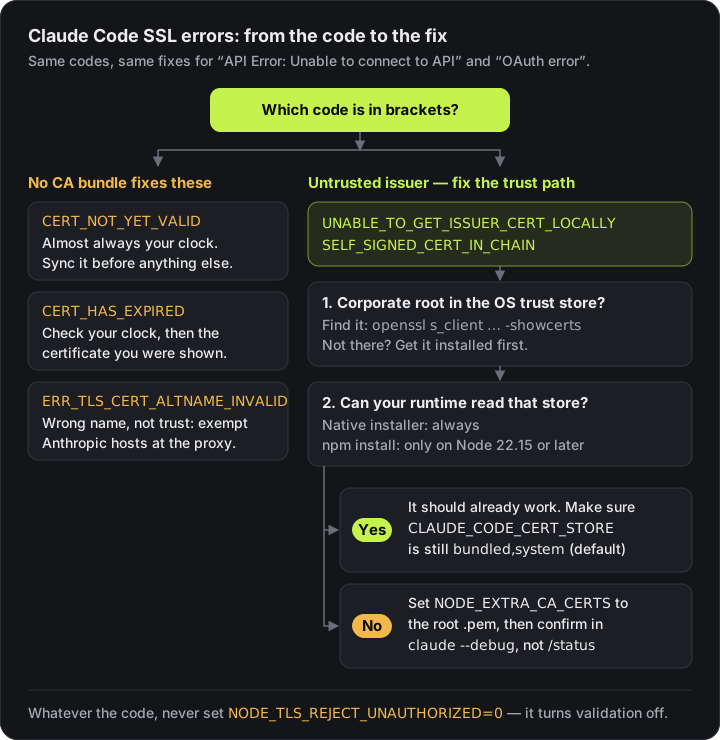
If Claude Code fails with API Error: Unable to connect to API: SSL certificate verification failed (UNABLE_TO_GET_ISSUER_CERT_LOCALLY) or Self-signed certificate detected (SELF_SIGNED_CERT_IN_CHAIN), the error's own advice is right: something between you and Anthropic — usually Zscaler, Netskope or another TLS-inspecting proxy — is re-signing your traffic with a corporate root certificate that Claude Code doesn't trust. The fix that works is the error's two suggestions applied in the opposite order:
- Get your corporate root into the OS trust store (IT has often done this already).
- Make sure your runtime can read that store. The native installer always can; an npm install needs Node 22.15 or later.
- Only if it can't, set
NODE_EXTRA_CA_CERTSto the root's.pem— and confirm it loaded inclaude --debug, not/status.
If the code in brackets is CERT_NOT_YET_VALID or ERR_TLS_CERT_ALTNAME_INVALID instead, no certificate setting will help — read the code first.
If it says UNABLE_TO_GET_ISSUER_CERT (or _LOCALLY on an HTTP MCP server) and started right after updating to 2.1.304, your setup is probably fine — it's a regression.
Why that order? Most guides repeat only the first half of the message — set NODE_EXTRA_CA_CERTS. That works for some people and not others, and the inconsistency is the actual clue. Claude Code already trusts your operating system's certificate store by default. From the enterprise network docs:
Enterprise TLS-inspection proxies work without additional configuration when their root certificate is installed in the OS trust store and the runtime can read it.
So if your corporate CA certificate is already in the OS store and the SSL error persists, adding a .pem path is treating a symptom. Start with that second clause instead — and the runtime can read it.
UNABLE_TO_GET_ISSUER_CERT after updating to 2.1.304
Short answer: it's a regression. Pin 2.1.303 and turn off auto-updates until a fix ships (commands below).
Since 2.1.304, issue #103680 reports every request failing for Bedrock behind an HTTPS gateway signed by a private CA:
API Error: Unable to connect to API: SSL certificate verification failed (UNABLE_TO_GET_ISSUER_CERT). The certificate comes from an authority Claude Code doesn't trust, usually a TLS-inspecting corporate proxy or a gateway signed by a private CA: set NODE_EXTRA_CA_CERTS to that CA bundle, or add it to the system certificate storeA commenter sees the same on an HTTP MCP server ("type": "http") as UNABLE_TO_GET_ISSUER_CERT_LOCALLY: unable to get local issuer certificate.
It's this bug, not your proxy, when all three hold:
- the same setup worked on 2.1.303;
- your CA configuration hasn't changed;
- the
claude --debuglog showsCA certs: Loaded … system CA certificatesorCA certs: Appended extra certificates from NODE_EXTRA_CA_CERTS, and the request still fails.
Your NODE_EXTRA_CA_CERTS and CLAUDE_CODE_CERT_STORE setup is still correct, so keep it. Per the issue, the CAs load but aren't used for the connection. Pin the last working version (other install methods):
claude install 2.1.303Then stop the background updater from moving you forward again, in ~/.claude/settings.json:
{ "env": { "DISABLE_AUTOUPDATER": "1" } }claude doctor should report auto-updates as disabled (set by env: DISABLE_AUTOUPDATER). Remove both once a fix ships.
Status (Oct 21, 2026): still broken in 2.1.306, confirmed by the issue author. The same error is reported in Claude Desktop's Code tab in 3P mode (Bedrock or a gateway) with a custom CA. No Desktop workaround is confirmed yet: claude install 2.1.303 only pins the terminal CLI, not the version bundled inside Desktop. Follow #103680 for the fix.
One comment thread links a failure to an emSign Root TLS CA - G1 CRL with an invalid signature (unconfirmed, possibly a separate cause).
The exact error messages this fixes
Claude Code prints the failure in two forms. On a request:
API Error: Unable to connect to API: SSL certificate verification failed (UNABLE_TO_GET_ISSUER_CERT_LOCALLY). The certificate comes from an authority Claude Code doesn't trust, usually a TLS-inspecting corporate proxy or a gateway signed by a private CA: set NODE_EXTRA_CA_CERTS to that CA bundle, or add it to the system certificate store · see https://code.claude.com/docs/en/network-config

API Error: Unable to connect to API: Self-signed certificate detected (SELF_SIGNED_CERT_IN_CHAIN). The certificate comes from an authority Claude Code doesn't trust, usually a TLS-inspecting corporate proxy or a gateway signed by a private CA: set NODE_EXTRA_CA_CERTS to that CA bundle, or add it to the system certificate store · see https://code.claude.com/docs/en/network-config
And during /login or the startup connectivity check:
OAuth error: SSL certificate error (CERT_NOT_YET_VALID). If you are behind a corporate proxy or TLS-intercepting firewall, set NODE_EXTRA_CA_CERTS to your CA bundle path, or ask IT to allowlist *.anthropic.com. Run `claude doctor` for details.

OAuth error: SSL certificate error (ERR_TLS_CERT_ALTNAME_INVALID). If you are behind a corporate proxy or TLS-intercepting firewall, set NODE_EXTRA_CA_CERTS to your CA bundle path, or ask IT to allowlist *.anthropic.com. Run `claude doctor` for details.
API Error: Unable to connect to API appears on requests; OAuth error appears at login. Same codes, same fixes.
Two version notes from the error reference. Before v2.1.273, the request-time messages ended at Check your proxy or corporate SSL certificates, with no code and no NODE_EXTRA_CA_CERTS hint — same causes, less information. And since v2.1.199, a certificate failure is reported on the first attempt instead of after the full retry budget; if yours took minutes to appear, you're on an older version.
If the error names a code, read the code first
Both forms suggest the same fix whatever the code says. The code is what tells you whether it can work. Node's error reference defines them:
| Code in the message | What Node says it means | Will adding a CA fix it? |
|---|---|---|
UNABLE_TO_GET_ISSUER_CERT_LOCALLY | "The certificate's issuer is not known" | Possibly — the rest of this post |
SELF_SIGNED_CERT_IN_CHAIN | An untrusted self-signed root sits in the chain | Possibly — same family |
UNABLE_TO_GET_ISSUER_CERT | OpenSSL: "the list of trusted certificates is not complete" | Possibly — but on 2.1.304 with a working CA setup, it's the regression |
UNABLE_TO_VERIFY_LEAF_SIGNATURE | "the chain contains only one certificate and it is not self signed" | Usually not — the chain is incomplete, typically a missing intermediate. Fix the chain the proxy or gateway sends |
DEPTH_ZERO_SELF_SIGNED_CERT | "The passed certificate is self-signed" and isn't in the trusted list | Rarely the right fix — the server itself presents a self-signed certificate; ask whoever runs that endpoint |
CERT_HAS_EXPIRED | "the notAfter date is before the current time" | No — check your clock, then whether the certificate presented to you has actually expired |
ERR_TLS_CERT_ALTNAME_INVALID | "the host name/IP of the peer did not match any of the subjectAltNames in its certificate" | No |
CERT_NOT_YET_VALID | "the notBefore date is after the current time" | No |
ERR_TLS_CERT_ALTNAME_INVALID is not a trust problem. The certificate may be perfectly trusted — it's just for a different name. Behind a corporate network that commonly means something in the path answered on Anthropic's behalf with its own certificate: a block page, a captive login, or an interception rule that doesn't cover the API host properly. No CA bundle changes the name on a certificate. The fix sits with whoever runs the proxy: exempt the Anthropic hosts from inspection, or fix the rule.
CERT_NOT_YET_VALID is almost always your clock. The certificate's start date is in the future relative to your machine. VMs resumed from suspend, dual-boot systems and disabled time sync are the usual culprits. Sync the clock before touching any certificate setting.
Whatever the code, don't reach for NODE_TLS_REJECT_UNAUTHORIZED=0. The error reference calls it out by name: it disables certificate validation entirely.
The two "possibly" codes are where the confusion lives, and where the rest of this post applies.
UNABLE_TO_GET_ISSUER_CERT_LOCALLY ("SSL certificate verification failed")
OpenSSL's definition is that the issuer certificate of an untrusted certificate cannot be found. In plain terms: Claude Code followed the chain it was given up to an issuer it has no copy of — not in the bundled Mozilla set, not in the OS store it can read, not in NODE_EXTRA_CA_CERTS. Behind TLS inspection, that issuer is your proxy's root. The same applies to an LLM gateway behind ANTHROPIC_BASE_URL whose certificate comes from a private CA — the message names that case too.
SELF_SIGNED_CERT_IN_CHAIN ("Self-signed certificate detected")
Here the chain could be built, but it ends in a self-signed root that isn't in any trust store Claude Code uses. Node's error reference gives this code the same one-line description as the one above, and the fix is the same: get that root trusted. The difference is only that the self-signed root arrived as part of the chain the server sent. "Self-signed" here describes that root — root certificates sign themselves — not a misconfigured server. A server presenting a self-signed certificate of its own is a different code, DEPTH_ZERO_SELF_SIGNED_CERT.
Find which certificate your proxy is presenting
Before exporting anything, look at what you actually receive when you connect to Anthropic's API from the affected machine:
openssl s_client -connect api.anthropic.com:443 -servername api.anthropic.com -showcerts </dev/nullIf your network only allows outbound traffic through an explicit proxy, add -proxy proxy.example.com:8080 and s_client tunnels through it with an HTTP CONNECT.
Read the Certificate chain block near the top. Each certificate has an s: line (subject) and an i: line (issuer). Behind TLS inspection, the issuers name your security vendor or your company's internal CA rather than a public certificate authority — that's the root you need trusted. Two caveats from the OpenSSL manual: -showcerts prints only what the server sent, in the order it sent it, and it is not a verified chain. And the Verify return code line at the end is OpenSSL's verdict against its own default trust store, which isn't necessarily the store Claude Code reads.
Once you have the root as a .pem, test it before pointing Claude Code at it:
openssl s_client -connect api.anthropic.com:443 -servername api.anthropic.com -CAfile /path/to/corp-ca.pem </dev/nullVerify return code: 0 (ok) means that file is the right root. Anything else, and setting NODE_EXTRA_CA_CERTS to it won't help either.
If you use Amazon Bedrock or Google Cloud's Agent Platform, model traffic goes to your provider rather than api.anthropic.com, so test against the endpoint your requests actually reach.
The one sentence that explains the inconsistency
Reading the OS store requires a runtime that exposes tls.getCACertificates:
| Install method | Can read the OS trust store |
|---|---|
| Native installer | Always |
| npm install | Only on Node 22.15 or later |
On an older Node, only the bundled Mozilla set and NODE_EXTRA_CA_CERTS apply. That single line explains why the same fix works for your colleague and not for you: they're on the native installer, you're on an npm install with Node 20.
Check your runtime before changing any certificate setting:
node --version        # npm installs: needs >= 22.15 to read the OS store
claude doctor
If you're on an npm install with an older Node, you have two real options — upgrade Node, or keep using NODE_EXTRA_CA_CERTS, which genuinely is the right tool in that situation.
The variable that actually decides: CLAUDE_CODE_CERT_STORE
This one is barely mentioned anywhere, and it's the switch that controls the whole behaviour. It takes a comma-separated list of sources:
| Value | Means |
|---|---|
bundled | The Mozilla CA set shipped with Claude Code |
system | Your operating system trust store |
The default is bundled,system — both. To trust only one:
export CLAUDE_CODE_CERT_STORE=system     # OS store only
export CLAUDE_CODE_CERT_STORE=bundled    # bundled Mozilla set only
⚠️ It has no dedicated settings.json schema key. Set it in the env block of ~/.claude/settings.json or directly in the process environment. Putting it at the top level of a settings file does nothing, silently.
If your corporate CA is in the OS store and the SSL failure persists, check that nothing has narrowed this to bundled — that alone will reject every corporate certificate your proxy presents.
Verify the certificate loaded — /status will lie to you
This is the trap that turns a ten-minute certificate fix into an afternoon.
/status shows an Additional CA cert(s) row with your NODE_EXTRA_CA_CERTS path. It shows the path without checking the file loaded. A typo'd path, a permissions problem, a malformed PEM — all look identical to success.
Use the debug log instead:
claude --debugOutput goes to ~/.claude/debug/<session-id>.txt, not the terminal. Look for these:
CA certs: Appended extra certificates from NODE_EXTRA_CA_CERTS (/etc/ssl/certs/corp-ca.pem)
mTLS: Loaded client certificate from CLAUDE_CODE_CLIENT_CERT
mTLS: Loaded client key from CLAUDE_CODE_CLIENT_KEY
If a file couldn't be read, you get a Failed to read or Failed to load line with the reason. That's the difference between guessing and knowing.
The /status rows for mTLS client cert and mTLS client key are more honest — they appear only when the files loaded, so a missing row means the load failed.
Proxy configuration, and the parts that surprise people
export HTTPS_PROXY=https://proxy.example.com:8080
export NO_PROXY="localhost,192.168.1.1,.example.com"
Four things worth knowing:
- Precedence is fixed. Claude Code uses the first one set, in the order
https_proxy,HTTPS_PROXY,http_proxy,HTTP_PROXY. Lowercase variants work. If you set two and get the wrong one, that's why. - SOCKS proxies are not supported. At all.
- You don't need a loopback entry in
NO_PROXY. WebSocket connections tolocalhost,::1and127.0.0.0/8never go through the proxy. - The proxy URL is the one setting validated at startup. An unparseable value — one missing the
http://scheme, say — stops launch with an error naming the variable. Everything else on this page fails later, on a request.
And the timing rule underneath all of it: variables are read once at startup. A running session doesn't pick up changes to your shell environment, so export then retry in the same session proves nothing.
Certificates aren't the only thing an inspecting proxy or gateway can break. One that cuts streaming responses short or rewrites them also breaks auto mode's safety check, which shows up as auto mode's classifier giving no verdict — even on pwd.
Why your settings work in the terminal but not the Desktop Code tab
This one produces a genuinely confusing bug report, and it's deliberate behaviour rather than a fault.
When the Desktop app manages the provider connection, Claude Code reads NODE_EXTRA_CA_CERTS, the mTLS variables and HTTP_PROXY/HTTPS_PROXY/NO_PROXY only from managed settings and ~/.claude/settings.json. It ignores them in a repository's own settings files — so a checked-out repo can't redirect the TLS or proxy path of a session whose credentials come from the app.
That's a sensible security boundary: otherwise cloning a repository could reroute your authenticated traffic. But if you put your CA config in a project's .claude/settings.json, it will work in your terminal and silently not in the Desktop Code tab. Related: issue #22559.
A local, SSH or WSL Code tab session signed in through claude.ai isn't app-managed, so it reads every settings scope like a normal terminal session.
Cloud sessions ignore these entirely — the hosting environment owns the connection. NODE_EXTRA_CA_CERTS, NODE_TLS_REJECT_UNAUTHORIZED and the client-certificate variables are all dropped, and each ignored key is noted in the session's debug log.
Background agents don't inherit your shell
If you use claude agents, --bg or /background, this will bite you eventually.
Background sessions run under a per-user supervisor process that outlives your shell. It inherits the environment of whichever shell started it first — and an OS-installed supervisor gets no shell environment at all.
So exporting your proxy or CA variables in .bashrc reaches background agents when that shell happened to cold-start the supervisor, and silently doesn't when a different one did. Same machine, same config, non-deterministic result.
Put them in the env block of ~/.claude/settings.json instead. Settings are the only configuration that reaches every background session:
{
  "env": {
    "HTTPS_PROXY": "https://proxy.example.com:8080",
    "NODE_EXTRA_CA_CERTS": "/etc/ssl/certs/corp-ca.pem",
    "CLAUDE_CODE_CERT_STORE": "bundled,system"
  }
}
An already-running supervisor keeps the configuration it started with, so run claude daemon stop --any after changing this.
Client certificates, if your gateway requires them
export CLAUDE_CODE_CLIENT_CERT=/path/to/client-cert.pem
export CLAUDE_CODE_CLIENT_KEY=/path/to/client-key.pem
export CLAUDE_CODE_CLIENT_KEY_PASSPHRASE="your-passphrase"
Rotation is handled better than most people expect: replace the files at the same paths and a running session picks them up. Since v2.1.232, a connection-level failure — a reset or a TLS handshake error — triggers a re-read and a retry with the new pair.
Two caveats. Claude Code re-reads in response to failures, not by watching files, so nothing happens at the moment you swap them. And if the gateway completes the handshake and returns an HTTP error instead of resetting, there's no re-read — you wait for the next settings apply or a restart.
Triage order
- Read the code in brackets.
CERT_NOT_YET_VALID,CERT_HAS_EXPIREDorERR_TLS_CERT_ALTNAME_INVALIDmean a clock or proxy-rule problem, not a missing CA. - Is your corporate root in the OS trust store?
openssl s_client … -showcertstells you which root the proxy is presenting. If it's installed, this should already work — go to step 3 rather than adding a.pem. - Can your runtime read the OS store? Native installer, or npm on Node ≥ 22.15. If not, that's your SSL error explained.
- Check nothing narrowed
CLAUDE_CODE_CERT_STOREaway frombundled,system. - Set
NODE_EXTRA_CA_CERTSonly if 3 rules out the OS store — test the file withopenssl s_client -CAfilefirst, then confirm in the debug log, not/status. - If it works in the terminal but not the Desktop Code tab, move the config to
~/.claude/settings.json. - If it works interactively but not for background agents, move it to the
envblock andclaude daemon stop --any.
Key takeaways
- The error's advice is right, in the opposite order: OS trust store first, NODE_EXTRA_CA_CERTS only when your runtime can't read it.
- UNABLE_TO_GET_ISSUER_CERT that started on 2.1.304, with CAs that load in claude --debug, is a regression: pin 2.1.303 and set DISABLE_AUTOUPDATER until a fix ships.
- API Error: Unable to connect to API appears on requests; OAuth error: SSL certificate error appears at login. Same codes, same fixes.
- Claude Code trusts your OS certificate store by default — CLAUDE_CODE_CERT_STORE defaults to bundled,system.
- Reading the OS store needs tls.getCACertificates: the native installer always has it, npm installs need Node 22.15+. That is why the same fix works for one person and not another.
- CERT_NOT_YET_VALID and ERR_TLS_CERT_ALTNAME_INVALID are not trust problems — no CA bundle fixes them.
- /status shows the NODE_EXTRA_CA_CERTS path without checking the file loaded. Confirm in claude --debug output instead.
- Background agents run under a supervisor that inherits whichever shell started it first, so shell exports reach them unreliably. Use the env block in settings.
Frequently asked questions
Why does Claude Code fail with UNABLE_TO_GET_ISSUER_CERT after updating to 2.1.304?
It is a reported regression (GitHub issue #103680): on 2.1.304, requests to Amazon Bedrock through an HTTPS gateway signed by a private CA fail even though claude --debug shows the custom CA certificates loaded, and the same setup works on 2.1.303. A commenter reports the same on an HTTP MCP server, as UNABLE_TO_GET_ISSUER_CERT_LOCALLY. Your NODE_EXTRA_CA_CERTS and CLAUDE_CODE_CERT_STORE settings are still correct. Until a fix ships, pin 2.1.303 with claude install 2.1.303 and set DISABLE_AUTOUPDATER to 1 in the env block of ~/.claude/settings.json. The issue author confirmed it is still broken in 2.1.306.
Does the 2.1.304 certificate error affect Claude Desktop?
Yes. It's reported in Claude Desktop's Code tab in 3P mode with a custom CA. Pinning 2.1.303 with claude install fixes the terminal CLI only. There's no confirmed Desktop workaround yet, so watch issue #103680.
What does 'SSL certificate verification failed (UNABLE_TO_GET_ISSUER_CERT_LOCALLY)' mean in Claude Code?
Claude Code could not find the issuer of the certificate it was shown in any trust store it uses. Behind a corporate network this almost always means a TLS-inspecting proxy such as Zscaler or Netskope is re-signing traffic with a company root certificate. Install that root in your operating system trust store and make sure your runtime can read it: the native installer always can, npm installs need Node 22.15 or later. Only if it cannot, point NODE_EXTRA_CA_CERTS at the root and confirm it loaded with claude --debug.
Why does NODE_EXTRA_CA_CERTS work for some people and not others?
Because it is usually not the thing that matters. Claude Code trusts both its bundled Mozilla CA set and your operating system trust store by default, so if your corporate root is installed in the OS store it should already work. Reading the OS store needs a runtime with tls.getCACertificates — the native installer always has it, but npm installs need Node 22.15 or later. On an older Node only the bundled set and NODE_EXTRA_CA_CERTS apply, which is why the same advice fixes it for one person and not the next.
What is CLAUDE_CODE_CERT_STORE and what is the default?
It takes a comma-separated list of certificate sources. The recognized values are bundled, meaning the Mozilla CA set shipped with Claude Code, and system, meaning your operating system trust store. The default is bundled,system. It has no dedicated settings.json schema key, so set it in the env block of your settings file or directly in the process environment.
Why did my certificate settings stop applying in the Claude Desktop Code tab?
When the Desktop app manages the provider connection, Claude Code reads the TLS and proxy variables only from managed settings and ~/.claude/settings.json. It deliberately ignores them in a repository's own settings files, so a checked-out repo cannot redirect the TLS or proxy path of a session whose credentials come from the app.
How do I confirm my CA certificate actually loaded?
Run claude --debug and read ~/.claude/debug/<session-id>.txt for a line reading 'CA certs: Appended extra certificates from NODE_EXTRA_CA_CERTS'. Do not rely on /status alone — its Additional CA cert(s) row shows the configured path without checking that the file loaded, so it looks identical whether the load succeeded or failed.
The reason the Claude Code SSL certificate error burns so much time in enterprises isn't that it's hard — it's that the default behaviour is better than people expect, so everyone reaches for the override first and then debugs the override. Establish whether the OS store is being read at all, and most of these tickets close in ten minutes.
Related errors
| If you're seeing | Read |
|---|---|
The same certificate errors in npm, pip, git or curl | What each tool actually trusts behind a corporate proxy — tested settings, and which ones break off the network |
Failed to fetch Google Fonts in next build on the same corporate network | Next.js Google Fonts behind a corporate proxy — the same proxy breaks next/font, and NODE_EXTRA_CA_CERTS behaves differently there |
There's an issue with the selected model through a gateway or ANTHROPIC_BASE_URL | Why "issue with the selected model" is usually a 404 |
404 or model not found on Google Cloud's Agent Platform (Vertex AI) | Claude Code on Vertex AI: 404s and wrong regions |
| Auto mode blocking every command behind a gateway or proxy | Auto mode's classifier gave no verdict |
529 Overloaded or failures that look like network problems | What Claude Code retries on a 529, and what it won't |
| Claude Code won't start at all on Windows | Raw mode is not supported, and the other Windows startup errors |
For anything not in this table, the full list of Claude Code errors and fixes covers every error I've written up, grouped by cause.
References
- Enterprise network configuration — Claude Code docscode.claude.com · accessed 2026-10-08
- Error reference: SSL certificate errors — Claude Code docscode.claude.com · accessed 2026-10-08
- Environment variables reference — Claude Code docscode.claude.com · accessed 2026-09-06
- Desktop app does not forward NODE_EXTRA_CA_CERTS to the CLI subprocess (issue #22559)github.com · accessed 2026-09-06
- Bedrock: UNABLE_TO_GET_ISSUER_CERT on 2.1.304, custom CAs loaded but not used (issue #103680)github.com · accessed 2026-10-21
- Claude Code releases (2.1.304 to 2.1.306)github.com · accessed 2026-10-21
- Set up Claude Code: install a specific version and disable auto-updates — Claude Code docscode.claude.com · accessed 2026-10-21
- CLI reference: claude install [version] — Claude Code docscode.claude.com · accessed 2026-10-21
- Private key compromise of eMudhra intermediate certificates (Mozilla bug 2083449)bugzilla.mozilla.org · accessed 2026-10-21
- Errors — Node.js documentation (TLS and OpenSSL error codes)nodejs.org · accessed 2026-10-08
- openssl-s_client — OpenSSL documentationdocs.openssl.org · accessed 2026-10-08
- X509_STORE_CTX_get_error (certificate verification error codes) — OpenSSL documentationdocs.openssl.org · accessed 2026-10-08
Last reviewed October 21, 2026

Tahir Nazir
Senior AI Engineer & Full-Stack Lead
5+ years shipping AI-powered products — RAG pipelines, agentic workflows, and MCP tooling. Top Rated on Upwork with a 100% job success score.
More about Tahir →Keep reading
New posts land here first. Follow along by RSS, or get in touch if you are building something similar.
Related articles
Next.js 'Failed to Fetch' Google Fonts Behind a Corporate Proxy: I Tested Every Fix
NODE_EXTRA_CA_CERTS fixes it under webpack and does nothing under Turbopack. I ran nine builds through an intercepting proxy on Next.js 16.1 and 16.3 — the fix that works depends on your version.TroubleshootingWeb Development11 min readClaude Code 'There's an Issue With the Selected Model': It's Usually Just a 404
I pointed Claude Code at a fake API and fed it every kind of error. Any 404 — a typo, a stray /v1, a gateway's error page — produced this exact message. Here's how to tell which one you have.TroubleshootingAI Engineering11 min readClaude Code on Vertex AI: Why You Get 404s, Wrong Regions and an Opus-Sized Bill
Model not found on Google Cloud's Agent Platform is rarely one problem. A malformed region is silently ignored and falls back to us-east5, ANTHROPIC_VERTEX_PROJECT_ID overrides the project in your credentials, and a deployment with no pinned model is billed at the Opus rate.TroubleshootingAI Engineering11 min read