Claude Code Auto Mode Is Now the Default: Turn It Off, or Keep It
Claude Code now starts in auto mode: 'Auto mode is now Claude Code's default permission mode.' What auto mode does, how to turn it off with permissions.defaultMode or Shift+Tab, how it compares with accept edits, plan and bypass permissions, and what each 'auto mode unavailable' message means.
 Tahir Nazir21 min read
Claude Code auto mode lets a safety classifier approve Claude's actions instead of asking you for each one, without skipping permission checks entirely, and since Claude Code 2.1.283 (2.1.284 for every account) it is the mode new terminal and VS Code sessions start in. That's why you saw "Auto mode is now Claude Code's default permission mode." To turn it off, press Shift+Tab once for this session, or set "permissions": { "defaultMode": "default" } in ~/.claude/settings.json for every session. To keep it, do nothing; to pin it, set "defaultMode": "auto" in that same user file, because a project's .claude/settings.json ignores auto.
| You want to | Do this |
|---|---|
| Leave auto mode in this session | Press Shift+Tab once (it switches to Manual) |
| Never start in auto mode on this machine | "permissions": { "defaultMode": "default" } in ~/.claude/settings.json |
| Start one session without it | claude --permission-mode default |
| Always start in auto mode | "permissions": { "defaultMode": "auto" } in ~/.claude/settings.json, not the project file |
| Stop VS Code conversations starting in it | Set claudeCode.initialPermissionMode in VS Code user settings |
| Remove it for a whole organization | "permissions": { "disableAutoMode": "disable" } in managed settings |
Last reviewed 2 November 2026, against Claude Code 2.1.316. The notices and "unavailable" messages below are quoted from the 2.1.316 Windows build, which I downloaded from npm into a throwaway folder and searched without installing it; the rest comes from Anthropic's permission-mode docs and changelog, linked at each point.
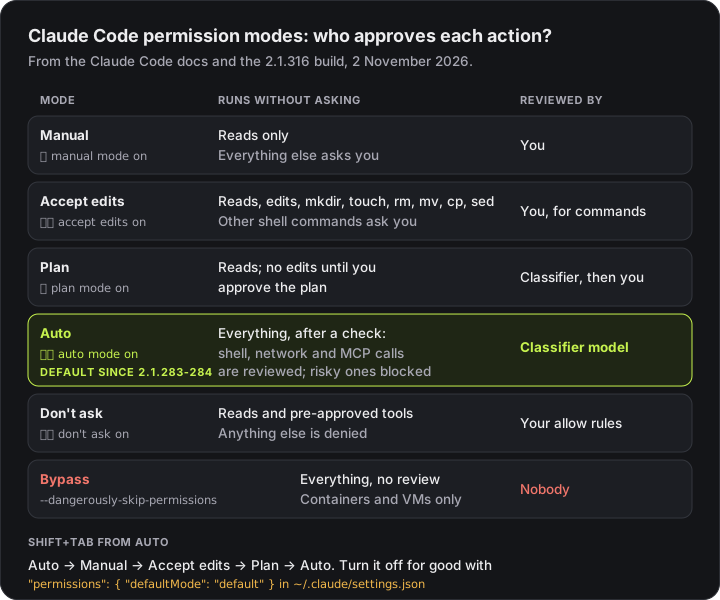
What is auto mode in Claude Code?
Auto mode is a permission mode in which a second model, the classifier, reviews Claude's actions in place of you. The first-run text in the 2.1.316 build puts it plainly: "Auto mode lets Claude handle permission prompts automatically. Claude checks each tool call for risky actions and prompt injection before executing, runs the ones it assesses as lower-risk, and blocks the rest."
In practice each action goes through a fixed order:
- Your rules first. Anything your
allow,askordenyrules match resolves straight away, with a few exceptions such as dangerousrmpaths. - Reads and edits in your project run. Read-only actions and file edits inside your working directory don't go to the classifier.
- Everything else goes to the classifier. Shell commands, network requests, MCP tools and subagents are reviewed before they run.
- A block comes back as a reason. Claude receives the rule that blocked it, tries a safer approach, and the call is listed in
/permissionsunder Recently denied, whererretries it with your manual approval.
The status bar shows ⏵⏵ auto mode on while it's active. Auto mode also nudges Claude to keep working instead of stopping for clarifying questions, which is the most visible change from Manual.
Why did Claude Code start in auto mode?
Because auto mode is now the built-in starting mode. From Claude Code 2.1.283, the docs say interactive terminal and VS Code sessions start in auto mode on every plan and provider when nothing else picks a mode. The changelog rolled it out in two steps: 2.1.283 for third-party providers and telemetry-off sessions, then 2.1.284 for everyone. Before that, auto was the starting mode only on Pro, Max, Ultra and Team plans in sessions that fetched feature flags, per the permission modes docs.
The first session that starts this way shows a one-time notice. In the terminal it appears once at the top of the session:
Auto mode is now Claude Code's default permission mode.In the VS Code extension it's a card on the new-conversation screen that stays until you dismiss it. If you had already set another defaultMode in ~/.claude/settings.json, nothing changes: your sessions keep starting in that mode, and on Pro, Max, Ultra and Team plans Claude Code asks you once whether to switch: "Make auto mode your default permission mode?"
Claude Code picks the starting mode from the first of these that applies:
- A
--permission-modeflag, or--dangerously-skip-permissions permissions.defaultModein a settings file- The built-in default, which is now
autofor interactive sessions
Two exceptions keep the old behaviour. claude -p and Agent SDK runs start in Manual mode (from 2.1.302), so scripts don't silently get a classifier. And if any settings file sets disableAutoMode to "disable", or the session can't use auto mode, it starts in Manual.
How do I turn off auto mode in Claude Code?
Press Shift+Tab once to leave auto mode for the current session. To stop every session starting in it, set "permissions": { "defaultMode": "default" } in ~/.claude/settings.json. For one launch, run claude --permission-mode default. Admins can remove it for everyone with disableAutoMode.
For this session: press Shift+Tab
From auto mode, the first press of Shift+Tab switches to Manual, shown as a gray ⏸ manual mode on. Further presses cycle Manual, accept edits and plan mode, then back to auto. In VS Code, click the mode indicator under the prompt box; in the desktop app, use the mode selector.
For every session on your machine: set defaultMode
Add this to ~/.claude/settings.json:
{
  "permissions": {
    "defaultMode": "default"
  }
}
default is the config name for Manual mode, and Claude Code accepts "manual" as an alias. The next session starts with ⏸ manual mode on. If you'd rather start in accept edits or plan mode, use "acceptEdits" or "plan" instead. A project's .claude/settings.json can set default, acceptEdits, plan or dontAsk for that project only, and it outranks your user file: a project that sets default overrides an auto in your user file, but a project can't set auto itself.
For one launch: use the flag
claude --permission-mode defaultIn the VS Code extension
The extension has its own setting. Set claudeCode.initialPermissionMode in your VS Code user settings to default, acceptEdits, plan or bypassPermissions. It never reads a project's .claude/settings.json for the starting mode, and it remembers the mode you last picked from the indicator, so picking Manual once also sticks.
For a whole organization
Set "permissions": { "disableAutoMode": "disable" } in managed settings. That removes auto from the Shift+Tab cycle, makes --permission-mode auto start in Manual, and switches a running auto session out with the message auto mode disabled by settings. Setting defaultMode in managed settings instead changes where sessions start while still letting people choose auto.
How do I turn auto mode on, or make it my default?
On 2.1.283 or later (2.1.284 for every account) auto is already your starting mode, unless a --permission-mode flag or a permissions.defaultMode setting picks another. Otherwise:
- Right now: press
Shift+Tabuntil the status bar shows⏵⏵ auto mode on. Auto only appears in the cycle when it's available to your session. - From a permission prompt: in Manual and accept edits, a Bash permission prompt offers Yes, and switch to auto mode (2.1.247 or later).
- After a plan: approving a plan offers Yes, and use auto mode.
- For one launch:
claude --permission-mode auto. This is also how to get auto mode inclaude -p. - As your default:
"defaultMode": "auto"underpermissionsin~/.claude/settings.json.
That last one has a trap. "auto" has no effect in a project's .claude/settings.json or .claude/settings.local.json; Claude Code ignores it there and falls back to the built-in default. If you set auto and your sessions still start in Manual with no error, that's almost always why. Move it to the user file. In VS Code, claudeCode.initialPermissionMode doesn't accept auto either: leave it unset and pick Auto from the mode indicator once.
How is auto mode different from accept edits, plan mode and bypass permissions?
Auto mode is the only mode that runs shell commands without asking while a classifier model still reviews them. Accept edits only skips edit and basic file-command prompts, plan mode blocks edits until you approve a plan, and bypass permissions skips review entirely.
| Mode | Status bar | Runs without asking | Best for |
|---|---|---|---|
Manual (default) | ⏸ manual mode on | Reads only | Sensitive work, reviewing every step |
Accept edits (acceptEdits) | ⏵⏵ accept edits on | Reads, file edits, and mkdir, touch, rm, mv, cp, sed inside the project | Iterating on code you review with git diff |
Plan (plan) | ⏸ plan mode on | Reads, plus classifier-approved commands when auto mode is available; no edits until you approve the plan | Exploring before changing anything |
Auto (auto) | ⏵⏵ auto mode on | Everything, after the classifier reviews risky actions | Long tasks without prompt fatigue |
Don't ask (dontAsk) | ⏵⏵ don't ask on | Reads plus pre-approved tools; anything else is denied | CI and scripts |
Bypass (bypassPermissions) | ⏵⏵ bypass permissions on | Everything, no review | Isolated containers and VMs only |
Auto mode vs accept edits. Accept edits saves you the edit prompts but still stops for every other shell command, so a test run or a git command asks. Auto mode stops asking for those too and puts the classifier in your place. If what bothers you is only the edit prompts, accept edits is the smaller change.
Auto mode vs plan mode. They work together rather than compete. Plan mode keeps Claude from editing until you approve a plan; with auto mode available, its exploration commands go through the classifier instead of prompting. Approving the plan with Yes, and use auto mode carries on in auto.
Auto mode vs bypass permissions (--dangerously-skip-permissions). Both remove the prompts. Bypass removes the checks too: every action runs immediately, which is why Anthropic says to use it only in containers and VMs, and why on Linux and macOS it refuses to start as root. Auto mode keeps a reviewer. Deny rules apply in both. If you were reaching for --dangerously-skip-permissions to stop the interruptions, auto mode is usually the better trade; the sandbox and Docker guide covers when you really do need bypass.
What does auto mode block, and what does it allow?
Out of the box the classifier trusts your working directory and the git remotes configured when the session started, and treats everything else as external. Among many others, it blocks by default:
- Downloading and running code, like
curl | bash - Production deploys and migrations, and
terraform destroy git push --force, andgit reset --hard,git clean -fdorgit checkout -- .that would discard uncommitted work- Sending secrets or sensitive data to outside endpoints, or printing a live token into the transcript
- Deleting files that existed before the session, and mass deletes in cloud storage
- Starting another agent with
--dangerously-skip-permissions
It allows local file work in your project, installing dependencies your lock files declare, read-only HTTP requests, and pushing to any branch of the repository you're in, apart from deploy branches like production or gh-pages. claude auto-mode defaults prints the full rule lists as JSON.
Three behaviors catch people out:
- Broad allow rules are dropped while you're in auto mode.
Bash(*), wildcard interpreters likeBash(python*), package-manager run commands andAgentrules are set aside on entering auto mode and restored when you leave. Narrow rules likeBash(npm test)stay. - What you say in the conversation counts. "Don't push" becomes a block until you lift it. But those boundaries aren't stored as rules, and compaction can drop the message that set them. For a hard limit, write a deny rule.
- Repeated blocks pause it. Three blocks in a row or 20 in a session and auto mode pauses and Claude Code goes back to prompting; approving the prompted action resumes it. The thresholds aren't configurable.
Why is auto mode unavailable, missing or not working?
When auto mode can't run, it disappears from the Shift+Tab cycle and sessions that would start in it start in Manual instead. The status line names the reason. These are the exact messages in the 2.1.316 build:
| Message | What it means | What to do |
|---|---|---|
auto mode disabled by settings | A settings file sets disableAutoMode to "disable", usually your organization's managed settings | Ask your admin; you can't override managed settings locally |
auto mode is unavailable for your plan | Despite the wording, this is the circuit-breaker case: Anthropic or the server has turned auto mode off for this session. Auto mode itself is on all plans | Start a new session later; it stays off until the session ends |
auto mode unavailable for this model | Your model doesn't support auto mode | Switch with /model. On the Anthropic API that means Opus 4.6+, Sonnet 4.6+, Haiku 5.5 or a Fable model; on Bedrock, Agent Platform and Foundry, Sonnet 5+, Opus 4.7+, Haiku 5.5 or Fable, per the permission modes docs |
auto mode unavailable while fast mode is on · run /fast off | Fast mode and auto mode don't run together | Run /fast off |
auto mode is unavailable right now | No specific reason was recorded | Start a new session; check the items above |
Two other cases look like "auto mode isn't working" but aren't on that list:
- It's set but sessions start in Manual, with no message.
"defaultMode": "auto"is in a project settings file, where it's ignored. Move it to~/.claude/settings.json. - Auto mode is on but blocks everything, even
pwd. That's the safety check failing to answer, not the mode being off. Messages likeAuto mode is unavailable — the server returned no safety verdictand "cannot determine the safety of" belong here, and Claude Code auto mode "gave no verdict" walks through the fixes. My error page for the same message has the short version.
If auto mode disappeared after an update, check whether you're on a model it supports, and run /status: the Auto mode server row shows whether the server is reviewing your session's actions.
Does auto mode use more tokens or cost more?
It depends on your account. Each check Claude Code sends to the classifier includes part of the transcript plus the pending action, and the default classifier model is Claude Sonnet 5, whatever model you chose with /model.
- Pro, Max, Ultra and Team plans: no separate classifier charge is listed for these plans, and the billing notice about classifier requests never appears on them.
- Enterprise, the Claude API, Claude Platform on AWS, Bedrock, Agent Platform and Foundry: Claude Code's own classifier calls count toward your token usage.
- Server-side review: where the server checks actions as part of your normal model request, there are no separate classifier calls at all.
/statusshowsAuto mode server: Enabledwhen that's happening.
Reads and edits inside your project skip the classifier, so the overhead comes mostly from shell commands and network calls. If you saw "We're changing auto mode to no longer charge for classifier requests" followed by "this session isn't eligible", that's a gateway issue covered in auto mode classifier billing. For a model-by-model cost estimate, the LLM cost calculator does the arithmetic.
How do I stop auto mode blocking safe commands?
Run /auto-mode-setup, or list what you trust in autoMode.environment. Most false blocks come from the classifier not knowing what you trust: your company's buckets, internal registries, deploy hosts. Two ways to tell it:
/auto-mode-setupreads your project and recent sessions and drafts environment entries for you to review before saving. From 2.1.304 it also works on Bedrock, Vertex, Foundry, the Claude apps gateway and telemetry-off sessions.autoModesettings:autoMode.environmentlists trusted infrastructure, andautoMode.allowadds exceptions to the block rules. Include"$defaults"in anallowlist you write, or you replace the built-in exceptions instead of adding to them. Anthropic's auto mode configuration guide has the full format.
To keep a human checkpoint inside auto mode, for example before every git push, add a permissions.ask rule such as Bash(git push *). Ask rules still prompt in auto mode. My Claude Code settings builder writes the permissions block, including defaultMode and ask rules, without hand-editing JSON.
Is Claude Code auto mode safe?
Safer than skipping permissions, and not a guarantee. Anthropic's own docs put it in a warning: auto mode "reduces permission prompts but does not guarantee safety." The classifier never sees tool results in Claude Code's own classifier requests, so a hostile web page can't talk to it directly, and a separate server-side probe flags suspicious tool results before Claude reads them. But it makes judgment calls, and boundaries you state in chat can be compacted away.
The practical setup: let auto mode handle the routine prompts, keep deny rules for anything that must never happen, add ask rules for steps you want to see, and commit before long runs. For unattended work, put a sandbox or container around it. And if it's already too late, Claude Code deleted my files covers what you can get back.
What changed in auto mode recently?
| Version | Change |
|---|---|
| 2.1.316 | An autoMode.allow list without "$defaults" no longer removes the built-in rule on scheduled-task prompts |
| 2.1.314 | Blocked-call messages name the command, say Claude may retry, and point to /permissions |
| 2.1.304 | /auto-mode-setup added for Bedrock, Vertex, Foundry, Claude apps gateway and telemetry-off sessions |
| 2.1.302 | claude -p and Agent SDK runs with no mode set start in Manual; CLAUDE_CODE_AUTO_MODE_MODEL chooses the client-side classifier model |
| 2.1.288 | A conversation too long for the client-side classifier is compacted instead of failing every check |
| 2.1.285 | The one-time "make auto mode your default" offer also shows on third-party providers and with telemetry off |
| 2.1.284 | Interactive terminal and VS Code sessions start in auto mode on every plan and provider |
| 2.1.283 | Interactive sessions on third-party providers or with telemetry off start in auto mode |
| 2.1.278 | /status gains an Auto mode server row |
| 2.1.247 | Bash permission prompts offer Yes, and switch to auto mode |
Key takeaways
- Auto mode lets a classifier model approve Claude's actions instead of you. Reads and edits in your project run directly; shell commands, network calls and MCP tools are reviewed first.
- Since Claude Code 2.1.283 (2.1.284 for every account) it is the starting mode for interactive terminal and VS Code sessions, which is why you saw 'Auto mode is now Claude Code's default permission mode.'
- To turn it off: Shift+Tab once for this session, or "permissions": { "defaultMode": "default" } in ~/.claude/settings.json for every session. VS Code uses claudeCode.initialPermissionMode.
- "defaultMode": "auto" only works in ~/.claude/settings.json or managed settings; in a project's .claude/settings.json it is ignored.
- 'auto mode is unavailable for your plan' is the circuit-breaker message, not a plan limit: auto mode is on all plans. Start a new session later.
- Auto mode is not a sandbox. Keep deny rules for hard limits and run unattended work in a container.
FAQ
Frequently asked questions
What is auto mode in Claude Code?
Auto mode is a permission mode in which a second model, the classifier, reviews Claude's actions instead of asking you. Reads and file edits inside your project run straight away, and shell commands, network calls and other actions go to the classifier, which blocks anything that goes beyond your request, targets infrastructure it doesn't recognize, or looks driven by content Claude read. The status bar shows ⏵⏵ auto mode on.
Why did Claude Code start in auto mode?
Because auto mode became the built-in starting permission mode. From Claude Code 2.1.283 (2.1.284 for every account, per the changelog), interactive terminal and VS Code sessions start in auto mode on every plan and provider when nothing else sets a permission mode, and the first such session shows 'Auto mode is now Claude Code's default permission mode.' A --permission-mode flag or permissions.defaultMode in your settings still overrides it.
How do I turn off auto mode in Claude Code?
For the current session, press Shift+Tab once: from auto mode the first press switches to Manual. For every session on your machine, add "permissions": { "defaultMode": "default" } to ~/.claude/settings.json (manual is accepted as an alias). For one launch, run claude --permission-mode default. In the VS Code extension, set claudeCode.initialPermissionMode. To remove auto mode for a whole organization, set permissions.disableAutoMode to "disable" in managed settings.
How do I make auto mode my default in Claude Code?
On 2.1.283 or later (2.1.284 for every account) it already is, unless a settings file or flag picks another mode. To pin it, set "defaultMode": "auto" under permissions in ~/.claude/settings.json. The value has no effect in a project's .claude/settings.json or .claude/settings.local.json, which is the usual reason a session still starts in Manual. For a single run, pass claude --permission-mode auto.
What is the difference between auto mode and accept edits?
Accept edits only auto-approves file edits and the filesystem commands mkdir, touch, rm, mv, cp and sed inside your project; every other shell command still asks you. Auto mode runs everything without a prompt, but a classifier model reviews shell commands, network calls and other risky actions first and blocks the ones it judges unsafe.
What is the difference between auto mode and --dangerously-skip-permissions?
--dangerously-skip-permissions starts bypassPermissions mode, which runs every action with no review at all and is meant for containers and VMs. Auto mode also runs without prompts, but each risky action is checked by a classifier first, and blocked actions show up in /permissions under Recently denied. Deny rules apply in both.
Why does Claude Code say auto mode is unavailable for your plan?
Despite the wording, auto mode is available on all plans. In the 2.1.316 build, 'auto mode is unavailable for your plan' is the message for the circuit-breaker case: Anthropic or the server has turned auto mode off for the session. That lasts until the session ends, so start a new session later. Other messages name other causes: 'auto mode disabled by settings', 'auto mode unavailable for this model' and 'auto mode unavailable while fast mode is on · run /fast off'.
Does auto mode use more tokens?
Only on some accounts. On Enterprise, the Claude API, Claude Platform on AWS, Bedrock, Agent Platform and Foundry, each classifier check Claude Code sends counts toward token usage, because it sends part of the transcript plus the pending action. On Pro, Max, Ultra and Team the docs list no classifier charges. Where the server reviews actions as part of the normal model request, there are no separate classifier calls. Reads and edits in your project skip the classifier, so the extra cost comes mostly from shell commands.
Is Claude Code auto mode safe?
Safer than skipping permissions, not a guarantee. Anthropic's docs say auto mode "reduces permission prompts but does not guarantee safety." It blocks things like curl | bash, force pushes, production deploys and git reset --hard by default, but it reads boundaries from the conversation, which compaction can drop. For a hard limit, add a deny rule; for unattended runs, add a sandbox or container.
Auto mode is one corner of a bigger picture: the full list of Claude Code errors and fixes covers the rest, and the plan mode guide pairs well with this one. Setting up coding agents so teams can run them with fewer prompts and no surprises is part of the work I do: see recent projects.
References
- Choose a permission mode (Claude Code docs)code.claude.com · accessed 2026-11-02
- Configure auto mode (Claude Code docs)code.claude.com · accessed 2026-11-02
- Auto mode classifier billing (Claude Code docs)code.claude.com · accessed 2026-11-02
- Configure permissions (Claude Code docs)code.claude.com · accessed 2026-11-02
- Claude Code changelog (2.1.247 to 2.1.316)github.com · accessed 2026-11-02
- @anthropic-ai/claude-code-win32-x64 2.1.316 (npm)npmjs.com · accessed 2026-11-02
Last reviewed November 2, 2026

Tahir Nazir
Senior AI Engineer & Full-Stack Lead
5+ years shipping AI-powered products — RAG pipelines, agentic workflows, and MCP tooling. Top Rated on Upwork with a 100% job success score.
More about Tahir →Keep reading
New posts land here first. Follow along by RSS, or get in touch if you are building something similar.
Related articles
Claude Code 'Auto Mode Check Unavailable' or 'Classifier Unavailable'? 4 Fixes
Bash, Edit and MCP calls all refused while Read still works. The auto mode safety check failed, not your command. What the error means, why it stops after ten, and four fixes from Anthropic's own docs.TroubleshootingAI Engineering15 min readClaude Code Auto Mode Classifier Billing: Why 'This Session Isn't Eligible'
Claude Code now says auto mode will stop charging for classifier requests, then tells you your session isn't eligible. Nothing is broken, but you may be paying for safety checks other people get free. Who is billed, why a gateway is usually the cause, and the fix.TroubleshootingAI Engineering14 min readClaude Code Sandbox: How to Set It Up on macOS, Linux, Windows and Docker (Tested)
How to sandbox Claude Code: turn on the built-in Bash sandbox with /sandbox, what it does and doesn't isolate, why it doesn't run on native Windows, and how to run Claude Code in Docker for --dangerously-skip-permissions. Includes a test showing the built-in sandbox can't start in a default Docker container.How-toAI Engineering20 min read