Codex Crashpad 'pending' Eating Your Mac's Disk? Check, Clean and Stop It
Codex Desktop can write a crash dump every second into Crashpad/pending, and people have lost 59, 168, 323 and even 511 GB to it. Why the loop happens, how to check both folders, how to clean them safely, and what actually stops it.
 Tahir Nazir11 min read
If your Mac's disk is suddenly full and you use OpenAI's Codex desktop app (current builds ship as the unified ChatGPT desktop app, bundle ID com.openai.codex), check its Crashpad/pending folder. Its Chromium crash handler, browser_crashpad_handler, can get stuck writing a dump into it about once a second, roughly 15 GB a day, and nothing ever cleans it up. Quit the app, move the Crashpad folder to the Trash, then update macOS and the app so it doesn't come back.
The bug has been open on GitHub since June as openai/codex #25921, and it reached Hacker News in October 2026 with over 120 points. The numbers people report are not small: 59 GB, 114 GB, 168 GB, a combined 323 GB across 4 million files, and in one case 511 GB. The app keeps working the whole time, so most people only find it when the disk hits zero.
Where is the Codex Crashpad folder on a Mac?
Depending on your app build, the dumps go into one of two folders, and some Macs have both. In Finder, press Shift-Command-G and paste a path to open it:
~/Library/Application Support/Codex/Crashpad/pending
~/Library/Application Support/com.openai.codex/web/Crashpad/pending
In Terminal, this shows how much space each one is using:
for d in "$HOME/Library/Application Support/Codex/Crashpad" \
         "$HOME/Library/Application Support/com.openai.codex/web/Crashpad"; do
  [ -d "$d" ] && du -sh "$d"
done
To see whether it's still actively growing, count the dumps written in the last minute. Around 60 means the loop is running right now:
find "$HOME/Library/Application Support/Codex/Crashpad/pending" \
  -maxdepth 1 -name '*.dmp' -mmin -1 | wc -l
Run it against the com.openai.codex/web/Crashpad/pending path too if that's the one you have. With millions of files, these commands can take a while; one reporter noted that even listing the folder timed out.
I'm on Windows, so I haven't run these on a Mac myself. They're built from the commands reporters used in the GitHub issues. The Windows check further down is one I did run.
What the files look like
The folder fills with pairs: a .dmp minidump of about 181 KB and a tiny _sidecar.json. Open the crash report macOS keeps for browser_crashpad_handler, or the text inside a dump, and you'll see the same error every time:
[FATAL:third_party/crashpad/crashpad/handler/mac/exception_handler_server.cc:76]
Check failed: kr == KERN_SUCCESS.
mach_port_request_notification: (os/kern) invalid capability (20)
If you see invalid capability (20) from exception_handler_server.cc:76, you have the Codex Crashpad loop described below.
Why is Codex Crashpad pending so big?
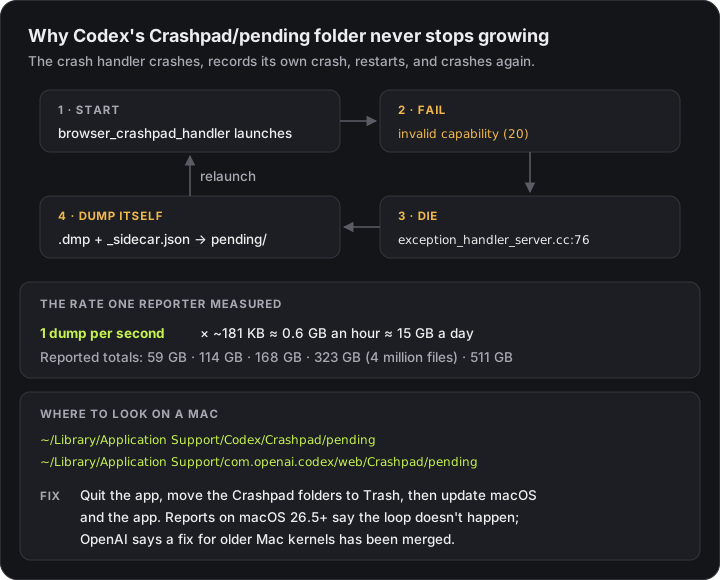
Codex Desktop is built on Chromium, which uses a small helper process, the crash handler, to write a report whenever something crashes. One reporter in the issue traced the dumps and found that the dumps they inspected were all of the crash handler itself, not of Codex:
browser_crashpad_handlerstarts and asks macOS for a notification port.- macOS refuses with
invalid capability (20), and the handler stops on a failed check. - The handler watches itself, so its own crash is written to
pendingas a new dump. - It's relaunched, fails the same check, and the loop starts again.
They measured about one dump per second, roughly 0.6 GB an hour. Because nothing in the app prunes pending, the folder only ever grows. Another commenter pointed out that Crashpad ships with a pruning mechanism the app doesn't appear to use.
The same crash-handler error isn't unique to Codex. Claude Desktop hit the identical mach_port_request_notification failure on macOS Tahoe 26.3.1 in March (anthropics/claude-code #37230), and a VS Code issue shows the same error in its terminal. In Codex's case it turns into a disk problem because the reports pile up instead of being removed.
There's a second symptom once the folder is huge: one reporter found the app itself started crashing about a minute after launch, running out of memory as it dealt with the backlog. If Codex won't stay open, clean the folder first.
Is it safe to delete Codex Crashpad pending?
The dumps are crash reports, not your projects, settings or conversations, so removing them is safe. Do it carefully, though. These commands are written for Terminal, and none of them deletes anything outright:
1. Quit the app with ⌘Q. On current builds it's the ChatGPT app; older ones are called Codex.
2. Stop a leftover crash handler. In the original report, two crash-handler processes were running on their own, detached from the app. After quitting, list any that are left:
pgrep -fl browser_crashpad_handlerEach line starts with a process ID. Stop only the ones whose path is inside the Codex or ChatGPT app (it contains Codex.app, ChatGPT.app or Codex Framework), one at a time:
kill 12345 # the process ID from the line above3. Move the Crashpad folders to the Trash. Moving a folder within the same disk is instant, even with millions of files inside:
cd "$HOME/Library/Application Support" || exit
[ -d "Codex/Crashpad" ] && mv "Codex/Crashpad" "$HOME/.Trash/Codex-Crashpad-$(date +%s)"
[ -d "com.openai.codex/web/Crashpad" ] && mv "com.openai.codex/web/Crashpad" "$HOME/.Trash/codex-web-Crashpad-$(date +%s)"
If Terminal says Operation not permitted, macOS is protecting the Trash from it. Open the folder in Finder (Shift-Command-G, paste the path) and drag the Crashpad folder to the Trash instead.
4. Empty the Trash. With millions of small files this can take a long time, but space comes back as it goes. One reporter went from 1.4 GB free to more than 50 GB within minutes.
Don't delete the whole ~/Library/Application Support/Codex folder unless you want a full reset of the app. Only the Crashpad folder is the problem, and Chromium-based apps normally recreate it on their own when they next need it.
5. Reopen the app and check again after a few minutes with the find … -mmin -1 command above. If new dumps are still arriving every second, the loop is still running, and the next section is what stops it.
How do I stop Codex Crashpad dumps coming back?
Update macOS. An OpenAI contributor said on October 6, on a related issue that reported 511 GB: "This seems to be an issue for older mac kernels. A fix has been merged and will be released soon." The reports line up with that. Every affected Mac I found in the threads was on macOS 15.x or Tahoe 26.0–26.3, while people on 26.5 and 26.6.2 said it doesn't happen to them. That's a pattern from user reports, not an official version boundary.
Update the app. As of October 18 the fix isn't mentioned in OpenAI's changelog, and one person still saw the loop on app build 26.1007 with macOS 15.7.4. Keep the app updated and re-check the folder after each update.
If you can't update yet, use a brake. People in the issue used two stopgaps:
- A scheduled cleanup that empties
pendingevery 15 minutes, so it never gets big. - Making
pendingread-only, so the handler can't write there at all:
# run after the app has recreated the pending folder
for d in "$HOME/Library/Application Support/Codex/Crashpad/pending" \
         "$HOME/Library/Application Support/com.openai.codex/web/Crashpad/pending"; do
  [ -d "$d" ] && chmod a-w "$d"
done
# undo later, once you're on a fixed version: the same loop with chmod u+w
Reporters said the read-only trick stopped the disk growth, though the handler keeps crashing in the background. It also stops genuine crash reports, which is the signal OpenAI needs to fix crashes. Treat it as temporary and undo it after updating.
On Windows
Every report I found is from macOS. The failing check lives in Crashpad's Mac exception handler, so I wouldn't expect the same loop on Windows.
I checked on my own Windows 11 machine, which has Codex 26.1013 installed from the Microsoft Store. Its crash reports live under the app's package folder, and there is no pending folder at all, just reports and attachments:
%LOCALAPPDATA%\Packages\OpenAI.Codex_<id>\LocalCache\Roaming\Codex\web\Codex\CrashpadThis PowerShell one-liner shows how much it holds:
$c = @(Get-ChildItem "$env:LOCALAPPDATA\Packages\OpenAI.Codex_*\LocalCache\Roaming\Codex\web\Codex\Crashpad" -Recurse -File -ErrorAction SilentlyContinue)
"{0} files, {1:N1} MB" -f $c.Count, (($c | Measure-Object Length -Sum).Sum / 1MB)
On my machine it printed 0 files, 0.0 MB. If your Windows disk is filling up, look elsewhere first, such as build artifacts in agent worktrees, which came up a lot in the Hacker News thread.
Quick reference
| Question | Answer |
|---|---|
| Which folder? | ~/Library/Application Support/Codex/Crashpad and/or …/com.openai.codex/web/Crashpad |
| Is it the bug? | .dmp + _sidecar.json pairs, ~181 KB each, error invalid capability (20) |
| Still growing? | find … -name '*.dmp' -mmin -1 | wc -l returns around 60 |
| Safe to remove? | Yes, quit the app first and move only the Crashpad folder to the Trash |
| Permanent fix | Update macOS (26.5+ reported fine) and the app (fix merged, per OpenAI) |
| Can't update yet? | Scheduled cleanup, or make pending read-only temporarily |
| Windows? | Not reported; Codex keeps reports and attachments, no pending |
Key takeaways
- Codex Desktop's crash handler can crash-loop on some Macs, writing a dump of itself into Crashpad/pending about once a second, roughly 15 GB a day, with reports of up to 511 GB.
- Check both ~/Library/Application Support/Codex/Crashpad and ~/Library/Application Support/com.openai.codex/web/Crashpad; the error inside is mach_port_request_notification: (os/kern) invalid capability (20).
- Quit the app, stop any leftover browser_crashpad_handler, move the Crashpad folders to the Trash and empty it. Your projects and settings aren't in there.
- OpenAI says a fix for older Mac kernels is merged; reports from macOS 26.5 and 26.6.2 say the loop doesn't happen. Update both, and re-check after each update.
- On Windows, Codex keeps crash reports in its Store package folder with no pending folder, and I found it empty on my machine.
Frequently asked questions
Why is Codex's Crashpad pending folder so big?
On some Macs, the Codex desktop app's crash handler, browser_crashpad_handler, crashes as soon as it starts with 'mach_port_request_notification: (os/kern) invalid capability (20)'. It monitors itself, so each crash writes a minidump of the handler into Crashpad/pending, then the handler restarts and crashes again. One reporter measured one dump per second at about 181 KB each, roughly 15 GB a day, and nothing cleans the folder up. Reported totals range from tens of gigabytes to 511 GB.
Where is the Codex Crashpad folder on a Mac?
Depending on the app build, it's ~/Library/Application Support/Codex/Crashpad or ~/Library/Application Support/com.openai.codex/web/Crashpad, and the dumps pile up in the pending folder inside. Some people have both. Check both with du -sh, or in Finder press Shift-Command-G and paste the path.
Why is Codex taking up so much disk space on my Mac?
Usually it's the crash-report folder: ~/Library/Application Support/Codex/Crashpad/pending, or com.openai.codex/web/Crashpad/pending on some builds, which a crash-handler loop can fill at about 15 GB a day. Check it with du -sh. If it isn't large, look at build artifacts in agent worktrees, which came up often among developers on Hacker News.
Is it safe to delete Codex Crashpad pending files?
Yes. They are crash reports, not your projects, settings or conversations. Quit the Codex or ChatGPT desktop app first, then move the Crashpad folder to the Trash rather than deleting your whole Application Support folder. People in the GitHub issue reclaimed their disk space this way.
How do I stop Codex Crashpad dumps from coming back?
Update macOS and the app. OpenAI said on October 6, 2026 that a fix for older Mac kernels had been merged and would be released soon, and reports from Macs on macOS 26.5 and 26.6.2 say the loop doesn't happen there. Until then, check whether pending is still growing after a cleanup. Making the pending folder read-only stops it immediately, but also stops real crash reports, so treat that as a temporary brake.
Does the Codex Crashpad bug affect Windows?
Every report I found is from macOS, because the failing check is in Crashpad's Mac exception handler. On Windows, Codex keeps its crash reports under AppData\Local\Packages\OpenAI.Codex_...\LocalCache\Roaming\Codex\web\Codex\Crashpad, with reports and attachments folders and no pending folder. On my Windows machine with Codex 26.1013 it was empty.
Desktop AI apps are now big, always-running pieces of software on developer machines, and they fail in ways the agent itself can't see, as the SneakPeek preview-pane flaw in Claude Desktop showed. If it's your coding agent that's slow or eating memory rather than disk, see Claude Code slow, hanging or eating memory. I help teams roll out AI coding tools on company machines. See recent projects.
References
- Codex Desktop continuously generates Crashpad pending dumps (openai/codex #25921)github.com · accessed 2026-10-18
- browser_crashpad_handler crash-loops once per second, 511 GB of minidumps (openai/codex #47466)github.com · accessed 2026-10-18
- macOS desktop: Crashpad/pending reached 168 GB (openai/codex #52194)github.com · accessed 2026-10-18
- Crashpad folder grows to 50GB+ with no cleanup (openai/codex #30335)github.com · accessed 2026-10-18
- Claude Desktop crashes on macOS Tahoe 26.3.1: Crashpad mach_port_request_notification failure (anthropics/claude-code #37230)github.com · accessed 2026-10-18
- Integrated terminal freezes after Crashpad fatal error on macOS (microsoft/vscode #282433)github.com · accessed 2026-10-18
- Hacker News discussion: Codex Desktop continuously generates Crashpad pending dumpsnews.ycombinator.com · accessed 2026-10-18
- Codex changeloglearn.chatgpt.com · accessed 2026-10-18
Last reviewed October 18, 2026

Tahir Nazir
Senior AI Engineer & Full-Stack Lead
5+ years shipping AI-powered products — RAG pipelines, agentic workflows, and MCP tooling. Top Rated on Upwork with a 100% job success score.
More about Tahir →Keep reading
New posts land here first. Follow along by RSS, or get in touch if you are building something similar.
Related articles
Claude SneakPeek Vulnerability: Is Your Claude Desktop Patched?
SneakPeek let a booby-trapped HTML file steal SSH keys and cloud credentials through Claude Code Desktop's preview pane. It was fixed in August in Claude Desktop 1.30096.1. Here's a one-line check I tested on Windows, and why it has nothing to do with the claude-sneakpeek tool.TroubleshootingAI Engineering11 min readClaude Code 'Autocompact Is Thrashing', Slow or Hanging? Start With the Silent Failures
High CPU, frozen commands and missing search results usually trace to a handful of specific causes — a thrashing auto-compact loop, a bundled ripgrep that won't run, or WSL quietly returning fewer matches while claude doctor reports everything as OK.TroubleshootingAI Engineering9 min readWinError 10013 and EACCES on Windows: The Port Isn't in Use, It's Reserved
Your port is free, netstat shows nothing on it, and Windows still refuses it with 'forbidden by its access permissions'. I reproduced it in Node and Python: the port sits in a range Windows has reserved, and here's how to see the list and get the port back.TroubleshootingWeb Development13 min read