Claude SneakPeek Vulnerability: Is Your Claude Desktop Patched?
SneakPeek let a booby-trapped HTML file steal SSH keys and cloud credentials through Claude Code Desktop's preview pane. It was fixed in August in Claude Desktop 1.30096.1. Here's a one-line check I tested on Windows, and why it has nothing to do with the claude-sneakpeek tool.
 Tahir Nazir11 min read
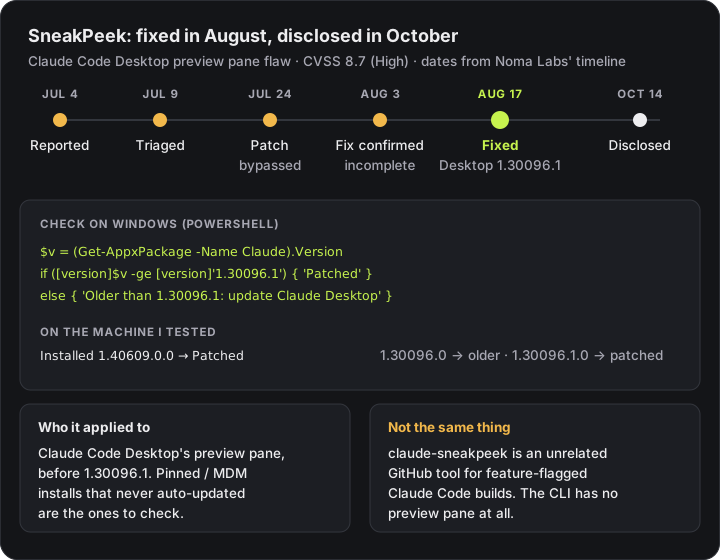
The Claude SneakPeek vulnerability was a high-severity flaw in Claude Code Desktop's HTML preview pane that let a booby-trapped HTML file over 256KB steal SSH keys and cloud credentials. It was fixed on August 17, 2026, in Claude Desktop 1.30096.1, and the app installs that update by itself. If your Claude Desktop version is 1.30096.1 or later, you're patched. On Windows you can confirm it with one PowerShell command, below. The people who need to act are those on pinned or managed installs that never updated, and anyone who previewed HTML from untrusted repos on an older build.
SneakPeek went public on October 14, 2026, when Noma Labs published its research and Dark Reading called it "a silent zero-click threat." Anthropic rated it CVSS 8.7, High. The headline is scary, but the fix had been out for two months by then.
How do I check my Claude Desktop version?
On Windows, Claude Desktop is installed as an app package, so PowerShell can read its version without opening the app. This prints the version and a plain verdict:
$v = (Get-AppxPackage -Name Claude).Version
if (-not $v) { 'Claude Desktop not found as an app package: check the version in the app instead' }
elseif ([version]$v -ge [version]'1.30096.1') { "Installed: $v - Patched for SneakPeek (1.30096.1 or later)" }
else { "Installed: $v - OLDER than 1.30096.1: update Claude Desktop" }
I ran it on my own Windows 11 machine:
Installed: 1.40609.0.0 - Patched for SneakPeek (1.30096.1 or later)If Claude Desktop wasn't installed as an app package, Get-AppxPackage finds nothing. Rather than failing with a confusing error, the first line catches that, and you should read the version from the app's About screen instead. I tested both branches.
I also checked the comparison at the edges, because comparing version numbers as text gets this wrong. [version] compares each number separately: 1.30096.0 reports as older, 1.30096.1.0 as patched, and 1.29999.9 as older.
If you only want the raw number, Get-AppxPackage -Name Claude on its own shows the Version field. It only reads package information, so it's safe to run on any machine.
On a Mac, open the Claude menu and choose About Claude. There's no Mac in front of me, so I haven't run that one myself.
Two things to watch:
- Relaunch after updating. An update can download while the old version keeps running, so confirm the version after a restart. Developers Digest's write-up makes the same point.
- The Claude Code CLI isn't the disclosed attack path: it has no preview pane.
claude --versionreports the CLI, not Desktop, and updating one doesn't update the other.
Is claude-sneakpeek the same as the SneakPeek vulnerability?
No. claude-sneakpeek is an unrelated open-source tool on GitHub that only shares the name. When I checked on October 15, 2026, it was Google's top result for "sneakpeek claude code", with more than 1,000 stars. In its own words, it gets you "a parallel build of Claude Code that unlocks feature-flagged capabilities like swarm mode."
The two have nothing to do with each other:
| SneakPeek (the vulnerability) | claude-sneakpeek (the tool) | |
|---|---|---|
| What it is | A security flaw, named by Noma Labs | A community install script on GitHub |
| Where | Claude Code Desktop's preview pane | A separate, patched copy of the Claude Code CLI |
| What to do | Make sure Desktop is 1.30096.1 or later | Not covered by this advisory; it's a separate install you chose |
If you installed the tool, this advisory doesn't change anything about it. If you came here about the vulnerability, the check above is what you need.
How did the SneakPeek attack work?
SneakPeek worked because HTML files over 256KB skipped the preview pane's script-blocking policy and request filter, so JavaScript inside them could read local credential files and send them out.
Claude Code Desktop shows a preview pane whenever Claude reads or edits an HTML file, so you can see the page straight away. That pane is a small built-in browser. Anthropic had locked it down with three layers: a policy that blocks scripts, an isolated origin so the page can't read local files, and a filter on the requests it can make.
Noma found a way past all three, using one detail: file size.
- Files under 256KB were shown in the locked-down way.
- Files over 256KB were written to a temporary file and opened from disk. That path didn't get the script-blocking policy, and the request filter wasn't active for a static file, so JavaScript inside could read other files on the machine.
Their demo was a normal-looking public repository with a test coverage report padded past 256KB. Big generated reports are common, so nothing looked odd. A developer clones the repo, asks Claude to look at the coverage report, the preview pane opens it, and the hidden script runs. According to Noma, it could read SSH private keys, AWS keys, npm and GitHub tokens, Kubernetes and Docker credentials and Claude's own login token, and send them out in the background.
Anthropic's first patch blocked those file reads from the page itself. Noma bypassed it by making the same request from a background worker, and the complete fix followed on August 17. That's why the safe version is the August one, not July's.
As of October 15, 2026, no CVE has been assigned. Noma said Anthropic is preparing a GitHub security advisory and has requested a CVE, as CSO Online reported.
Why didn't Claude Code's permission prompts stop SneakPeek?
Because the agent never did anything that needed permission.
Claude Code's safety controls, such as permission prompts, auto mode's classifier and deny rules for .env files, all control what the agent does. In SneakPeek the agent did nothing unusual. It read a file you asked it to read. The preview pane ran the code, as a side effect of showing you the file, inside the app itself.
So there was no prompt to approve and no tool call to block. Noma put it plainly: the victim "doesn't need to approve or grant Claude Desktop access to anything."
Two lessons follow, for any AI coding tool, not just this one:
- Anything that renders untrusted content is a door, whether that's a preview, a markdown viewer or an embedded browser. Agent permissions don't guard it.
- What's on your laptop is what can be stolen. The damage depended entirely on long-lived credentials sitting in your home folder.
If you ran an older version: what to do
An old version number is a reason to look, not proof that anything was taken. Exposure needed all three: a build older than 1.30096.1, a malicious HTML file over 256KB in a repo you didn't write, and Claude Code Desktop reading or editing it. That can happen during a broader task, not only when you name the file.
1. Update and relaunch Claude Desktop, then re-run the version check above.
2. Look for unusually large HTML files in repositories you cloned from strangers and worked on with Claude. Run these from inside the cloned repository's folder. They only list files; they don't open them in anything that could run a script:
Get-ChildItem -Recurse -Filter *.html -File | Where-Object { $_.Length -gt 256KB } |
Select-Object FullName, Lengthfind . -name '*.html' -size +256kI tested both against a dummy 300KB coverage.html and a tiny HTML file. Each listed the large one and ignored the small one. A hit isn't proof of an attack, because real coverage reports are often that big. Open anything suspicious in a plain text editor, never a browser.
3. If you can't rule it out, rotate what was on that machine: SSH keys, cloud access keys, npm and GitHub tokens, Kubernetes and Docker credentials, and your Claude login. Rotation takes minutes; an abused token can take weeks to trace.
4. Shrink what's there to steal. Noma's advice, via CSO: keep AI coding tools updated, keep long-lived credentials off developer machines, and use short-lived, scoped tokens wherever you can.
For IT teams: fleets where Claude Desktop is pinned through device management are the ones most likely to still be exposed, because auto-update fixed everyone else in August. Anthropic's macOS deployment guide says the app updates itself unless enterprise policy turns that off. General Analysis has a fleet-wide inventory and exposure-review guide.
Key takeaways
- The Claude SneakPeek vulnerability (CVSS 8.7) was fixed on August 17, 2026 in Claude Desktop 1.30096.1, delivered by auto-update, and disclosed on October 14.
- On Windows, Get-AppxPackage -Name Claude shows your version. Compare it as a [version], not as text: 1.30096.1 or later is patched.
- SneakPeek has nothing to do with claude-sneakpeek, an unrelated GitHub tool that unlocks feature-flagged Claude Code builds.
- The preview pane ran the attacker's script, not the agent, so permission prompts and deny rules couldn't see it.
- If you previewed untrusted HTML on an older build, scan for HTML files over 256KB and rotate long-lived credentials on that machine.
Frequently asked questions
What is the Claude SneakPeek vulnerability?
SneakPeek is a high-severity flaw (CVSS 8.7) in the preview pane of Claude Code Desktop, found by Noma Labs. An HTML file larger than 256KB, for example a fake test coverage report in a public repository, could run JavaScript when Claude previewed it and quietly send SSH keys, cloud credentials, npm and GitHub tokens and Claude's own login token to an attacker. Anthropic fixed it on August 17, 2026 in Claude Desktop 1.30096.1, and it was disclosed on October 14, 2026.
How do I check if my Claude Desktop is patched for SneakPeek?
Check that your Claude Desktop version is 1.30096.1 or later. On Windows, run Get-AppxPackage -Name Claude in PowerShell and read the Version field, or compare it with [version]$v -ge [version]'1.30096.1'. On a Mac, open the Claude menu and choose About Claude. If the app updates itself, as it does by default, you have very likely had the fix since August.
Is claude-sneakpeek the same as the SneakPeek vulnerability?
No. claude-sneakpeek is an unrelated open-source tool on GitHub that installs a separate, patched build of Claude Code to unlock feature-flagged capabilities such as swarm mode. SneakPeek is the name Noma Labs gave to a security flaw in Claude Code Desktop's preview pane. They only share a name.
Does SneakPeek affect the Claude Code CLI?
The disclosed attack ran through the preview pane of the Claude Code Desktop app, which renders HTML files in a built-in browser view. The Claude Code CLI in a terminal has no preview pane, so it is not the disclosed path. Updating the CLI does not update the Desktop app, so check the Desktop version separately if you use both.
What should I do if I used an older Claude Desktop version?
Update the app first. Then think about whether Claude Code Desktop read or edited HTML files from repositories you did not write while on a version older than 1.30096.1, including during a broader task where you never named the file. If you can't rule that out, rotate long-lived credentials on that machine, such as SSH keys, cloud access keys and npm or GitHub tokens, and prefer short-lived, scoped tokens from now on. An old version number on its own is not proof that anything was stolen.
Rolling out AI coding tools on company machines means thinking about what's on the laptop as much as what the agent can do. Corporate networks bring their own problems, such as Claude Code's SSL certificate errors behind inspection proxies, and every other error message is indexed in Claude Code not working? Every error and its fix. I help teams roll out Claude Code. See recent projects.
References
- SneakPeek: How the Preview Pane in Claude Code Desktop Can Exfiltrate Your Data — Noma Labsnoma.security · accessed 2026-10-15
- Anthropic 'SneakPeek' Flaw Is a Silent Zero-Click Threat — Dark Readingdarkreading.com · accessed 2026-10-15
- How Claude Code's 256KB blind spot put developers' secrets in the preview pane — CSO Onlinecsoonline.com · accessed 2026-10-15
- Claude Desktop SneakPeek: patch and exposure review — General Analysisgeneralanalysis.com · accessed 2026-10-15
- Deploy Claude Desktop for macOS — Claude Help Centersupport.claude.com · accessed 2026-10-15
- Claude Code Desktop SneakPeek Flaw: Fixed Version and What To Do — Developers Digestdevelopersdigest.tech · accessed 2026-10-15
- mikekelly/claude-sneakpeek — GitHubgithub.com · accessed 2026-10-15
Last reviewed October 15, 2026

Tahir Nazir
Senior AI Engineer & Full-Stack Lead
5+ years shipping AI-powered products — RAG pipelines, agentic workflows, and MCP tooling. Top Rated on Upwork with a 100% job success score.
More about Tahir →Keep reading
New posts land here first. Follow along by RSS, or get in touch if you are building something similar.
Related articles
Claude Code Not Working? Every Error and Its Fix
Every Claude Code error I've written up, grouped by what actually broke: network and enterprise setup, cost and context limits, or setup and tools. Find your exact message in the lookup table, get the one-line answer, then follow the link to the full fix.TroubleshootingAI Engineering13 min readClaude Code Auto Mode 'Gave No Verdict': Why Even pwd Gets Blocked
Bash, Edit and MCP calls all refused while Read still works. The auto mode safety check failed, not your command. What the error means, why it stops after ten, and four fixes from Anthropic's own docs.TroubleshootingAI Engineering12 min readClaude Code SSL Certificate Verification Failed: Fix It by Error Code
SSL certificate verification failed (UNABLE_TO_GET_ISSUER_CERT_LOCALLY) or Self-signed certificate detected (SELF_SIGNED_CERT_IN_CHAIN) behind Zscaler or any TLS-inspecting proxy. The error's advice is right — but Claude Code already reads your OS certificate store, so the order you apply it in decides whether it works.TroubleshootingAI Engineering18 min read