WinError 10013 and EACCES on Windows: The Port Isn't in Use, It's Reserved
Your port is free, netstat shows nothing on it, and Windows still refuses it with 'forbidden by its access permissions'. I reproduced it in Node and Python: the port sits in a range Windows has reserved, and here's how to see the list and get the port back.
 Tahir Nazir13 min read
"An attempt was made to access a socket in a way forbidden by its access permissions" usually means the port isn't in use at all: Windows has reserved it. Run netsh interface ipv4 show excludedportrange protocol=tcp and if your port falls inside one of the listed ranges, that's your answer. Pick a port outside them, or reserve the port for yourself so nothing else can take it.
It shows up under different names depending on what you were starting:
Error: listen EACCES: permission denied 0.0.0.0:5000

PermissionError: [WinError 10013] An attempt was made to access a socket in a way forbidden by its access permissions

Error response from daemon: ports are not available: exposing port TCP 0.0.0.0:54327 -> 127.0.0.1:0: listen tcp 0.0.0.0:54327: bind: An attempt was made to access a socket in a way forbidden by its access permissions.
The first is Node, the second Python (I hit it with python -m http.server; any Python server that binds the port gets the same PermissionError), and the third is Docker Desktop, as reported in a Supabase CLI issue. Microsoft's error reference lists it as WSAEACCES, 10013: "Permission denied."
The confusing part is what happens next. You look for the process using the port, and there isn't one.
How I tested it
I reproduced this on my own Windows 11 machine, which has WSL2 and Docker Desktop installed, using Node 22.22 and Python 3.11. I tried to listen on ports inside and outside the reserved ranges, on 0.0.0.0, 127.0.0.1 and ::, and checked each one with netstat and PowerShell's Get-NetTCPConnection. Everything below ran from a normal, non-administrator terminal unless I say otherwise.
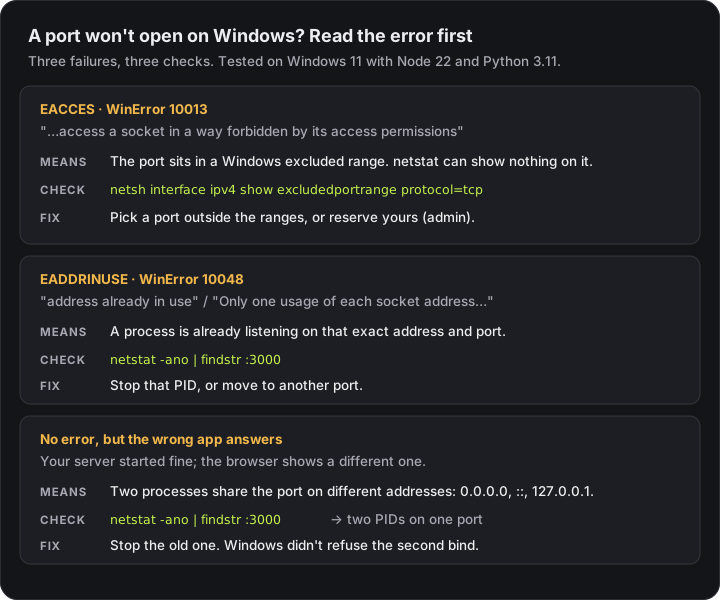
Step 1: check whether Windows has reserved the port
netsh interface ipv4 show excludedportrange protocol=tcpYou don't need an administrator terminal for this. Here's what it printed on my machine:
Protocol tcp Port Exclusion Ranges

Start Port    End Port
----------    --------
      5000        5000
     50000       50059     *
     58217       58316
     59786       59885
     59886       59985
     63002       63101

* - Administered port exclusions.
Every port in those ranges is off limits to normal programs. Port 5000, Flask's default, was reserved here on its own. I tried to listen on 5000, 58250 and 63050, all inside listed ranges, and both Node and Python failed every time, on every address:
node 0.0.0.0 58250   -> listen EACCES: permission denied 0.0.0.0:58250
node 127.0.0.1 58250 -> listen EACCES: permission denied 127.0.0.1:58250
node :: 58250        -> listen EACCES: permission denied :::58250
python 58250         -> [WinError 10013] An attempt was made to access a socket in a way forbidden by its access permissions
Ports 5001 and 50010 bound without a problem. Port 50010 is inside a listed range, but that range has an asterisk, which matters for the fix below.
Run the same command with ipv6 in place of ipv4 if your server listens on ::. On my machine both lists were identical.
Why netstat shows nothing on the port
This is what sends people around in circles. A reservation isn't a socket, so the usual tools for finding which process is using a port have nothing to show:
> netstat -ano | findstr :58250
(nothing)

> Get-NetTCPConnection -LocalPort 58250
No MSFT_NetTCPConnection objects found with property 'LocalPort' equal to '58250'.
The port is free in the sense that nothing is using it, and blocked in the sense that Windows won't let you have it. There's no process to stop.
One exception worth knowing: on my machine, port 5000 did show up in netstat, owned by PID 4. PID 4 is the Windows System process, not a program you can kill. Something listening as PID 4 on a web-style port is usually HTTP.sys, Windows' built-in web server driver, and you can see which program registered it with:
netsh http show servicestate view=requestqMine listed HTTP://LOCALHOST:5000/ registered by another process. So port 5000 was blocked twice over: reserved, and held through HTTP.sys. Moving off 5000 was the only sensible fix.
Where the reserved ranges come from
Windows hands out temporary "ephemeral" ports for outgoing connections from its dynamic range, which Microsoft documents as 49152 to 65535 by default. Windows networking components can also exclude blocks of ports for their own use. The ones developers run into are the Hyper-V and WinNAT networking behind WSL2 and Docker Desktop. The top Docker for Windows issue on this, filed in January 2019, is titled "Docker-for-Windows & Hyper-V excluding but not using important port", and a WSL issue shows reserved blocks running from port 2164 to 10895, right across common development ports.
The ranges aren't fixed. People in those threads describe ports that worked one day and failed the next after a reboot or an update, with no change on their side.
I can't tell you which component reserved each range on my machine, and netsh doesn't say. What matters is whether your port is on the list.
Fix 1: use a port outside the ranges (no admin needed)
This is the fastest fix and the one I'd try first. Pick a port that isn't inside any listed range and start your server there:
flask run --port 5001
python -m uvicorn main:app --port 8001
npx vite --port 5174
docker run -p 5001:80 your-image
For Docker, only the host side of -p host:container has to change. The app inside the container can keep its port.
Most frameworks fall back to 3000, 5000, 5173, 8000 and 8080, so if one of those is inside a reserved range, set the port in your config file rather than on the command line, so the next person on the team doesn't hit it too.
Fix 2: reserve the port for yourself (admin)
If you need that exact port, because a teammate's setup, an OAuth redirect URL or a mobile app expects it, claim it before Windows does. In an administrator terminal:
net stop winnat
netsh int ipv4 add excludedportrange protocol=tcp startport=5000 numberofports=1
net start winnat
Replace 5000 with your port. Stopping WinNAT first releases the reservations it made (the same effect Fix 3 relies on), so your port is free to claim. Stopping it briefly interrupts WSL2 and Docker networking, so close those first.
It looks backwards to reserve the port you want to use, but Microsoft's documentation on reserved ranges explains why it works: a reserved range keeps the port from being handed out at random, and "only a program or process that specifically requests a port that is in the reserved range can use the port." Your dev server asks for the port by number, so it's allowed in. Hyper-V can't take it any more.
I saw this on my own machine. Ranges you add yourself show an asterisk, as "administered port exclusions." My 50000–50059 range was one of those, and port 50010 inside it bound normally from Node and Python. The ranges without an asterisk refused every bind.
I didn't run these three commands while testing for this post, because they restart the networking WSL and Docker rely on. Everything else in this post I ran myself.
Fix 3: restart WinNAT (admin, temporary)
The most-repeated quick fix in the Docker, WSL and Supabase issue threads is:
net stop winnat
net start winnat
A commenter in the WSL thread reports it shrinks the exclusion list only temporarily, because WinNAT reserves ports again. Treat it as a way to get unblocked today, then use Fix 1 or 2 so it doesn't come back.
Fix 4: check the dynamic port range wasn't moved
netsh int ipv4 show dynamicport tcpThe default is a start port of 49152 and 16384 ports, which keeps temporary ports well clear of 3000, 5000 and 8080. If yours starts much lower, that's worth fixing: the reserved blocks in the WSL report, from 2164 to 10895, sat far below the default start. A widely shared answer in the Docker issue puts the range back to the default from an administrator terminal:
netsh int ipv4 set dynamic tcp start=49152 num=16384
netsh int ipv6 set dynamic tcp start=49152 num=16384
Mine was already at the default, which is why most of my reserved blocks sat above 49152. Port 5000 was the odd one out.
If the error is EADDRINUSE instead, the port really is taken
EADDRINUSE is a different problem, and this time there is a process to find. Here's what I got with one test server already listening on port 5002:
node   -> listen EADDRINUSE: address already in use 0.0.0.0:5002
python -> [WinError 10048] Only one usage of each socket address (protocol/network address/port) is normally permitted
Find who owns it, then stop it if it's yours:
netstat -ano | findstr :5002Get-NetTCPConnection -LocalPort 5002 -State Listen | Select-Object LocalAddress, OwningProcess
Get-Process -Id <PID>
Stop-Process -Id <PID>Check what the process is before you stop it. A PID can belong to a database, a sync client or another project, not the dev server you forgot about. I got tired of the netstat → tasklist → guesswork routine and built ZeroPort, a small Windows app that lists every listening port with the program behind it and checks the process is still the same one before stopping it. It won't show a reserved range, though. Nothing is listening there, which is the whole point of this post.
The quiet one: no error, but the wrong app answers
This one isn't an error at all, and it surprised me. With a test server holding 0.0.0.0:5002, a second server on the same port started without complaint when it used a different address:
| First server holds | Second server binds | Result |
|---|---|---|
0.0.0.0:5002 | 0.0.0.0:5002 | ❌ EADDRINUSE |
0.0.0.0:5002 | 127.0.0.1:5002 | ✅ Started |
0.0.0.0:5002 | [::]:5002 | ✅ Started |
[::]:5002 | [::]:5002 | ❌ EADDRINUSE |
[::]:5002 | 0.0.0.0:5002 or 127.0.0.1:5002 | ✅ Started |
Microsoft's socket binding rules match: with default options and the same user account, a bind to a specific address succeeds even while another socket holds the wildcard address on that port.
In practice, an old dev server you forgot about keeps running, the new one starts fine on a slightly different address, and localhost in the browser goes to whichever one Windows picks. If your changes aren't showing up and the terminal says the server started, run netstat -ano | findstr :PORT. Two PIDs on one port is the answer.
Quick reference
| What you see | What it means | Check | Fix |
|---|---|---|---|
EACCES / WinError 10013, nothing in netstat | Port is in an excluded range | netsh interface ipv4 show excludedportrange protocol=tcp | Use another port, or reserve yours (admin) |
EACCES / 10013, PID 4 in netstat | Reserved or held by a kernel service such as HTTP.sys | netsh http show servicestate view=requestq | Use another port |
EADDRINUSE / WinError 10048 | A process is listening on that address | netstat -ano | findstr :PORT | Stop that PID, or use another port |
| Server starts, browser shows old app | Two listeners on different addresses | netstat -ano | findstr :PORT | Stop the old one |
| Port worked yesterday, fails today | Reserved ranges changed after a reboot or WSL/Docker restart | Re-run the excludedportrange check | Reserve the port so it stays yours |
Key takeaways
- 'An attempt was made to access a socket in a way forbidden by its access permissions' (WinError 10013, EACCES in Node) on a free port means Windows has reserved it, not that a program is using it.
- netsh interface ipv4 show excludedportrange protocol=tcp shows the reserved ranges without admin rights. netstat and Get-NetTCPConnection show nothing, because a reservation isn't a socket.
- The fastest fix is a port outside the ranges. To keep a specific port, reserve it yourself as administrator: ranges you add are 'administered' and your own server can still bind inside them.
- EADDRINUSE (WinError 10048) is different: a real process holds the port, and netstat -ano gives you its PID.
- On Windows, a second server can start on the same port with a different address (0.0.0.0, ::, 127.0.0.1) with no error at all, so two PIDs on one port explains 'my changes aren't showing up'.
Frequently asked questions
What does 'An attempt was made to access a socket in a way forbidden by its access permissions' mean?
It is Windows error WSAEACCES (10013). When a server fails to start with it, the usual cause is that the port falls inside a range Windows has reserved, often for Hyper-V, WSL2 or Docker Desktop networking. Nothing has to be listening on the port for this to happen. Run netsh interface ipv4 show excludedportrange protocol=tcp and see whether your port is inside one of the listed ranges.
Why does netstat show nothing on the port but Windows still refuses it?
Because a reserved port isn't in use, it's excluded. netstat and Get-NetTCPConnection list sockets that exist, and a reservation is not a socket. In my tests ports 58250 and 63050 had nothing on them in netstat, yet Node and Python both failed to bind them with EACCES and WinError 10013, because both sat inside excluded ranges.
Do I need administrator rights to fix WinError 10013?
Not to diagnose it or to work around it: listing the excluded ranges works from a normal terminal, and moving your app to a port outside the ranges needs no special rights. Restarting the WinNAT service or reserving the port permanently with netsh int ipv4 add excludedportrange both need an administrator terminal.
Is EACCES the same as EADDRINUSE on Windows?
No. EADDRINUSE, or WinError 10048 'Only one usage of each socket address is normally permitted', means a process is already listening on that address and port, and netstat -ano shows its PID. EACCES, or WinError 10013, means Windows is forbidding the bind, usually because the port is reserved, and netstat may show nothing at all.
How do I stop Hyper-V or Docker from taking my port again?
Reserve the port yourself. From an administrator terminal, stop WinNAT with net stop winnat, run netsh int ipv4 add excludedportrange protocol=tcp startport=5000 numberofports=1 with your own port number, then net start winnat. Reservations you add are marked with an asterisk as administered port exclusions, and in my test a port inside an administered range bound normally.
Windows has its own ways of breaking developer tools that work fine elsewhere: Claude Code refusing to start in Git Bash, and npm, pip, git and curl each trusting certificates differently behind a corporate proxy. Getting development environments working cleanly on locked-down Windows machines is a lot of the work I do — see recent projects.
References
- Windows Sockets Error Codes: WSAEACCES (10013) and WSAEADDRINUSE (10048) — Microsoft Learnlearn.microsoft.com · accessed 2026-10-10
- Reserve a range of ephemeral ports — Microsoft Learnlearn.microsoft.com · accessed 2026-10-10
- The default dynamic port range for TCP/IP — Microsoft Learnlearn.microsoft.com · accessed 2026-10-10
- Using SO_REUSEADDR and SO_EXCLUSIVEADDRUSE — Microsoft Learnlearn.microsoft.com · accessed 2026-10-10
- Unable to bind ports: Docker for Windows and Hyper-V excluding but not using important ports — docker/for-win#3171github.com · accessed 2026-10-10
- Too many reserved ports for Hyper-V — microsoft/WSL#5514github.com · accessed 2026-10-10
- Failed to start on Windows: port is unavailable due to reserved range — supabase/cli#4128github.com · accessed 2026-10-10
- Get-NetTCPConnection — Microsoft Learnlearn.microsoft.com · accessed 2026-10-10
Last reviewed October 10, 2026

Tahir Nazir
Senior AI Engineer & Full-Stack Lead
5+ years shipping AI-powered products — RAG pipelines, agentic workflows, and MCP tooling. Top Rated on Upwork with a 100% job success score.
More about Tahir →Keep reading
New posts land here first. Follow along by RSS, or get in touch if you are building something similar.
Related articles
Claude Code 'Raw Mode Is Not Supported' on Windows? Match the Error First
Raw mode is not supported, 'claude' is not recognized, 32-bit Windows, Exec format error on WSL1 — five different Windows startup failures that get treated as one problem. Each has a distinct cause and a distinct fix, and four of them aren't install failures at all.TroubleshootingAI Engineering9 min readCorporate Proxy SSL Errors in npm, pip, git and curl: What Each Tool Actually Trusts
I put npm, pip, Python, git and curl behind an intercepting proxy and tested every certificate setting. Half the usual fixes are silently ignored, and half the ones that work break your tools the moment you leave the office.TroubleshootingWeb Development13 min readNext.js 16 Turbopack webpack Config Error: Don't Silence It
Next.js 16 fails the build when it finds a webpack config, and the error suggests turbopack: {}. I tested it. The build passes — and the service worker silently disappears.TroubleshootingWeb Development10 min read