Corporate Proxy SSL Errors in npm, pip, git and curl: What Each Tool Actually Trusts
I put npm, pip, Python, git and curl behind an intercepting proxy and tested every certificate setting. Half the usual fixes are silently ignored, and half the ones that work break your tools the moment you leave the office.
 Tahir Nazir13 min read
"Unable to get local issuer certificate" behind a corporate proxy means your company's inspection proxy re-signed the connection with its own root certificate, and the tool you're using doesn't trust that root. The fix is one company certificate — but every tool reads it from a different place, and several of the common settings are silently ignored.
You've probably met it as one of these:
npm error code SELF_SIGNED_CERT_IN_CHAIN
npm error code UNABLE_TO_GET_ISSUER_CERT_LOCALLY

[SSL: CERTIFICATE_VERIFY_FAILED] certificate verify failed: self-signed certificate in certificate chain

fatal: unable to access 'https://github.com/...': schannel: SEC_E_UNTRUSTED_ROOT (0x80090325) -
The certificate chain was issued by an authority that is not trusted.

curl: (60) SSL certificate problem: unable to get local issuer certificate
Zscaler, Netskope, Palo Alto and similar products decrypt your HTTPS traffic to inspect it, then re-encrypt it with a certificate signed by your company's own root. Browsers trust that root because IT installed it. Developer tools often don't, because many of them don't use the system's certificate store at all.
How I tested it
Rather than repeat forum advice, I tested it. I built a small proxy on my own machine that intercepts HTTPS the way a corporate proxy does, signed with a throwaway test root, and ran each tool through it. I tried the default setup first, then every certificate setting the docs and forums suggest.
Then I ran each working fix again without the proxy, straight to the real servers. That second run is the one most guides skip, and it changes the advice.
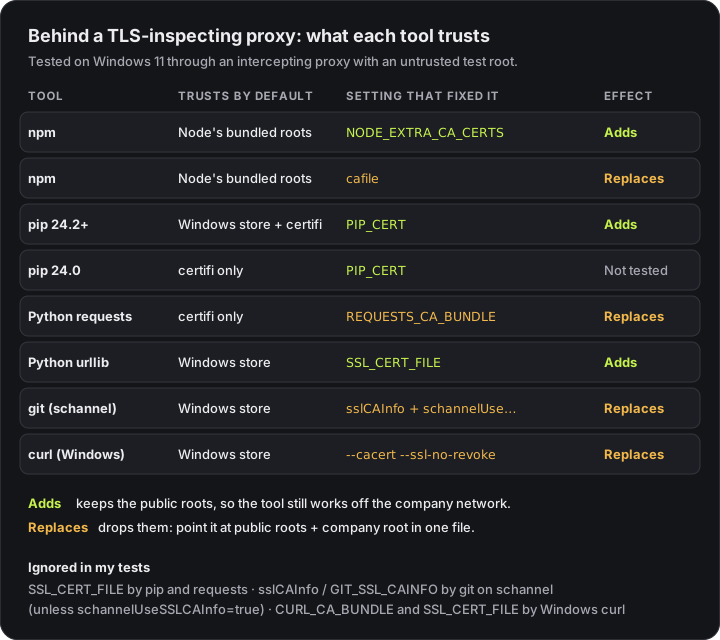
The setup: Windows 11, Node 22.22, npm 10.9, Python 3.11 with pip 24.0 and pip 26.2, requests 2.34, git 2.54 and curl 8.19. The test root was never installed into Windows' certificate store, so "trusts the Windows store" below means the tool would work on a managed laptop where IT has installed the real root.
First, get the company root certificate
Every fix below needs one file: your company's root certificate in PEM format, the text kind that starts with -----BEGIN CERTIFICATE-----. Ask IT for it. They usually publish it for exactly this reason.
If they don't, you can export it yourself on Windows. Run certmgr.msc (or certlm.msc for the machine-wide store), open Trusted Root Certification Authorities → Certificates, find your proxy vendor's root (for example, Zscaler Root CA), and export it as Base-64 encoded X.509. Save it somewhere stable, such as C:\certs\corp-root.pem.
The trap: settings that add vs settings that replace
This was the most useful thing the tests turned up.
Some settings add your company root to the tool's existing list of public certificate authorities. Others replace the whole list with just the file you give them. Through the proxy, both work, because everything you reach is signed by the company root. Off the proxy — at home, on a VPN split tunnel, in CI — a "replace" setting fails, because now the real servers' public certificates aren't trusted:
| Setting | With only the company root, off the proxy |
|---|---|
NODE_EXTRA_CA_CERTS (npm, Node) | ✅ Still works — adds |
PIP_CERT on pip 26.2 | ✅ Still works — adds |
SSL_CERT_FILE for Python's urllib | ✅ Still works — adds |
npm cafile | ❌ UNABLE_TO_GET_ISSUER_CERT_LOCALLY |
REQUESTS_CA_BUNDLE | ❌ certificate verify failed |
git http.sslCAInfo | ❌ fails on both backends (unable to get local issuer certificate with OpenSSL, the certificate chain is incomplete with schannel) |
curl --cacert | ❌ the certificate or certificate chain is based on an untrusted root |
That's the "it works in the office and breaks at home" ticket that IT teams see constantly.
The fix for every "replace" setting is a combined bundle: the public roots plus your company root, in one file. If Python is installed, certifi already has a good public bundle:
cat "$(python -m certifi)" corp-root.pem > ~/certs/combined.pemI re-ran npm's cafile, REQUESTS_CA_BUNDLE and git's sslCAInfo pointing at a combined file built this way. All three worked through the proxy and directly. Rebuild the file now and then, because public roots change.
npm and Node.js
Default: Node's own bundled list of public roots. It ignores the Windows store unless you ask it not to.
Fix: set NODE_EXTRA_CA_CERTS before running npm:
# macOS / Linux / Git Bash
export NODE_EXTRA_CA_CERTS="$HOME/certs/corp-root.pem"

# PowerShell (persists for your user)
setx NODE_EXTRA_CA_CERTS "C:\certs\corp-root.pem"
Node's docs describe it exactly: the well-known roots are "extended with the extra certificates in file." It adds, so it keeps working off the network, and it fixes every Node-based tool at once, not just npm. That's why it's also the fix for Claude Code's SSL errors on older Node versions.
npm's own cafile setting also worked, but it replaced the list in my tests. Use it only with a combined bundle.
If IT has already installed the root on your machine, there's a cleaner option: --use-system-ca makes Node trust the operating system's store as well. It's available from Node 22.15 and 23.8 (Windows and macOS first, other platforms from 23.9):
export NODE_OPTIONS=--use-system-caThat didn't help in my test, because my test root wasn't in the Windows store, which is the expected result. On a managed laptop it saves you handling a certificate file at all.
One thing that fooled me: npm reported success on an early test while the proxy was rejecting it. It had served the answer from its local cache. If a certificate fix seems to work suspiciously well, retry with an empty cache (--cache pointing at a fresh folder) before you believe it.
pip
What pip trusts depends on its version. pip's docs say that from 24.2, "system certificates are used in addition to certifi." Earlier versions used certifi only.
That showed up directly in the error text. pip 24.0 failed with OpenSSL's wording:
[SSL: CERTIFICATE_VERIFY_FAILED] certificate verify failed: self-signed certificate in certificate chainpip 26.2 failed with Windows' wording, because it was asking Windows to check the certificate:
A certificate chain processed, but terminated in a root certificate which is not trusted by the trust provider.So the first fix for pip is often just this:
python -m pip install --upgrade pipOn a managed laptop where the company root is already in the Windows store, a current pip should then work with no certificate settings at all.
If it still fails, point pip at the certificate:
export PIP_CERT="$HOME/certs/corp-root.pem"
# or per command:
python -m pip install --cert ~/certs/corp-root.pem somepackage
PIP_CERT and REQUESTS_CA_BUNDLE both worked on pip 24.0 and 26.2. On 26.2, PIP_CERT still worked off the network, so it added rather than replaced. SSL_CERT_FILE did nothing on either version.
Python requests and urllib
This is where the most confusion comes from, because two Python libraries on the same machine behaved in opposite ways.
requests trusts the certifi bundle only. It ignored SSL_CERT_FILE completely and failed with:
urllib3.exceptions.SSLError: [SSL: CERTIFICATE_VERIFY_FAILED] certificate verify failed:
self-signed certificate in certificate chain (_ssl.c:1006)
The fix is REQUESTS_CA_BUNDLE, and it replaces certifi, so use the combined bundle:
export REQUESTS_CA_BUNDLE="$HOME/certs/combined.pem"Requests' own docs flag a catch: settings like this come from the environment, and a request prepared and sent through a Session doesn't pick them up unless you merge the environment settings in. If the variable works in a quick test and not in your app, that's the likely reason.
Python's built-in urllib trusts the Windows store on Windows, and SSL_CERT_FILE worked for it and added to the store rather than replacing it. On a managed laptop, a script using urllib can work while the same request through requests fails, which is very confusing if you don't know they read different stores.
git
Git for Windows uses the Windows certificate store when its backend is set to schannel, which the Git for Windows installer had set on my machine. So on a managed laptop, git usually just works.
When it doesn't, the obvious fix fails silently. I set http.sslCAInfo, then GIT_SSL_CAINFO, and git ignored both:
fatal: unable to access 'https://github.com/octocat/Hello-World/': schannel: SEC_E_UNTRUSTED_ROOT
(0x80090325) - The certificate chain was issued by an authority that is not trusted.
It's deliberate. Git's documentation explains that a certificate bundle "would override the Windows Certificate Store. Since this is not desirable by default, Git will tell cURL not to use that bundle by default when the schannel backend was configured via http.sslBackend, unless http.schannelUseSSLCAInfo" is set.
So you need both settings, and the bundle replaces the Windows store, so combine:
git config --global http.schannelUseSSLCAInfo true
git config --global http.sslCAInfo "C:/certs/combined.pem"
Alternatively, switch git to OpenSSL and give it the combined bundle:
git config --global http.sslBackend openssl
git config --global http.sslCAInfo "C:/certs/combined.pem"
Check what you have first with git config --show-origin --get http.sslBackend. The setting often lives in Git's system config, not your own.
curl
curl on Windows uses the Windows store. That's true of both the curl built into Windows and the one that ships with Git Bash — I tested both, and both are built with Schannel. curl's docs confirm it: "If curl was built with Schannel support, then curl uses the Windows native CA store for verification."
The same docs say you can set CURL_CA_BUNDLE or SSL_CERT_FILE to choose a bundle. Neither Windows build honoured either variable in my tests. Only the command-line option worked:
curl --cacert ~/certs/combined.pem https://example.comWith my test root, --cacert alone then failed a second check:
curl: (60) schannel: the revocation status is unknownWindows also tries to confirm that the certificate hasn't been revoked, and my test root had no revocation list to check. If you see this with your real proxy, --ssl-no-revoke skips only that revocation lookup. Certificate verification itself stays on. Tell IT as well, because it means their certificate's revocation information can't be reached from your machine.
On macOS and Linux, curl is usually built against OpenSSL or a similar library, uses a file-based bundle, and does honour CURL_CA_BUNDLE. Test before you rely on it.
Don't switch verification off
Every tool has an escape hatch — npm config set strict-ssl false, NODE_TLS_REJECT_UNAUTHORIZED=0, pip --trusted-host, git -c http.sslVerify=false, curl -k. They all "work", and I confirmed npm's does.
They work by trusting anyone in the network path, not just your corporate proxy. A package manager installs code that runs on your machine. Turning off verification there means anyone between you and the registry — on hotel Wi-Fi, a compromised network, or a misconfigured proxy — can hand you different code. Trusting the one company root fixes the same problem without that risk.
Quick reference
| Tool | Default trust | Fix | Off-network |
|---|---|---|---|
| npm / Node | Bundled roots | NODE_EXTRA_CA_CERTS=corp-root.pem | Fine |
| pip 24.2+ | System store + certifi | Upgrade pip; else PIP_CERT=corp-root.pem | Fine |
| pip before 24.2 | certifi | PIP_CERT or upgrade pip | — |
| Python requests | certifi | REQUESTS_CA_BUNDLE=combined.pem | Needs combined |
| Python urllib | System store | SSL_CERT_FILE=corp-root.pem | Fine |
| git (Windows, schannel) | Windows store | schannelUseSSLCAInfo + sslCAInfo=combined.pem | Needs combined |
| curl (Windows) | Windows store | --cacert combined.pem | Needs combined |
Key takeaways
- 'Unable to get local issuer certificate' behind Zscaler or Netskope means the tool doesn't trust your company's inspection root — and npm, pip, Python, git and curl each read trust from a different place.
- NODE_EXTRA_CA_CERTS adds to Node's roots and fixes npm; pip 24.2+ already reads the system store, so upgrading pip is often the whole fix on a managed laptop.
- SSL_CERT_FILE was ignored by pip and requests, and git on Windows ignores http.sslCAInfo unless http.schannelUseSSLCAInfo is true.
- npm's cafile, REQUESTS_CA_BUNDLE, git's sslCAInfo and curl's --cacert replace the public roots, so with only the company root they break off the network. Use public roots plus the company root in one file.
- Never switch verification off with strict-ssl=false, NODE_TLS_REJECT_UNAUTHORIZED=0 or curl -k. Trust the one company root instead.
Frequently asked questions
How do I fix 'unable to get local issuer certificate' behind a corporate proxy?
Your company's TLS-inspecting proxy re-signs HTTPS traffic with its own root certificate, and the tool doesn't trust that root. Each tool reads a different trust store: npm uses Node's bundled list (fix with NODE_EXTRA_CA_CERTS), pip 24.2 and later uses the operating system store plus certifi (fix with PIP_CERT), Python requests uses certifi (REQUESTS_CA_BUNDLE), and git and curl on Windows use the Windows store. Get the company root from IT, then use the setting that matches the tool.
Why doesn't SSL_CERT_FILE work for pip or requests?
Because neither of them uses OpenSSL's default trust paths. Python requests uses the certifi bundle and reads REQUESTS_CA_BUNDLE instead, and pip reads PIP_CERT or REQUESTS_CA_BUNDLE. In my tests SSL_CERT_FILE had no effect on pip 24.0, pip 26.2 or requests, while it did work for Python's built-in urllib.
Why does git ignore http.sslCAInfo on Windows?
When git uses the schannel backend, which reads the Windows certificate store, it deliberately tells curl not to use the http.sslCAInfo bundle, because that would override the Windows store. Set http.schannelUseSSLCAInfo to true to make it apply, or install the company root into the Windows store, which git then reads automatically.
Why does my tool work at the office but fail at home after I fixed the certificate?
Some settings replace the tool's built-in list of public certificate authorities instead of adding to it. In my tests npm's cafile, REQUESTS_CA_BUNDLE, git's http.sslCAInfo and curl's --cacert all replaced it, so with only the company root configured, connections without the proxy failed. Point them at one file containing the public roots plus your company root.
Is it safe to set strict-ssl=false or NODE_TLS_REJECT_UNAUTHORIZED=0?
No. Those settings switch off certificate checking entirely, so the tool will trust anyone in the network path, not just your company's proxy. A package manager that installs code onto your machine is the worst place to do that. Trust the company root instead.
The same proxy breaks AI tools and frameworks in their own ways: Claude Code's SSL errors and Next.js failing to fetch Google Fonts each need their own fix. Getting developer tooling working cleanly inside locked-down company networks is a lot of the work I do — see recent projects.
References
- SSL certificate verification — curlcurl.se · accessed 2026-10-08
- HTTPS certificates — pip documentationpip.pypa.io · accessed 2026-10-08
- git-config: http.schannelUseSSLCAInfo — Git documentationgit-scm.com · accessed 2026-10-08
- Command-line options: NODE_EXTRA_CA_CERTS and --use-system-ca — Node.js documentationnodejs.org · accessed 2026-10-08
- Config: cafile, ca and strict-ssl — npm documentationdocs.npmjs.com · accessed 2026-10-08
- SSL cert verification — Requests documentationrequests.readthedocs.io · accessed 2026-10-08
Last reviewed October 8, 2026

Tahir Nazir
Senior AI Engineer & Full-Stack Lead
5+ years shipping AI-powered products — RAG pipelines, agentic workflows, and MCP tooling. Top Rated on Upwork with a 100% job success score.
More about Tahir →Keep reading
New posts land here first. Follow along by RSS, or get in touch if you are building something similar.
Related articles
Claude Code SSL Certificate Verification Failed: Fix It by Error Code
SSL certificate verification failed (UNABLE_TO_GET_ISSUER_CERT_LOCALLY) or Self-signed certificate detected (SELF_SIGNED_CERT_IN_CHAIN) behind Zscaler or any TLS-inspecting proxy. The error's advice is right — but Claude Code already reads your OS certificate store, so the order you apply it in decides whether it works.TroubleshootingAI Engineering18 min readNext.js 'Failed to Fetch' Google Fonts Behind a Corporate Proxy: I Tested Every Fix
NODE_EXTRA_CA_CERTS fixes it under webpack and does nothing under Turbopack. I ran nine builds through an intercepting proxy on Next.js 16.1 and 16.3 — the fix that works depends on your version.TroubleshootingWeb Development11 min readClaude Code 'There's an Issue With the Selected Model': It's Usually Just a 404
I pointed Claude Code at a fake API and fed it every kind of error. Any 404 — a typo, a stray /v1, a gateway's error page — produced this exact message. Here's how to tell which one you have.TroubleshootingAI Engineering11 min read