OpenCode's 'Free Tier Can Only Be Used From Within OpenCode' Error, Even in OpenCode: What Triggers It
OpenCode's free models refuse with 'free tier can only be used from within OpenCode' while you're using OpenCode. I tested which configs trigger it: a denied read permission does, a denied bash doesn't. Plus the newer 'detected abusive traffic from this IP address' block, which is your network, not your config.
 Tahir Nazir13 min read
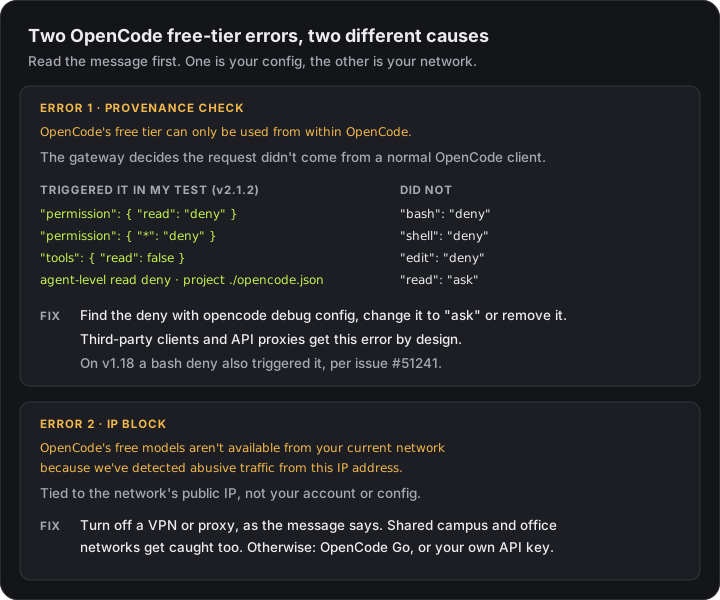
If OpenCode's free models fail with "OpenCode's free tier can only be used from within OpenCode" while you're using OpenCode, the gateway thinks your request didn't come from a normal client. A common cause you can fix yourself is your own config. In my tests, denying the read permission is enough to trigger it:
Error: OpenCode's free tier can only be used from within OpenCode. Download it at https://opencode.ai and keep building.

Error from provider (Console): OpenCode's free tier can only be used from within OpenCode
The second form is how it appeared in the desktop app and in earlier reports, such as #49680 in September. It's the same check failing.
Quick fix: run opencode debug config, find any read deny (including "*": "deny" and "tools": { "read": false }), change it to "ask" or remove it, and try again. If your message instead says "aren't available from your current network because we've detected abusive traffic from this IP address", it's your network, not your config. Skip to that one.
A wave of these hit on 17 October 2026. The main GitHub report, #56324, collected around 70 comments from people on Windows, macOS and Linux, in the CLI and the desktop app, on v2.0.32. It hit most of the free models people tried, Big Pickle and DeepSeek V4.1 Flash Free included. OpenCode's triage bot couldn't reproduce it and closed it on 20 October, pointing at "something on the gateway that depends on your network or region". Config and network are both real causes, and they need different fixes.
How I tested it
On 21 October 2026 I installed the official OpenCode CLI (v2.1.2, from npm as @opencode/cli) on Windows 11, signed out, with an empty project folder and a config folder of its own so nothing else could leak in. Each test sent one prompt, "Reply with exactly: OK", to the free opencode/deepseek-v4.1-flash-free model with opencode run --standalone, changing one config setting at a time:
| Config | Result |
|---|---|
| No config | ✅ OK |
"permission": { "read": "deny" } | ❌ free-tier error |
"permission": { "*": "deny" } | ❌ free-tier error |
"tools": { "read": false } | ❌ free-tier error |
"agent": { "build": { "permission": { "read": "deny" } } } | ❌ free-tier error |
"read": "deny" in the project's opencode.json, global config clean | ❌ free-tier error |
"permission": { "read": "ask" } | ✅ OK |
"permission": { "bash": "deny" } | ✅ OK |
"permission": { "shell": "deny" } | ✅ OK |
"permission": { "edit": "deny" } | ✅ OK |
A provider.opencode override with baseURL set to https://opencode.ai/zen/v1 | ✅ OK |
Removing the deny fixed it on the very next run. I didn't need to sign in, restart a service or reinstall.
Two things I couldn't test: the IP block (my network works), and a signed-in Console account.
Why a permission causes a "not from OpenCode" error
Free models are served through OpenCode's Zen gateway. The free tier is meant to be used from inside OpenCode, so the gateway checks that each request looks like one OpenCode would send. A denied tool is left out of the request, and a request without the read tool apparently fails that check. That matches how a commenter described it in #51241: the cause is "the absent bash tool in the outgoing request". The message then blames where you're running OpenCode, which is why it's so confusing when you're already in it.
Version 1 behaved differently. On OpenCode 1.18.33, the same issue shows "bash": "deny" and "tools": { "bash": false } triggering the error too, and #50627 reports it from a shell deny on a custom agent. In my v2.1.2 test only read mattered. If you're on v1, look for bash denies too.
Fix 1: find the deny and change it to "ask"
opencode debug configThis lists every config source OpenCode loaded, global and project, and shows the parsed rules under each file. On my test machine, a project file's read deny showed up like this:
"permissions": [
  { "action": "read", "resource": "*", "effect": "deny" }
]
Check every file it lists. In my test, a deny in a project's opencode.json broke the free models even with a clean global config, so a repository you've cloned can cause it. The usual global locations are ~/.config/opencode/opencode.json (or opencode.jsonc), which on Windows is %USERPROFILE%\.config\opencode\.
Then change the rule. If you want OpenCode to stop reading files without your say-so, "ask" keeps that control and the free models still work:
{
  "$schema": "https://opencode.ai/config.json",
  "permission": { "read": "ask" }
}
A commenter on #51241 also reports, on 1.19.0, that a read deny-all with one path allowed back works, "read": { "*": "deny", "<one path>": "allow" }, because the read tool survives. I didn't test that pattern.
Fix 2: the other causes the maintainers list
OpenCode's triage bot listed these as known causes of the same message on #56324:
- A leftover provider entry pointing at
https://opencode.ai/zen/v1. My simplebaseURLoverride didn't trigger the error, but if you have an older customzenprovider, remove it and use the built-inopencodeprovider. #55435 has reports of that fixing it. - Plugins, including leftovers from one you've uninstalled. Check the
pluginentries in your config and theplugin/pluginsfolder next to it. - No stored Console credential, which
opencode auth login opencodefixes, per #52917. Signed-out requests worked in my test and in the maintainers', so this doesn't apply to everyone.
To see the exact error in context, run one request with logs. The failure appears as a Failed to drain Session line:
opencode run --standalone --print-logs --log-level error -m opencode/deepseek-v4.1-flash-free "hi""Detected abusive traffic from this IP address" is a different error
OpenCode's free models aren't available from your current network because we've detected abusive traffic from this IP address. This isn't related to your account. If you're on a VPN or proxy, turn it off and try again, or subscribe to OpenCode Go at https://opencode.ai/go to keep building.This one blocks the free models for your network's public IP address, and it says so. No config change fixes it. Some people saw a plain 403 Forbidden with "Forbidden, OpenCode Free Model Gateway Detect Abuse Traffic" (#56762) instead.
What the reports show:
- VPNs and proxies are the first suspect. The message names them. If you're on one, turn it off, as it says.
- Shared networks get caught. One reporter was on a university network where thousands of people share one public IP. Office networks and mobile carriers often work the same way. The block is on that IP, not on you.
- It's been temporary for some. A reporter in the US said it worked again by 18 October, while one in Bangladesh was still blocked on the 19th.
Many of the 17 October "free tier" reports look network-related too, even though they showed the free-tier message, not this one. Reporters had ruled out their config, it happened on the official desktop app, and it worked for the maintainers' bot at the same time. So if Fix 1 finds no deny anywhere, a gateway-side network issue, which the bot also suggested, is the likely explanation. If it persists, add your version, region and a timestamp to #56324 so they can match it in their logs. Don't try to dodge an abuse block with a VPN. The message names VPNs as a cause, and it keeps the free tier usable for everyone else.
If you need it working now
The free tier is shared and comes with no guarantees. If it's blocked for your network, or you can't wait:
- OpenCode Go, OpenCode's $10/month plan, which the error message itself links to.
- Your own provider key. OpenCode connects to most providers with
/connectin the TUI. OpenRouter is one way to try several models with one key; here's how to get an OpenRouter API key. To see what a coding session would cost on a paid model, put your numbers into the LLM cost calculator. - The same model elsewhere. Several of the free models are free versions of public ones. DeepSeek V4.1 Flash, the one I tested with, has its pricing and limits here. If you're choosing one for agent work, see which model to pick for a coding agent.
There's no free-tier API for other apps. Third-party clients and tools that turn the free tier into an API get the free-tier error by design. That's what the message is for, and there's no fix for it on your side.
Quick reference
| You see | Cause | Fix |
|---|---|---|
free tier can only be used from within OpenCode in OpenCode | A read deny somewhere (bash too on v1) | opencode debug config, change it to "ask" |
| The same, with no deny anywhere | Leftover zen/v1 provider, a plugin, or the network block | Remove the override and plugin, then check your network |
detected abusive traffic from this IP address or a 403 | The network's public IP is blocked | Turn off a VPN or proxy, wait, or use OpenCode Go or your own key |
| The error from a third-party client or proxy | By design | Use OpenCode itself, or a paid key |
Key takeaways
- "OpenCode's free tier can only be used from within OpenCode" can appear inside OpenCode itself. It's the gateway's check failing, not where you run it.
- In my test on v2.1.2, a read deny triggered it: permission read deny, * deny, tools read false, an agent-level deny, or one in a project's opencode.json.
- bash, shell and edit denies didn't trigger it on v2.1.2, but a bash deny did on 1.18.33. read ask works and keeps you in control.
- opencode debug config lists every config file it loaded and shows the parsed deny rules, which is the fastest way to find the culprit.
- "Detected abusive traffic from this IP address" is a network block. Turn off a VPN or proxy; shared campus and office IPs get caught too.
Frequently asked questions
Why does OpenCode say its free tier can only be used from within OpenCode when I'm using OpenCode?
The error comes from OpenCode's Zen gateway, which only serves free models to requests that look like they came from a normal OpenCode client. A config that removes a tool from the request can fail that check. In my test on OpenCode v2.1.2, a read permission set to deny, a wildcard deny, tools read false, an agent-level read deny and a read deny in a project's opencode.json all triggered it. Change the read deny to ask, or remove it, and the next request works.
OpenCode free model not working: what should I check first?
Read the error message. If it says the free tier can only be used from within OpenCode, run opencode debug config and look for a read permission set to deny in any config file, including a project opencode.json, and change it to ask. If it says free models aren't available from your current network, the network's IP address is blocked: turn off a VPN or proxy, or use OpenCode Go or your own API key. If neither applies, run one request with --print-logs to see the exact error.
Does denying bash break OpenCode's free models?
Not in my test on v2.1.2: bash deny, shell deny and edit deny all worked with a free model. On OpenCode 1.18.33, a commenter on issue #51241 reproduced the error with bash set to deny and with tools bash false, so older versions behave differently. If you're on v1, change a bash deny to ask.
What does 'detected abusive traffic from this IP address' mean in OpenCode?
It is a different error. OpenCode's free models are blocked for the network's public IP address, not for your account or config. The message itself says to turn off a VPN or proxy if you're using one. Shared networks such as university or office NAT, where many people use one public IP, are affected too. Otherwise the options are OpenCode Go, the paid subscription, or connecting your own API key.
How do I find which OpenCode config file has the deny?
Run opencode debug config. It lists every configuration source it loaded, global and project, and shows the parsed rules, so a read deny appears as an entry with action read, resource * and effect deny under the file that set it. Check every listed file, including an opencode.json in the project directory.
Can I use OpenCode's free models from another client or an API proxy?
No. The free tier is meant to be used from OpenCode itself, so third-party clients and tools that turn it into an API get this error by design. Use OpenCode, or pay for a provider and connect its key.
Coding agents now sit behind checks you can't see: a gateway that decides whether a request looks legitimate, or a safety classifier that has to answer before a command runs. When one fails, the error often blames the wrong thing, much like Claude Code's auto mode blocking even pwd when its check gave no verdict. Desktop agents can also fail in ways the agent itself can't see, like Codex filling a Mac's disk with crash dumps. I help teams roll out AI coding tools. See recent projects.
References
- Free models fail inside official OpenCode TUI with 'free tier can only be used from within OpenCode' (anomalyco/opencode #56324)github.com · accessed 2026-10-21
- Free models fail when shell or read permissions are denied (anomalyco/opencode #51241)github.com · accessed 2026-10-21
- Deny shell on a custom agent breaks free tier (anomalyco/opencode #50627)github.com · accessed 2026-10-21
- Same free-tier error on Windows after it had been working (anomalyco/opencode #55435)github.com · accessed 2026-10-21
- Misleading free-tier auth error has no documented fix (anomalyco/opencode #52917)github.com · accessed 2026-10-21
- Error from provider (Console): OpenCode's free tier can only be used from within OpenCode (anomalyco/opencode #49680)github.com · accessed 2026-10-21
- Forbidden, OpenCode Free Model Gateway Detect Abuse Traffic (anomalyco/opencode #56762)github.com · accessed 2026-10-21
- OpenCode docs: install, Console and OpenCode Goopencode.ai · accessed 2026-10-21
- OpenCode docs: providersopencode.ai · accessed 2026-10-21
Last reviewed October 21, 2026

Tahir Nazir
Senior AI Engineer & Full-Stack Lead
5+ years shipping AI-powered products — RAG pipelines, agentic workflows, and MCP tooling. Top Rated on Upwork with a 100% job success score.
More about Tahir →Keep reading
New posts land here first. Follow along by RSS, or get in touch if you are building something similar.
Related articles
Claude Code Auto Mode 'Classifier Unavailable' or 'Gave No Verdict'? 4 Fixes
Bash, Edit and MCP calls all refused while Read still works. The auto mode safety check failed, not your command. What the error means, why it stops after ten, and four fixes from Anthropic's own docs.TroubleshootingAI Engineering13 min readCodex Crashpad 'pending' Eating Your Mac's Disk? Check, Clean and Stop It
Codex Desktop can write a crash dump every second into Crashpad/pending, and people have lost 59, 168, 323 and even 511 GB to it. Why the loop happens, how to check both folders, how to clean them safely, and what actually stops it.TroubleshootingAI Engineering11 min readClaude Code SSL Certificate Verification Failed: Fix It by Error Code
SSL certificate verification failed (UNABLE_TO_GET_ISSUER_CERT_LOCALLY) or Self-signed certificate detected (SELF_SIGNED_CERT_IN_CHAIN) behind Zscaler or any TLS-inspecting proxy. The error's advice is right — but Claude Code already reads your OS certificate store, so the order you apply it in decides whether it works.TroubleshootingAI Engineering20 min read