Claude Ship and /ship in Claude Code: What It Does, and What I Hit on Windows
Claude Ship is Anthropic's set of GitHub pull request agents for Team and Enterprise plans; /ship is the Claude Code command you can run in a local session on v2.1.330 or later. I tested /ship on Windows: 'your PATH has a relative or empty entry', the nvm-windows cause the docs miss, and 'on Windows the checks that limit a watch don't run yet'.
 Tahir Nazir25 min read
Claude Ship is Anthropic's set of three GitHub pull request agents (Code Review, PR Steward and Claude Approvals) for Team and Enterprise organizations, launched on 23 November 2026. /ship is the Claude Code command that runs a local, single-pull-request version of that review-and-fix loop in your own session, on Claude Code 2.1.330 or later: it commits your change, opens the pull request, reviews it, then watches it and pushes fixes. On Windows I hit two walls before that last step: your PATH has a relative or empty entry, so Claude Code can't tell which gh and git would run, caused here by nvm-windows, and then on Windows the checks that limit a watch don't run yet.
| You want | Use | Who can use it |
|---|---|---|
| A pull request opened, reviewed and looked after from your terminal | /ship in Claude Code | Claude Code 2.1.330+ in a local terminal, on your own usage |
| Fixes for checks and comments on a pull request that's already open | /steward in Claude Code | Same; your own pull request, branch checked out |
| Review, fixes and approval policy on every pull request in a repository | Claude Ship (Code Review, PR Steward, Claude Approvals) | Team and Enterprise organizations, billed as usage credits |
| A review only | /code-review | Anyone |
/ship isn't in cloud sessions, or in sessions that skip feature-flag fetching, for example with DISABLE_TELEMETRY set or on a third-party provider, per the troubleshooting docs.
Last reviewed 24 November 2026, against Claude Code 2.1.330 on Windows 11 with Opus 5.5 in auto mode. The /ship messages below are from my own runs on a private throwaway repository, captured from the terminal; the rest comes from Anthropic's /ship and Claude Ship docs, linked at each point. I didn't test Claude Ship's organization agents, which need a Team or Enterprise plan.
What is Claude Ship?
Claude Ship is a set of agents that take a GitHub pull request through review, fixes and an approval decision, so a team doesn't manage each step by hand. Anthropic's Claude Ship docs name three:
- Code Review reads the change with the surrounding code and posts findings as inline comments, ranked by severity.
- PR Steward works on failing checks, merge conflicts and review comments, from people and from review bots, and pushes commits with its fixes. It is designed not to approve or merge.
- Claude Approvals is a check that reports who still has to approve, based on a policy file you write (
.claude/approvals.yml). It blocks a merge only where you make it a required check in GitHub.
It's for organizations on Team and Enterprise plans, set up by an Owner under Organization settings > Claude Ship, one agent at a time. Code Review is generally available; PR Steward and Claude Approvals are in public beta. It isn't available with Zero Data Retention, the HIPAA configuration or customer-managed encryption keys. Each agent is billed on token usage through the organization's usage credits, separately from the plan's included usage, and the docs warn that PR Steward "has no spend limit of its own until you set one."
The launch coverage, such as TechCrunch's, is mostly about those organization agents. If your plan isn't Team or Enterprise, the part you can use today is the /ship command.
Is Claude Ship the same as /ship?
No. Four names cover two products: Claude Ship and PR Steward run on GitHub for an organization, while /ship and /steward run in your own Claude Code session.
| Name | What it is | Where it runs | Billed to |
|---|---|---|---|
| Claude Ship | The set of three organization agents: Code Review, PR Steward, Claude Approvals | GitHub, for whole repositories | The organization's usage credits |
| PR Steward | The Claude Ship agent that pushes fixes for checks and comments | GitHub | The organization's usage credits |
/ship | Claude Code command: commit, pull request, review, then a watch | Your terminal, your checkout | Your own plan or API bill |
/steward | Claude Code command: the watch only, on your open pull request | Your terminal, your checkout | Your own plan or API bill |
ship-local is the name of the built-in skill behind /ship, the name you use to turn it off in settings. Where PR Steward is already working on a pull request, a local /steward watch doesn't start.
What does /ship do in Claude Code?
/ship takes a finished change on your machine to a reviewed pull request, then keeps working on it until it's ready for you to merge. From the /ship docs, in four steps:
- Pull request: it commits your uncommitted work, pushes the branch and opens a GitHub pull request, as you. On the default branch it commits on a new branch first.
- Review: Claude reviews the change with
/code-review, athigheffort unless you pass another level. - Watch: Claude keeps checking the pull request from your session and works on failing checks, merge conflicts, reviewers' comments and its own review findings, pushing fixes to your branch.
- Merge: you merge it yourself.
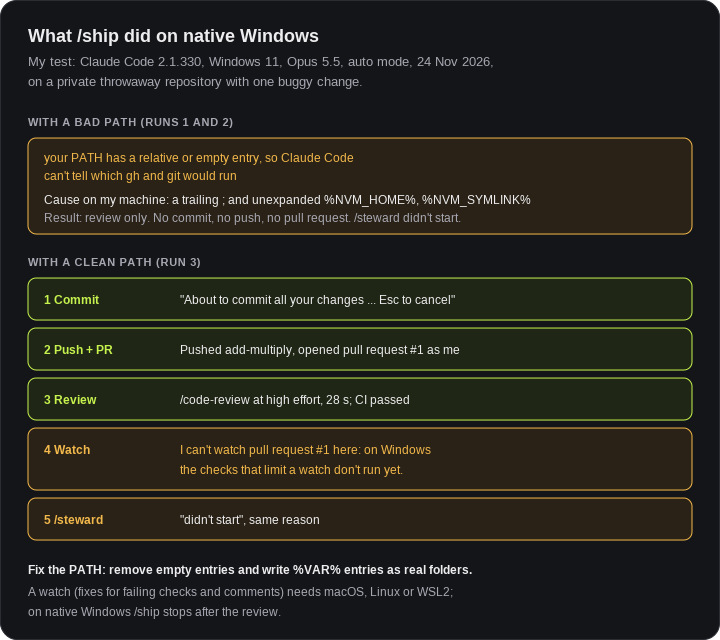
There's no confirmation prompt. Before the commit, and again before the push, a line ending Esc to cancel says what's about to happen, and if you do nothing /ship carries on after a few seconds. In my run those lines were:
About to commit all your changes (2 files: math.js, math.test.js) as you, on add-multiply. Esc to cancel.
Pushing 1 commit on add-multiply to its-tahir/claude-ship-test (private) and opening a PR. Esc to cancel.
Then: /ship pushed add-multiply to its-tahir/claude-ship-test and opened pull request #1 as you, ready for review. It didn't set an upstream, so a plain git pull or git push on add-multiply may first need git branch -u origin/add-multiply. Don't set that upstream while a watch is running: changing git's settings ends the watch.
/ship won't commit your uncommitted changes when a pull request is already open for the branch, when the repository is public (it pushes only a branch's existing commits there), when a file name suggests a secret such as .env, or when you changed a file that configures git, CI or a coding agent, such as .gitignore, CLAUDE.md or anything under .github/. It doesn't open pull requests on GitHub Enterprise or from a fork. For a draft pull request, another base branch or your repository's pull request template, open the pull request yourself and then run /ship.
How do I use /ship?
Install Claude Code 2.1.330 or later, the GitHub CLI 2.63 or later signed in with gh auth login, and git 2.38 or later; switch to auto mode; then type /ship at the Claude Code prompt in your local clone. It only starts from a line you type. The docs say it doesn't start from claude -p or from a program, and cloud sessions don't have it.
Before you run it:
- Check what will be committed.
/shipcan commit every uncommitted change, new files included. Rungit statusand stash or delete anything that shouldn't go in. - Look for secrets yourself. It spots secrets by file name only, and a deny rule like
Read(./notes.txt)doesn't keep a file out of the commit. - Use auto mode for an unattended watch. In most other modes Claude waits at each prompt; in
bypassPermissionsno watch starts. Claude Code auto mode covers what that mode allows. - Run it in the session where you made the change. Claude writes the commit message from the session's conversation.
The arguments, as the command hint shows them (/ship [low|medium|high|xhigh|max] [<pr#>|<pr url>|stop|terms] [+bot ...]):
| You type | What it does |
|---|---|
/ship low … /ship max | Review at that effort level; the default is high |
/ship 41 or a pull request URL | Work on that pull request (for a watch, it must be yours, branch checked out) |
/ship +my-lint-bot | Also read that bot's comments |
/ship stop | End the watch |
/ship terms | Show what Claude may do during a watch, and the limits |
Put the effort level first when you combine them: /ship low 41 +my-lint-bot.
What happened when I ran /ship on Windows
I made a private throwaway repository with one passing test and a GitHub Actions workflow, then added a multiply function with a deliberate bug (return a + b) and a failing test, left uncommitted on a branch. Each run was in a plain PowerShell window, not VS Code, with Claude Code 2.1.330, Opus 5.5 and auto mode.
Runs 1 and 2: blocked by PATH. /ship opened with:
I didn't look for a pull request or push anything: your PATH has a relative or empty entry, so Claude Code can't tell which gh and git would run. Once that's fixed, run /ship again. /ship runs in this session, on your plan's usage limits or your API or cloud bill. Reviewing at high effort. I fix the real problems in your working tree, and I don't commit, push or comment./ship still ran the review in the background (19 seconds), found the bug at math.js:6 ("multiply added its two numbers instead of multiplying them, so multiply(3, 4) gave 7 instead of 12") and fixed it in my working tree, without committing. /steward refused outright: /steward didn't start. I can't watch a pull request here: your PATH has a relative or empty entry, so Claude Code can't tell which gh and git would run.
Run 3: clean PATH. It committed, pushed, opened pull request #1, and reviewed it at high effort (28 seconds; the whole run took 1 minute 38 seconds). The code was fine by then. Its one real finding was about its own commit, covered below. Then the watch was refused:
I can't watch pull request #1 here: on Windows the checks that limit a watch don't run yet./steward gave the same answer: /steward didn't start. I can't watch pull request #1 here: on Windows the checks that limit a watch don't run yet. Both GitHub Actions runs on the branch passed. So on native Windows, /ship gets you a commit, a pull request and a review, but not the part that fixes failing checks and answers comments for you.
What does "your PATH has a relative or empty entry" mean?
your PATH has a relative or empty entry, so Claude Code can't tell which gh and git would run means at least one entry in your PATH is empty or isn't a full path, so Claude Code can't be sure which gh and git programs a command would run, and it refuses to commit, push or watch. /ship without a pull request number then reviews your change only. The troubleshooting docs name one cause, "a trailing :, or ; on Windows". On my machine there were two, and the second isn't in the docs:
| Cause | How it looks in PATH | Fix |
|---|---|---|
A trailing ; (an empty entry at the end) | ...\WinGet\Packages\Anthropic.ClaudeCode_...; | Remove the last ; from your user PATH |
| nvm-windows variables that never expanded | %NVM_HOME% and %NVM_SYMLINK% as literal text | Replace them in the system PATH with the folders they stand for |
The second one is easy to miss. nvm-windows puts %NVM_HOME% and %NVM_SYMLINK% in the system PATH, and in my terminal Windows left them unexpanded, so Claude Code saw two relative entries. I can't say why: both variables were defined, and the system PATH was stored as the expanding registry type, as it should be. A check I ran from another program showed them expanded, which is why the first fix (the trailing ;) seemed not to work.
1. Find the bad entries, in the same PowerShell window you start claude from:
$i=0; $env:Path -split ';' | ForEach-Object { $i++; if ($_ -eq '' -or -not [IO.Path]::IsPathRooted($_)) { "#$i '$_'" } }; "entries: $i"Any #NN line is a problem: '' is an empty entry, '%NVM_HOME%' an unexpanded one. Only entries: NN means PATH is clean.
2. Remove a trailing ; from your user PATH (no administrator rights needed):
$v = [Environment]::GetEnvironmentVariable('Path','User')
$v | Set-Content "$env:USERPROFILE\user-path-backup.txt"
[Environment]::SetEnvironmentVariable('Path', $v.TrimEnd(';'), 'User')
3. Replace %NVM_HOME% and %NVM_SYMLINK% in the system PATH, in PowerShell run as administrator. Check your own folders first with $env:NVM_HOME and $env:NVM_SYMLINK; mine were the nvm folder under %LOCALAPPDATA% and C:\nvm4w\nodejs, so substitute yours:
$k='HKLM:\SYSTEM\CurrentControlSet\Control\Session Manager\Environment'
$raw=(Get-Item $k).GetValue('Path',$null,'DoNotExpandEnvironmentNames')
$raw | Set-Content "$env:USERPROFILE\machine-path-backup.txt"
$new=$raw.Replace('%NVM_HOME%','C:\your\nvm\folder').Replace('%NVM_SYMLINK%','C:\your\nodejs\folder')
Set-ItemProperty -Path $k -Name Path -Value $new -Type ExpandString
Node and nvm keep working, because the folders are the same.
4. Get the new PATH into your terminal. This is the step that fooled me: closing and reopening PowerShell wasn't enough. Step 3 writes the registry directly, which doesn't tell Windows Explorer about the change, and a new window copies its environment from Explorer, so it kept the old system PATH. Sign out of Windows and back in, or reload PATH in the current window and start claude from there:
$env:Path = [Environment]::GetEnvironmentVariable('Path','Machine') + ';' + [Environment]::GetEnvironmentVariable('Path','User')Run the check from step 1 again; when it prints only entries: NN, start claude and run /ship.
A related block, from the docs: a PATH that holds a folder inside your checkout, for example an activated Python virtual environment in the repository, or claude started through npx or a package script. Run deactivate and start claude directly. Claude Code's own text in the 2.1.330 build also has a message for a PATH folder inside the session's temporary folder, which I didn't trigger.
Why does /ship say "on Windows the checks that limit a watch don't run yet"?
Because, as the message puts it, the checks that limit what Claude may do during a watch don't run on native Windows yet, so Claude Code doesn't start a watch there. The message is I can't watch pull request #1 here: on Windows the checks that limit a watch don't run yet., and Anthropic's troubleshooting page lists "You're on native Windows" as a case where no watch can start. /ship can still review your change.
Those checks matter because a watch acts on its own with your gh and git sign-ins. When Claude acts without a message from you, Claude Code blocks gh and git commands that merge, approve, turn on auto-merge or force-push, limits Claude to a short list of gh and git commands, and refuses tools the watch doesn't need. Without those limits, Windows gets no watch at all.
What you can do on Windows today:
- Use
/shipfor the pull request and review, then fix checks and comments yourself, or ask Claude to in the same session. - Run the watch on macOS, Linux or WSL2. The docs exclude only native Windows, and the troubleshooting page describes watches on "Linux and WSL2". I haven't tested WSL2 myself.
- On a Team or Enterprise plan, use PR Steward, which runs on GitHub rather than on your computer.
Other cases where no watch starts: someone else opened the pull request, you can't push to its repository after another person has commented, the session is in bypassPermissions mode, Remote Control is on, a deny rule forbids a command the watch needs such as git push, or the project has a hook that could approve shell commands.
What is the difference between /ship and /steward?
Use /ship for a finished change that has no pull request yet or hasn't been reviewed; use /steward to start the watch on a pull request that's already open, skipping the review. Both run in your session and count against your usage, and both stop at the same Windows and PATH checks, as my runs showed.
/steward works only on your own pull request with its branch checked out, and it's also how you restart a watch that ended. It's separate from PR Steward, the organization agent: where PR Steward is already working on a pull request, no local watch starts. To have Claude read a bot's comments as well as people's, add + and the bot's name, as in /steward +my-lint-bot.
A watch ends when the pull request is merged or closed, after seven days, when you press Esc or Ctrl+C, check out another branch, change git's settings (for example with git push -u), end or background the session, or run /clear, /resume or /branch. /ship stop ends it on purpose; /tasks shows a running one as a task whose name starts with /steward --tend.
Why did /ship add a Co-Authored-By line?
Because Claude Code adds attribution to commits and pull requests by default, and /ship's commit and pull request use it. My test commit's message was Update math.js and 1 more, ending with Co-Authored-By: Claude Opus 5.5 <noreply@anthropic.com>, and the pull request body was only that line. /ship's own review flagged it as the one real problem and offered to amend the commit, force-push and edit the pull request, each step after my approval.
To stop it on every commit and pull request Claude Code makes, set "attribution": false (Claude Code 2.1.281 or later) in your settings, ~/.claude/settings.json for all projects. In a settings file that older versions also read, set both keys to empty strings instead, as I did, plus "sessionUrl": false if you use cloud or Remote Control sessions, per the settings reference:
{
  "attribution": {
    "commit": "",
    "pr": ""
  }
}
The bland title is a separate issue: Claude writes the commit message from the session's conversation, and my session had none, because I made the change by hand. Run /ship in the session where you made the change, or open the pull request yourself with the title you want and then run /ship. My Claude Code settings builder writes settings blocks like this one without hand-editing JSON.
Is it safe to leave a /ship watch running?
Only if you trust everyone who can merge to the base branch or push to your branch, and your branch rules require a person's approval. Claude Code blocks merges, approvals, auto-merge and force-pushes during a watch, but the docs are clear that the limits don't cover everything: "Run a watch only where you trust everyone who can merge to the base branch or push to your branch. Any of them can run programs on your computer with your credentials." The watch could also merge a pull request that your branch rules let you merge alone. The cases the docs call out:
| Case | Risk |
|---|---|
| Auto-merge is on for the pull request | A fix Claude pushes can let GitHub merge it; turn it off with gh pr merge --disable-auto <number> |
| You type a message while Claude is idle | The watch limits are off while Claude answers you, so in auto mode it may be allowed to merge |
| You send the session to the background | The watch ends, but work under way can go on without the limits |
| The base branch | Claude merges it into yours to resolve conflicts, including scripts that run by themselves |
| Other people's pushes to your branch | Claude is instructed to merge them in |
| Code on the branch, such as your tests | Claude runs it with your credentials, and it can merge or force-push |
A .claude/skills/steward/SKILL.md in the checkout | Claude follows it; anyone who can merge to the repository can write it |
For a hard limit, use GitHub branch protection that requires a person's approval. To ask Claude to check with you before pushing or replying, say so at the prompt; the docs note Claude Code doesn't enforce that request. Administrators can turn both commands off with "skillOverrides": { "ship-local": "off", "steward": "off" } in managed settings, and a Bash(git push *) deny rule stops /ship's pushes. If you want a sandbox around what Claude runs, the Claude Code sandbox guide covers it.
Quick fixes for /ship and /steward
| You see | What it means | What to do |
|---|---|---|
your PATH has a relative or empty entry, so Claude Code can't tell which gh and git would run | An empty or non-absolute PATH entry | Remove trailing ;, expand %VAR% entries, reload PATH (steps above) |
on Windows the checks that limit a watch don't run yet | No watch on native Windows | Fix checks yourself, or run the watch on macOS, Linux or WSL2 |
/steward didn't start. | The rest of the message names the cause | Same fixes as above, or open the pull request first |
Unknown command: /ship, or /ship starts /code-review | Older version, a cloud session, or feature flags off | claude update, restart twice, remove disableBundledSkills or a ship-local override, check DISABLE_TELEMETRY |
Nothing started. /ship starts only from a line that you type | Started from claude -p or a program | Type it at the prompt yourself |
GitHub CLI (gh) isn't installed or isn't signed in | /ship reaches GitHub only through gh | Install gh 2.63+ and run gh auth login |
/ship can't start from a queued message | You typed it while Claude was working | Wait until Claude finishes, then run it |
A commit ending in Co-Authored-By: Claude … | Default attribution | Set "attribution": false (2.1.281+), or attribution.commit and attribution.pr to "" |
The messages other than the three in my runs are quoted from Anthropic's troubleshooting page; I didn't trigger them.
Does /ship cost anything?
/ship and /steward aren't billed separately: they run in your Claude Code session, so the review and the watch count against your plan's usage limits or your API or cloud bill. /ship says so itself when it starts. A long watch on a busy pull request can keep using your limit for days, up to the seven-day cap, so watch /usage the first few times; why Claude Code uses so many tokens explains where the usage goes. Claude Ship's organization agents are billed differently, on token usage through the organization's usage credits, outside the plan's included usage.
Versions
| Version | What changed for /ship |
|---|---|
| 2.1.330 | The minimum version for /ship and /steward, per the docs; the version I tested |
| 2.1.331 | The latest release on 24 November; its changelog mentions no change to /ship |
Key takeaways
- Claude Ship is three GitHub agents (Code Review, PR Steward, Claude Approvals) for Team and Enterprise organizations, billed as usage credits; /ship is the Claude Code command you run in a local session on 2.1.330+, on your own usage.
- /ship commits your change, pushes, opens a pull request as you, reviews it at high effort, then watches it and pushes fixes for failing checks and comments. You merge it yourself.
- 'your PATH has a relative or empty entry' blocks the commit, push and watch. On my Windows machine the causes were a trailing semicolon and nvm-windows' unexpanded %NVM_HOME% and %NVM_SYMLINK%.
- After fixing PATH, open a terminal that really has the new PATH: a new PowerShell window kept the old one until I reloaded it or signed out.
- On native Windows, /ship stops after the review: 'on Windows the checks that limit a watch don't run yet', and /steward refuses with the same reason.
- Set attribution.commit and attribution.pr to empty strings to stop the Co-Authored-By line, and use branch protection that requires a person's approval before leaving a watch alone.
FAQ
Frequently asked questions
What is Claude Ship?
Claude Ship is a set of three Anthropic agents for GitHub pull requests, launched on 23 November 2026: Code Review finds problems, PR Steward pushes fixes for review feedback and failing checks, and Claude Approvals checks a pull request against an approval policy you write. It is for Team and Enterprise plans, is set up by an Owner in Organization settings, and is billed as usage credits separately from the plan. Code Review is generally available; PR Steward and Claude Approvals are in public beta.
What does /ship do in Claude Code?
/ship commits your finished change, pushes the branch and opens a GitHub pull request as you, reviews it with /code-review at high effort, then starts a watch: Claude keeps checking the pull request and pushes fixes for failing checks, merge conflicts and review comments. You merge it yourself. It needs Claude Code 2.1.330 or later, the GitHub CLI 2.63 or later signed in, and git 2.38 or later, and it runs on your own plan's usage.
What does 'your PATH has a relative or empty entry' mean?
Claude Code found a PATH entry that is empty or not a full path, so it can't be sure which gh and git programs would run, and /ship falls back to a review only: no commit, push or pull request, and /steward won't start. The docs name a trailing semicolon; on my Windows machine a second cause was nvm-windows' unexpanded %NVM_HOME% and %NVM_SYMLINK% entries. Remove the empty entry, write %VAR% entries as real folders, open a fresh terminal with the new PATH, and run /ship again.
Does /ship work on Windows?
Partly. In my test on Claude Code 2.1.330 on Windows 11, /ship committed, pushed, opened the pull request and reviewed it, then said 'I can't watch pull request #1 here: on Windows the checks that limit a watch don't run yet.' /steward refused with the same reason. Anthropic's docs list native Windows as a case where no watch can start, so the automatic fixes for failing checks and comments need macOS, Linux or (untested by me) WSL2.
What is the difference between /ship and /steward?
/ship is for a finished change: it opens the pull request if there isn't one, reviews it, then starts a watch. /steward skips the pull request and review steps and starts the watch on a pull request that is already open, your own, with its branch checked out. Both run in your session, on your usage, and both stop at the same Windows and PATH checks.
Is Claude Ship the same as /ship?
No. Claude Ship is the set of organization agents (Code Review, PR Steward, Claude Approvals) that run on GitHub for whole repositories and are billed to the organization. /ship is a Claude Code command that runs in your own terminal session on your own plan, for your own pull request. /steward is likewise separate from PR Steward; where PR Steward is already working on a pull request, no local watch starts.
Why did /ship add a Co-Authored-By line to my commit?
Because Claude Code adds attribution to commits and pull requests by default, and /ship's commit and pull request use it: my test commit ended with 'Co-Authored-By: Claude Opus 5.5' and the pull request body was only that line. To hide it, set attribution.commit and attribution.pr to empty strings in your Claude Code settings. The commit message itself is written from the session's conversation, so run /ship in the session where you made the change.
Does /ship cost extra?
Not as a separate product: /ship and /steward run in your Claude Code session, so their review and watch count against your plan's usage limits or your API or cloud bill, as /ship itself says when it starts. Claude Ship, the organization agents, is different: each agent is billed on token usage through the organization's usage credits, separately from the plan's included usage.
More Claude Code fixes are collected in the full list of Claude Code errors and fixes. If you're choosing how much to let an agent do on its own, Claude Code agent teams and Claude Code mods cover two other ways to hand Claude more of the work. Setting up coding agents so a team can trust what they push is part of the work I do: see recent projects.
References
- Get a pull request ready with /ship and /steward (Claude Code docs)code.claude.com · accessed 2026-11-24
- Troubleshoot /ship and /steward (Claude Code docs)code.claude.com · accessed 2026-11-24
- Claude Ship (Claude Code docs)code.claude.com · accessed 2026-11-24
- Settings reference: attribution (Claude Code docs)code.claude.com · accessed 2026-11-24
- Anthropic launches Claude Ship, letting AI agents review, fix, and approve code changes (TechCrunch)techcrunch.com · accessed 2026-11-24
- Anthropic launches Claude Ship to help developers ship code faster (Reuters)reuters.com · accessed 2026-11-24
Last reviewed November 24, 2026

Tahir Nazir
Senior AI Engineer & Full-Stack Lead
5+ years shipping AI-powered products — RAG pipelines, agentic workflows, and MCP tooling. Top Rated on Upwork with a 100% job success score.
More about Tahir →Related articles
Claude Code Auto Mode Is Now the Default: Turn It Off, or Keep It
Claude Code now starts in auto mode: 'Auto mode is now Claude Code's default permission mode.' What auto mode does, how to turn it off with permissions.defaultMode or Shift+Tab, how it compares with accept edits, plan and bypass permissions, and what each 'auto mode unavailable' message means.How-toAI Engineering24 min readClaude Code Agent Teams: How to Enable Them, vs Subagents, and What They Cost (Tested on Windows)
Claude Code agent teams run several Claude sessions as a team: a lead plus named teammates that share a task list and message each other. How to turn them on with CLAUDE_CODE_EXPERIMENTAL_AGENT_TEAMS=1, how they differ from subagents, what a team cost next to subagents on the same task in my Windows test, and why teammates don't appear in claude -p.How-toAI Engineering17 min readClaude Code Not Working? Every Error and Its Fix
Every Claude Code error I've written up, grouped by what actually broke: network and enterprise setup, cost and context limits, or setup and tools. Find your exact message in the lookup table, get the one-line answer, then follow the link to the full fix.TroubleshootingAI Engineering23 min read
Follow along
New posts land here first. Follow along by RSS, or get in touch if you are building something similar.